EasyManua.ls Logo

RAB A17 - Remote Control Operation; Remote Display and Buttons; Programming Guidelines

RAB A17
7 pages
Print Icon
To Previous Page IconTo Previous Page
Loading...
PROGRAMMING GUIDELINES
INSTRUCTIONS


REMOTE CONTROL - IN - 0322
73724-RAB
1. If you want to send a setting, it will only work if the remote control is on. If you do not
press any button within 10 seconds, the indicator light will go out.
2. When using “ON/OFF” button, the rest of the buttons except the “ON/OFF”,

3. When using TEST button, the rest of the buttons except the TEST, “SENSITIVITY” and



4.
5. 

with the measured power.
Easy Answers
rablighting.com
Visit our website for product info
Tech Help Line
Call our experts: 888 722-1000
e-mail
Answered promptly - sales@rablighting.com
Free Lighting Layouts
Answered online or by request
© 2022 RAB LIGHTING Inc.
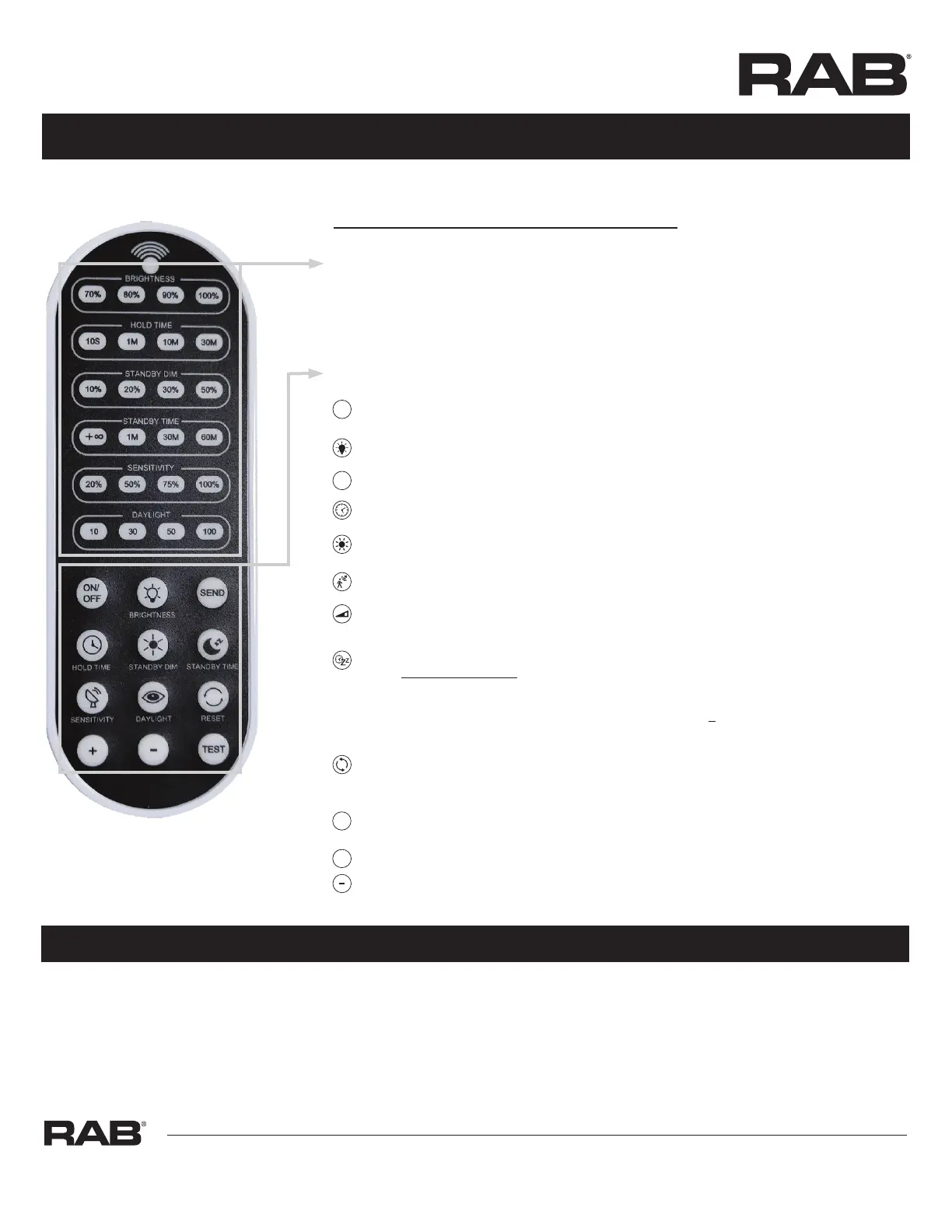
ON/OFF (Long press the “ON/OFF” button until the brightness indicator light is on (First-row).

BRIGHTNESS
Note: MVS Sensor Brightness factory setting is 100%.

 
Note: MVS Sensor factory setting hold time is 1 minute.

10lx/30lx/50lx/100lx.) Note: MVS Sensor daylight threshhold factory setting is disabled.
SENSITIVITY
Note: MVS Sensor sensitivity factory setting is 50%.

Note: MVS Sensor standby dimming level factory setting is 20%
∞ / 1min, 30min, 60min).


100/200 lux; or
< preset lux and motion is detected,
light will turn on at present lux).
note: MVS Sensor standby dimming level factory setting is 1 minute.
RESET

 .
TEST The button TEST is for testing purpose after debugging. Pressing this button, the sensor goes to test
mode (hold time is only 3s).




Button Setting Area
BRIGHTNESS100%)
 (10lx/30lx/50l/100lx)

 (10S/1min/10min/30min)
SENSITIVITY
/1min/30min/60min)
TEST
SEND
ON/
OFF
+