24 Rabbit Air - 25
Installing
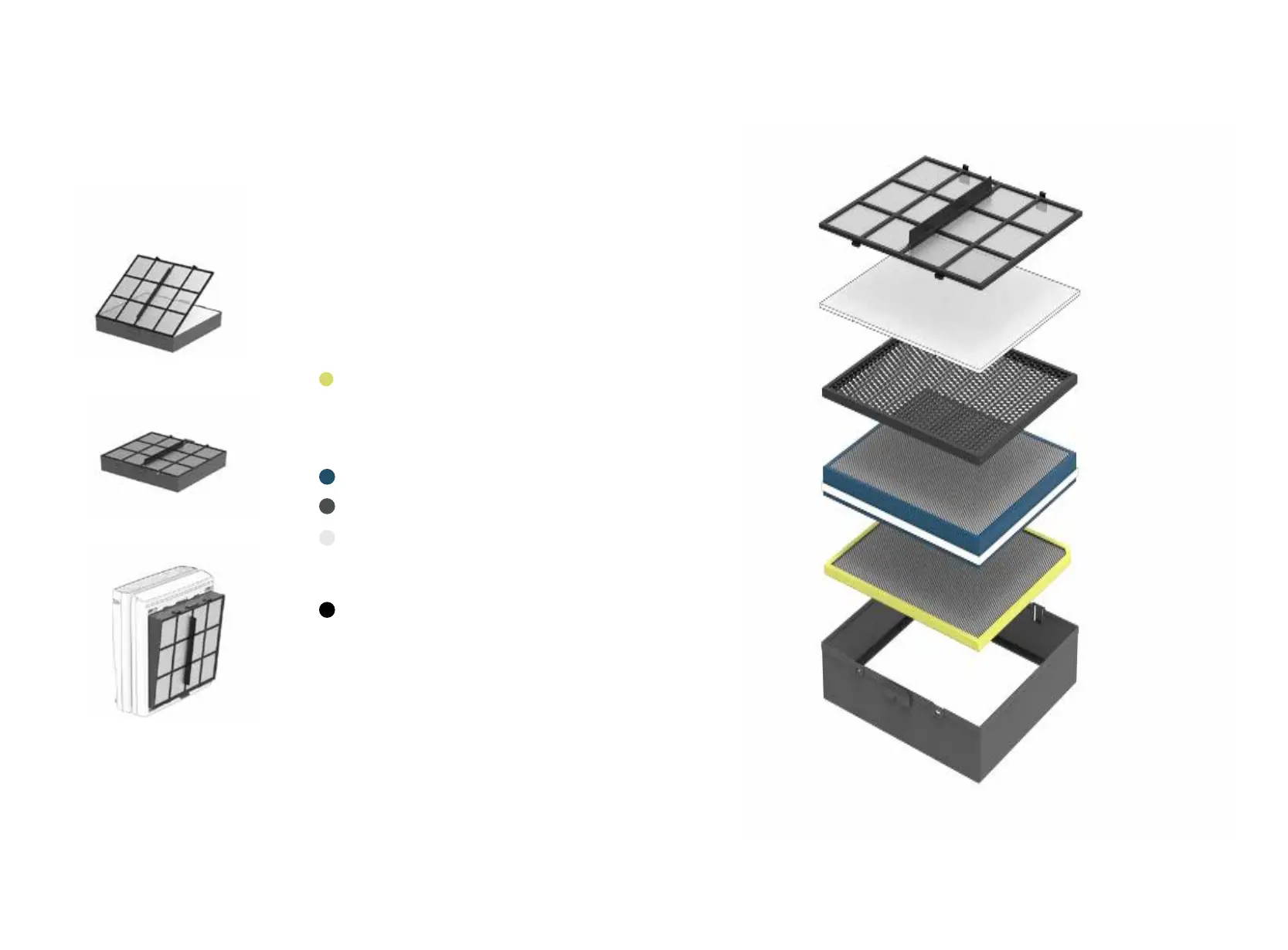
New lters
1. Unwrap all of your new replacement
lters.
2. Insert the new lters into the Filter
Case in the order below. Make sure to
identify the orientation and direction
for each lter by the label. Insert lters
in the order below.
1. Customized Filter
(please ensure lter label faces out-
ward and aligns with the top of the
Filter Case when inserting your Custom-
ized Filter)
2. BioGS HEPA Filter
3. Activated Carbon Filter
4. Medium Filter
(make sure the edge of the Medium
Filter lines up and sticks to the velcro
on the Activated Carbon Filter)
5. Pre-Filter
3. With the new lters inside the Filter
Case, place the Pre-Filter in last, making
sure all the lters are packed in place
snugly.
4. Insert the Filter Case with all the new
lters back into the MinusA3.
5. Once new lters are placed inside, the
lter replacement indicator will reset
for 12 months.



 To Next Page