RD-30 Operations Manual
33
From the pull down menu, the user has the option to congure the RD-30. The Setup tab affords
the operator the same function as if they had tapped the corresponding Congure Device icon in
8.3 ConfigureDevice
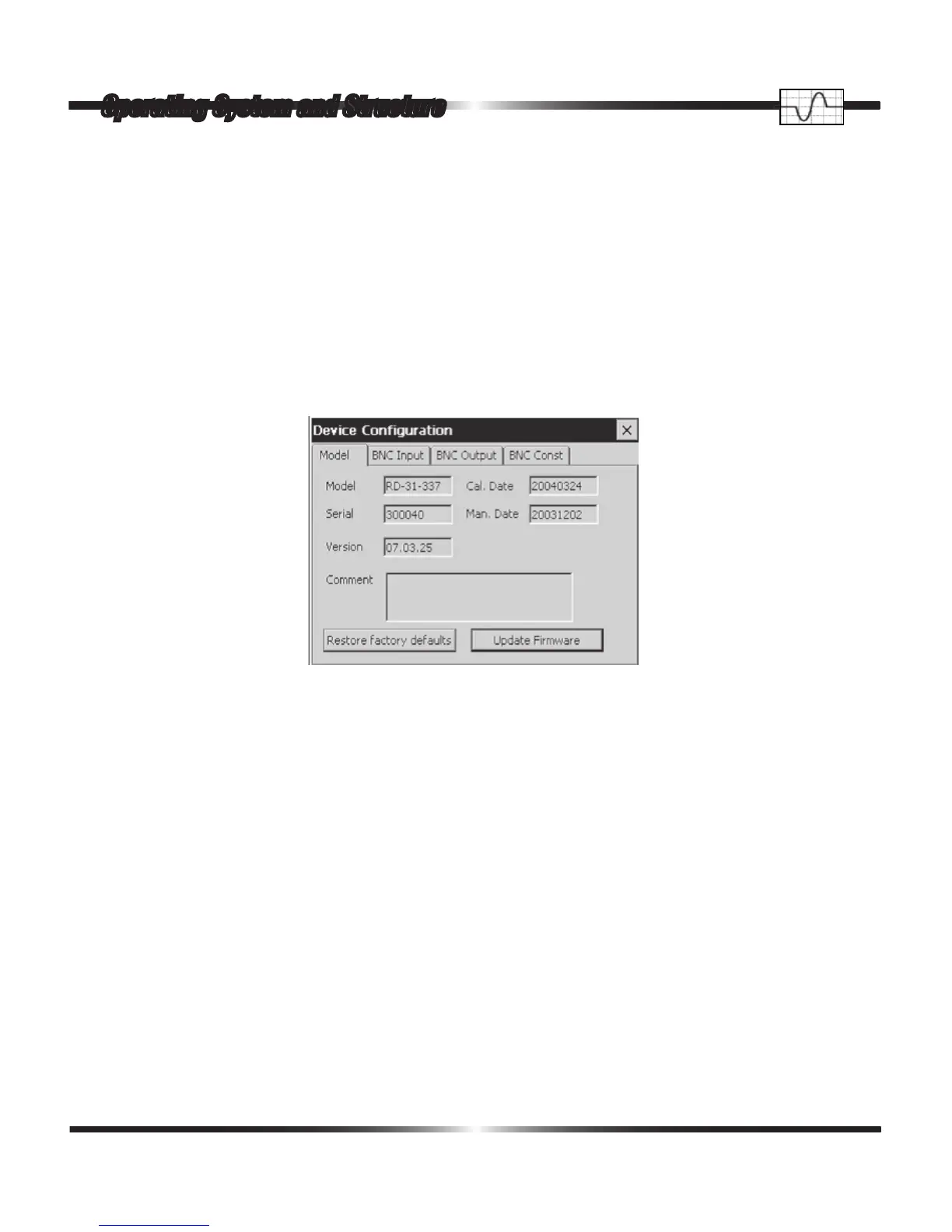
A single tap on the Congure Device icon opens the following window containing pertinent infor-
mation regarding the RD-30 instrument being used. The model number, serial number, rmware
version, calibration date, and manufacture date are all displayed on the Model tab.
In addition to the device information the model tab provides the user an Update Firmware button
and a Restore factory defaults button. The Update Firmware button prevents interruption from
other software during a rmware update. The Restore factory defaults button resets all changeable
elds back to their factory default state. Above the Update Firmware button and Restore factory
defaults button is a Comment Box. The Comment box is setup to allow a note from the factory to
be displayed. The Device Conguration window also provides the user the ability to congure the
RD-30 BNC Inputs, Outputs, and Pulse Constants.
Operating System and Structure



 To Next Page