RD-30 Operations Manual
35
In the BNC Output tab, the user is given the option of conguring the BNC Output terminals.
Ports 1, 2, and 3 may be set to output energy data for Phase A, Phase B, Phase C, and/or a Total
energy value. In other words, the RD-30 may be congured so a polyphase test, with each Port
output corresponding to a single phase energy value, may be run or three polyphase tests with each
Port corresponding to a total energy value may be run. The data output may be any of the mea-
surement parameters, i.e. watthours, varhours, qhours, etc., the RD-30 supports. With any changes
made to the settings in this window, the Update button will have to be tapped to save the changes.
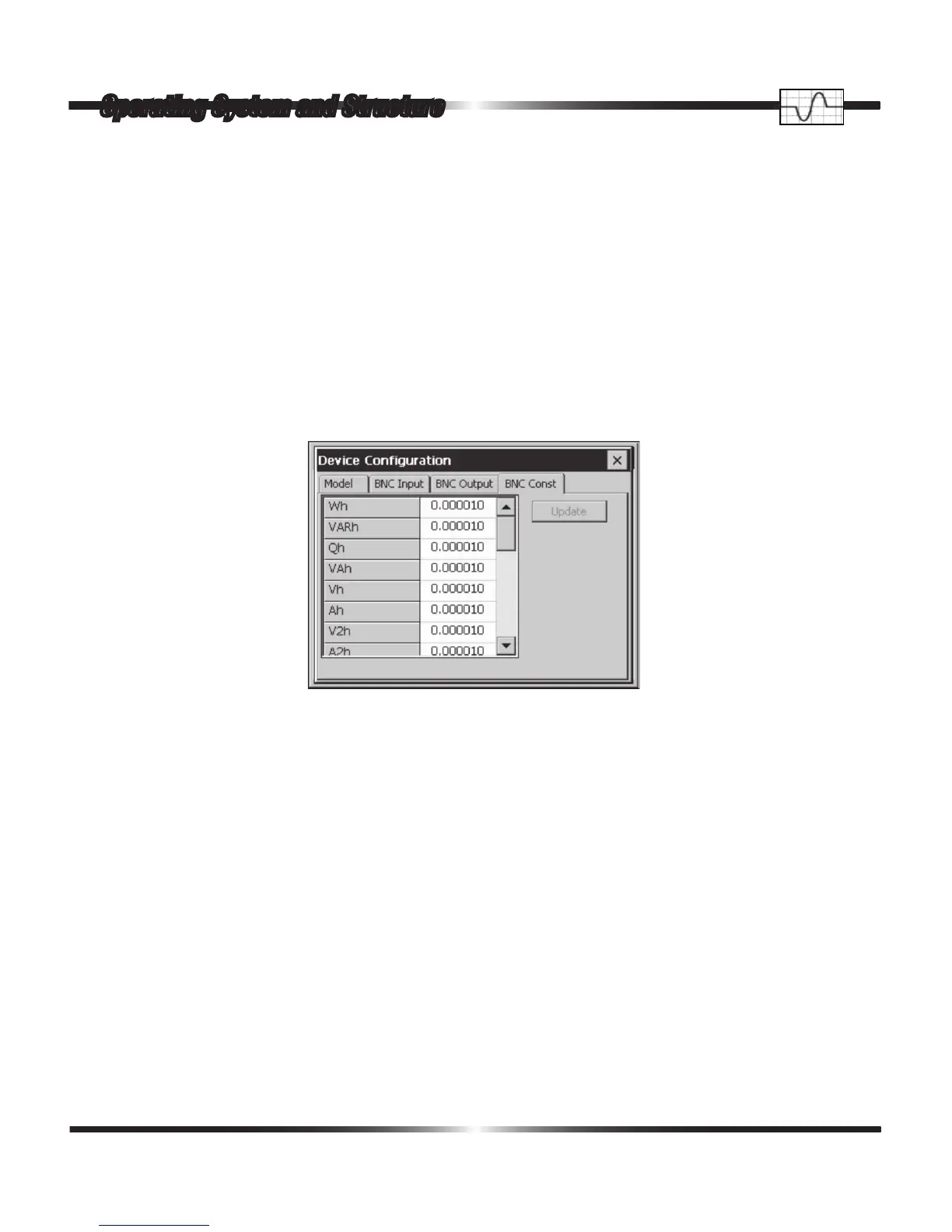
A single tap on the BNC Const tab opens the following window.
The RD-30 is factory loaded with the pulse constants for Radian Research standards. The pulse
constants may be changed by using the “softkbd” (see Section 8.10) or using RR-PCSuite. Once
changed, the Update button must be tapped. The factory default pulse constants programmed can
be viewed below.
Radian Research pulse constants:
Wh 0.000010 Watthours
VARh 0.000010 Voltampere Reactive hours
Qh 0.000010 Reactive hours
VAh 0.000010 Voltampere hours
Vh 0.000000 Volt hours
Ah 0.000000 Ampere hours
V2h 0.000100 Volt
2
hours
Operating System and Structure



 To Next Page