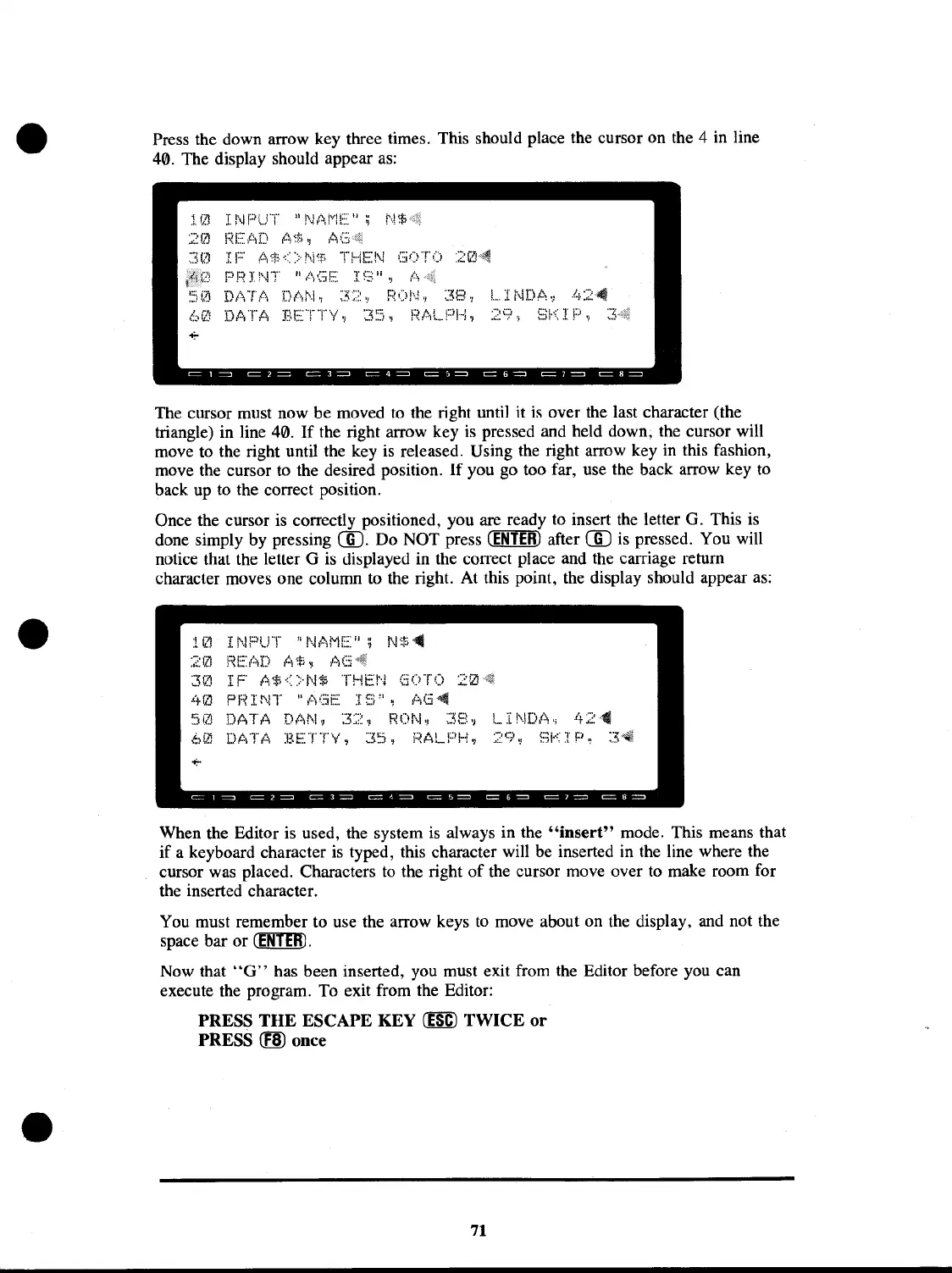
Press the down arrow key three times. This should place the cursor on the 4 in line
40. The display should appear
as:
I:~!
E~
l·:j
D
(-~i
~i~
.,
,t;
(;~<{f
IF
A$~::>N%
THEN
GO"f'O
PP I
i\~T
II
l,\(;;iE:
I
~:.~
II
OJ
l~
DATA
DAN,
32,
RON,
38,
LINDA,
42~
DATA
BETTY,
35.
RALPH.
29,
SKIP,
3~
The cursor must now be moved to the right until it
is
over the last character (the
triangle) in line 40.
If
the right arrow key
is
pressed and held down; the cursor will
move to the right until the key
is
released. Using the right arrow key
in
this fashion,
move the cursor to the desired position.
If
you go too far, use the back arrow key to
back up to the correct position.
Once the cursor
is
correctly positioned, you are ready to insert
the
letter G. This is
done simply by pressing
CID.
Do NOT press
(ENTER)
after
CID
is
pressed. You will
notice that the letter G
is
displayed in the correct place and the carriage return
character moves one column to the right. At this point, the display should appear
as:
INPUT "NAME";
Ns4
j~E:tlD
1",
:;;
~
,1\6
IF
A$<>NS
THEN
GOTO
20
.<+~~
PF~INT
"l\(::iE:
I~:)",
It:;G~
DATA
DAN,
32,
RON,
38,
LINDA,
42~
DATA
BETTY,
35,
RALPH,
29,
SKIP,
When the Editor is used, the system
is
always in the
"insert"
mode. This means that
if
a keyboard character
is
typed, this character will be inserted in the line where the
cursor was placed. Characters
to
the right
of
the cursor move over to make room for
the inserted character.
You must remember to use the arrow keys
to
move about on the display, and not the
space bar or
CENllID.
Now that
"G"
has been inserted, you must exit from the Editor before you can
execute the program. To exit from the Editor:
PRESS
THE
ESCAPE
KEY
(ESC)
TWICE
or
PRESS (lID once
71


 To Next Page
 Loading...











