
 Need help?
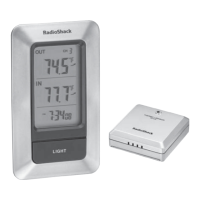
Do you have a question about the Radio Shack Wireless Indoor/Outdoor Thermometer and is the answer not in the manual?
Step-by-step guide for inserting batteries into the main unit and remote sensor.
Instructions for battery installation and settings within the remote sensor.
Guide for installing batteries in the primary display unit.
Information on placing or attaching the main unit and remote sensor.
Advice on choosing optimal placement for optimal transmission range.
Instructions for mounting the main display unit on a wall or flat surface.
Guide for positioning and securing the remote sensor unit.
How to choose which remote sensor's data to display on the main unit.
Enabling automatic cycling through readings from connected remote sensors.
Instructions for switching between Celsius (°C) and Fahrenheit (°F) displays.
Understanding how the unit shows temperature and humidity trends.
Interpreting the comfort level indicators based on recorded humidity.
How to check the strength and status of the signal from the remote sensor.
Retrieving and viewing the highest and lowest recorded temperature and humidity values.
Setting high/low limits to trigger audible alarms for temperature or humidity.
Manually initiating a search to re-establish connection with the remote sensor.
Procedures for resetting the main unit or remote sensor to default settings.
 General
| Brand | Radio Shack |
|---|---|
| Model | Wireless Indoor/Outdoor Thermometer |
| Category | Thermometer |
| Language | English |



 To Next Page