CB-500 CB Radio
9
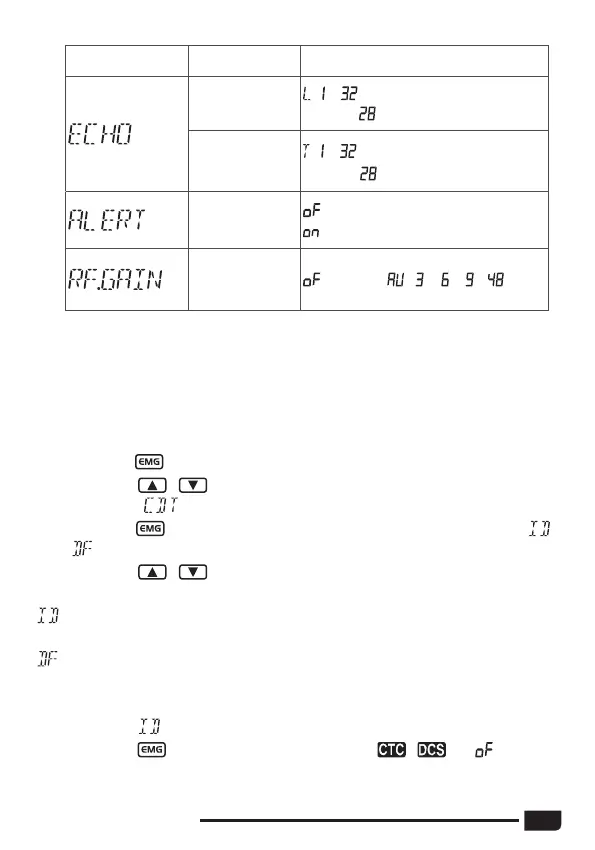
LCD display Function detail Setting details
ECHO volume
level setting
: ~
Default :
ECHO delay
time setting
: ~
Default
:
ALERT function
setting
: turn off ALERT function (default)
: turn on ALERT function
RF gain level
control
(default) , ,
、
、 ~
(1)
Long press key to enter the menu.
(2)
Short press / keys on the unit or
UP
/
DN
keys on the microphone
to select the
menu.
(3)
Short press key to confirm, the operating mode blinks on the LCD (
or
).
(4)
Short press / keys on the unit or
UP
/
DN
keys on the microphone
to select the operating mode.
: means that the code used will be identical for transmission (TX) and for
reception (RX).
: means that the user can use one code (or OFF = no code) for
transmission
(TX) and another (or OFF = no code) for reception (RX).
Identical mode
(5)
Short press key make the code type blink. ( , , or not set)
3.12
CTCSS/DCS SET



 To Next Page