Need help?
Do you have a question about the RadioLink Byme-DB and is the answer not in the manual?
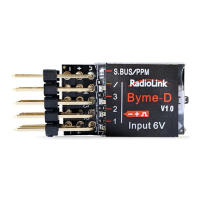
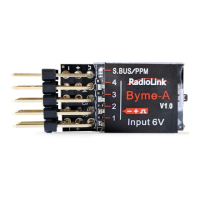
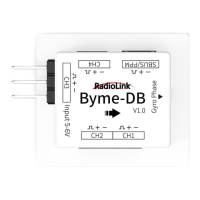
Details the various ports, buttons, and orientation indicators on the Byme-DB unit.
Procedure to verify servo movement alignment with control inputs.
Method to correct servo direction using Byme-DB buttons.
Beginner-friendly mode for level flight, controlled by joysticks for attitude.
The RadioLink Byme-DB is a flight controller designed for model airplanes, offering enhanced stability and control through its integrated three-axis gyroscope and three-axis acceleration sensor. It is compatible with a wide range of model aircraft, including delta wings, paper planes, J10, traditional SU27, SU27 with rudder servo, and F22 models. The device supports SBUS/PPM signal input, making it compatible with all transmitters that output these signals.
The Byme-DB serves as a central control unit for model aircraft, providing three distinct flight modes to cater to different pilot skill levels and flight scenarios: Stabilize Mode, Gyro Mode, and Manual Mode.
Stabilize Mode: This mode is ideal for beginners, offering flight controller balancing to assist with level flight. In Stabilize Mode, the aircraft's attitude (inclination angles) is controlled by the joysticks. When the joystick returns to the central position, the aircraft will automatically level itself. The maximum inclination angle is limited to 70° for rolling and 45° for pitching, providing a forgiving and stable flight experience.
Gyro Mode: Designed for more advanced pilots, Gyro Mode allows the joystick to control the rotation (angle speed) of the aircraft. The integrated three-axis gyro assists in increasing stability, but unlike Stabilize Mode, the aircraft will not automatically level itself when the joystick returns to the central point. This mode offers greater control and responsiveness for dynamic maneuvers.
Manual Mode: This is the most challenging mode, requiring advanced piloting skills. In Manual Mode, there is no assistance from the flight controller algorithm or gyroscope. All flight movements are realized manually, meaning the control surfaces will not move without direct operation from the transmitter. This mode provides complete, unassisted control over the aircraft.
The Byme-DB also incorporates a Motor Safety Lock feature, controlled by Channel 7 (CH7) on the transmitter. When the motor is locked, it will not rotate, even if the throttle stick is at its highest position. To unlock the motor, the throttle must be at its lowest position, and the CH7 switch toggled. A successful unlock is indicated by two long beeps from the motor. When the motor is locked, the Byme-DB's gyro is automatically turned off, and it turns on when the motor is unlocked. This feature enhances safety during handling and pre-flight checks.
Installation: The Byme-DB should be attached flatly to the fuselage using 3M glue, with the arrow pointing towards the aircraft head. It is recommended to install it near the center of gravity. The device comes with a receiver connect cable for easy integration with the receiver. Users should ensure proper matching of servo and ESC cables to the Byme-DB sockets, modifying them if necessary.
Transmitter Setup: When using the Byme-DB, it is crucial not to set any mixing in the transmitter, as the flight controller handles mixing automatically based on the flight mode. For RadioLink transmitters, Channel 3 (Throttle) should be set to Reversed, while other channels remain Normal. For non-RadioLink transmitters, no specific phase setting is required.
Power-on and Gyro Self-test: Upon powering on, the Byme-DB's gyro performs a self-test. The aircraft must remain stationary during this process. After the self-test, the control surfaces will shake slightly, and the green indicator light on CH3 will be continuously on. Green indicator lights on other channels (CH1, CH2) will also turn solid if the self-test is successful. If the indicator lights don't turn on, slight control surface movement confirms a successful self-test. It is important to push the throttle stick to the lowest position before powering on to avoid entering ESC calibration mode.
Attitude Calibration: To ensure balanced flight, the Byme-DB requires attitude/level calibration. The aircraft should be placed flat on the ground, with the model head lifted at a slight angle (20 degrees recommended for beginners) for smooth flight. Calibration is performed by pushing the left stick (left and down) and the right stick (right and down) simultaneously for more than 3 seconds. A single flash of the green LED indicates successful calibration. For non-RadioLink transmitters, if calibration fails, users may need to adjust channel directions in the transmitter to ensure correct joystick value ranges (e.g., CH1 2000 µs, CH2 2000 µs, CH3 1000 µs, CH4 1000 µs).
Servo Phase Test and Adjustment: After attitude calibration, the servo phase can be tested in Manual Mode to ensure joystick movements correspond correctly to control surface movements. If the ailerons or tailerons move in the opposite direction when the aileron stick is moved left, the aileron mix control is reversed. If they move oppositely when the elevator stick is moved down, the elevator mix control is reversed. If the rudder servo moves oppositely when the rudder joystick is moved, Channel 4 is reversed. Servo phase adjustments are made by pressing buttons on the front of the Byme-DB:
Gyro Sensitivity: The Byme-DB has a certain stability margin for its PID control. For aircraft of different sizes, if the gyro correction is either insufficient or too strong, pilots can adjust the rudder angle to fine-tune the gyro sensitivity.
Troubleshooting Motor Unlock: If the motor only beeps once when attempting to unlock, indicating a failure, users should first ensure the throttle is at the lowest position. If the issue persists with non-RadioLink transmitters, the throttle travel in the transmitter may need to be increased incrementally (e.g., from 100 to 101, 102, 103...) until two long beeps are heard, signifying successful unlocking. During this adjustment, the fuselage must be kept stable to prevent injuries from blade rotation.
Technical Support: RadioLink provides technical support via Facebook Messenger and email (after_service@radioLink.com.cn). Users can also download the latest manual from the RadioLink website for updated information and troubleshooting guides.
 General
| Brand | RadioLink |
|---|---|
| Model | Byme-DB |
| Category | Controller |
| Language | English |

 To Next Page