04
Monitoring from your Computer Monitoring from your Smartphone Troubleshooting Customer Service InformationAbout this Manual
Introduction
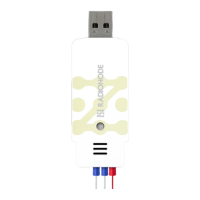
UA13 is a sensor that measures the temperature with a PT100.
Measurements are made by one of two methods:
●
Connect the UA13 sensor to your computer's USB port to use
the Tapaculo
®
Lite program.
●
Connect the UA13 sensor to your smartphone via the USB
gender to use the Tapaculo
®
Mobile app.
5BQBDVMPm.PCJMF5BQBDVMPm-JUF
Once power is supplied through the USB port, the
sensor will commence initialization. Initialization takes
approximately 5 minutes to complete. Measurements
may not be accurate until initialization is complete.
Radionode365, the cloud-based remote surveillance service provided
RADIONODE, is available for UA13 users with a RN17x WC series
data transmitter. For information on how to install and use RN17x
WC, see the information provided on the web page below:
https://help.radionode365.com/article-categories/https://help.radionode365.com/article-categories/
RN17x WC-helpRN17x WC-help
Introduction


 To Next Page