11
Introduction Monitoring from your Computer Troubleshooting Customer Service InformationAbout this Manual
Monitoring from your Smartphone
This chapter outlines how to use Tapaculo Mobile. For more
information on Tapaculo Mobile, see the information provided on the
web page below:
https://help.radionode365.com/article-categories/https://help.radionode365.com/article-categories/
tpm-manualtpm-manual
Installing
Tapaculo
Mobile
Search for "Tapaculo" on Google Play, or click the link below to install
Tapaculo Mobile app on your Android smartphone.
https://play.google.com/store/apps/details?id=com.https://play.google.com/store/apps/details?id=com.
dekist.mobiledekist.mobile
Tapaculo Mobile does not have an iOS version.
Starting
Tapaculo
Mobile
Refer to the following when using Tapaculo Mobile:
1.
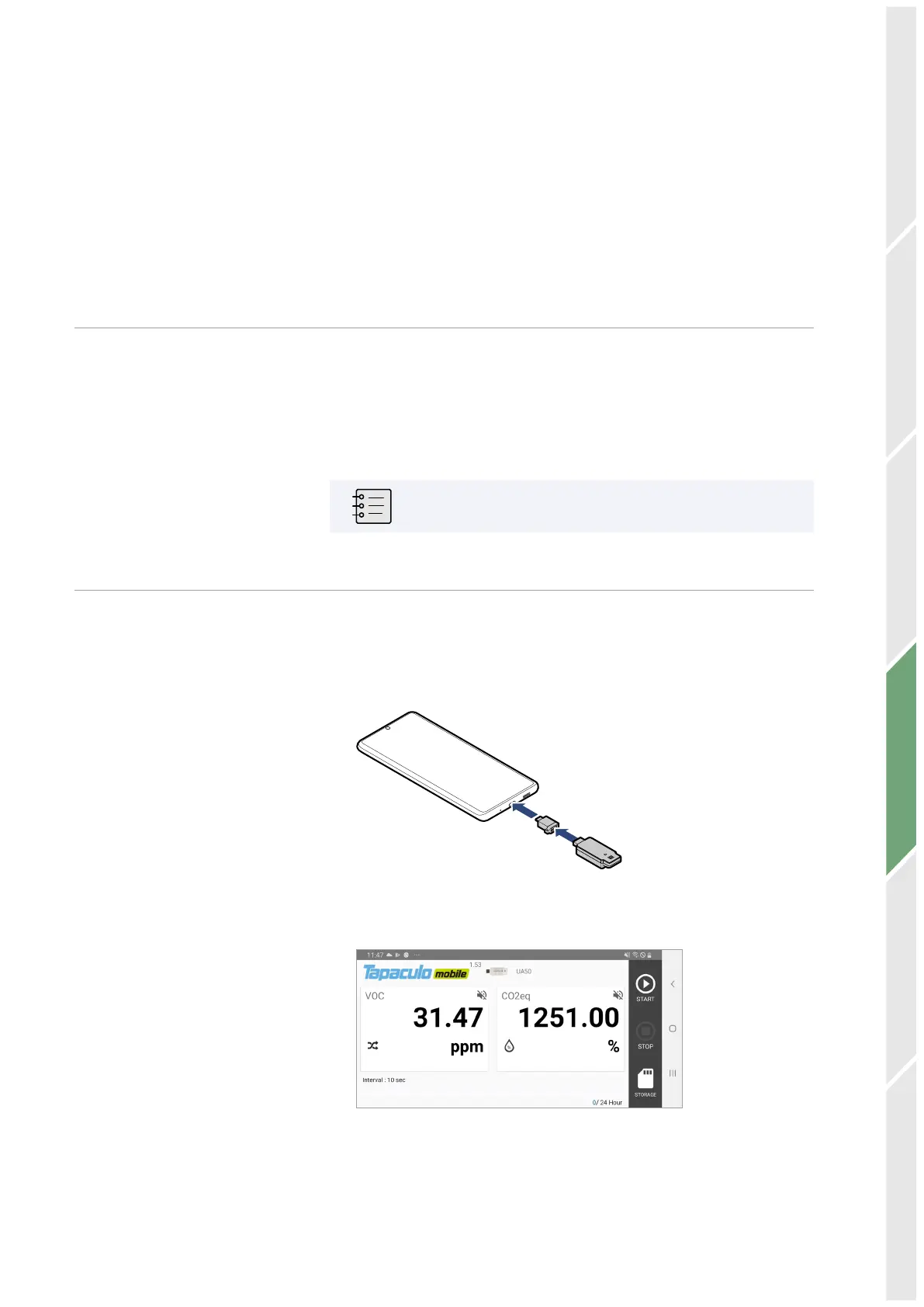
Connect the sensor to your smartphone using the USB gender.
2.
Tapaculo Mobile will open. Tap START to start logging data.
Monitoring from your Smartphone


 To Next Page