10
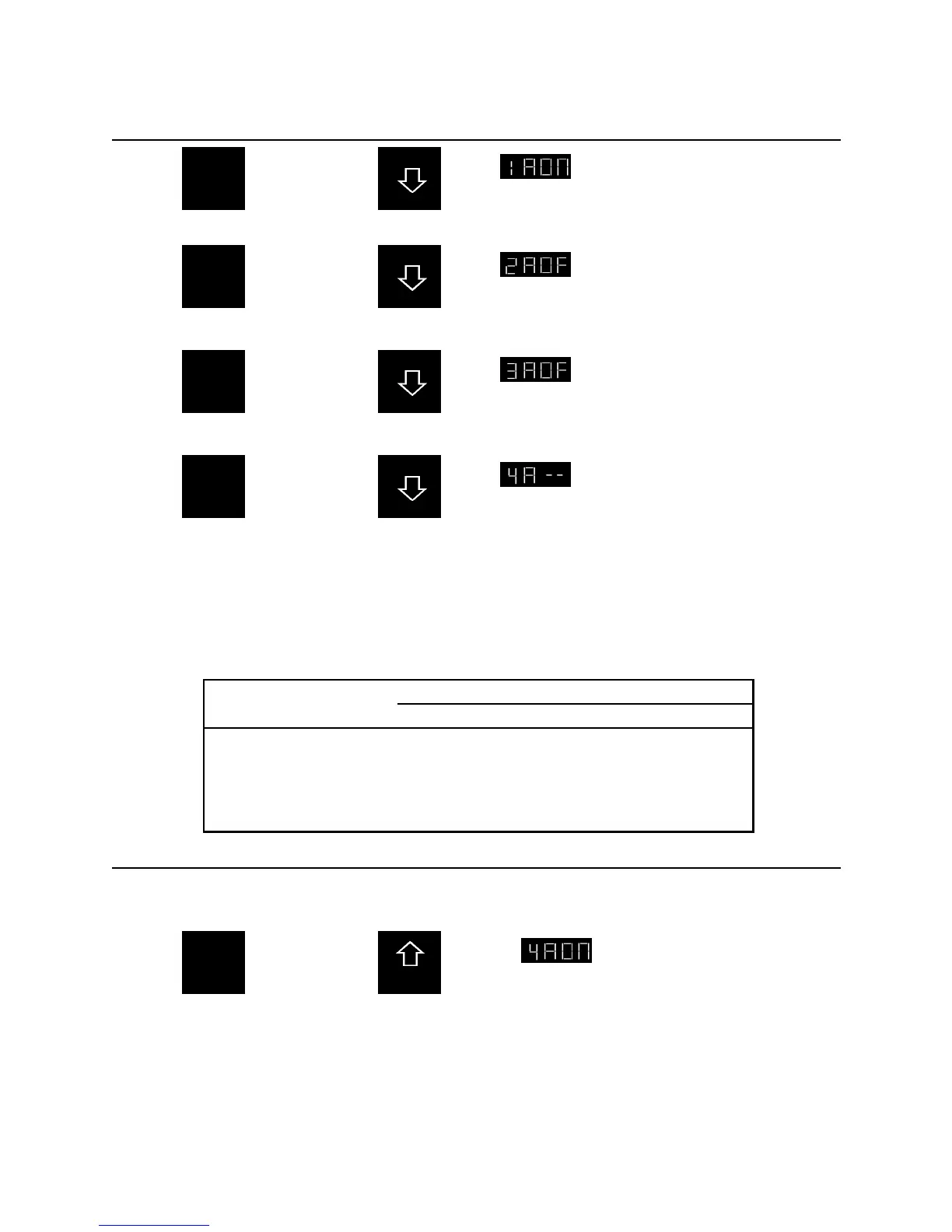
2-B: Watering on an interval of days
Press
and set day 1
to “on” by
pressing:
Day 1
Program A
On
WHICH
DAYS TO
WATER
Now
Press
and set day 2
to “off” by
pressing:
Day 2
Program A
Off
WHICH
DAYS TO
WATER
Now
Press
and set day 3
to “off” by
pressing:
Day 3
Program A
Off
WHICH
DAYS TO
WATER
Now
Press
and remove
day 4 through
day 7 by
pressing and
holding for 3
seconds:
Day 4
Program A
None
WHICH
DAYS TO
WATER
This is now set to water every third day. The timer waters on day 1, does not water on day 2 and 3, and
then goes back to day 1. The same procedure is used to set watering in other cycles (such as every fifth
day). See reference chart 2 below for detailed schedules.
Day Number and Setting
Desired watering cycle
1 2 3 4 5 6 7
Every day
Every other day
Every third day
Every fourth day
Every fifth day
Every sixth day
Once per week
On
On
On
On
On
On
On
- -
Of
Of
Of
Of
Of
Of
- -
- -
Of
Of
Of
Of
Of
- -
- -
- -
Of
Of
Of
Of
- -
- -
- -
- -
Of
Of
Of
- -
- -
- -
- -
- -
Of
Of
- -
- -
- -
- -
- -
- -
Of
Reference Chart 2: Display Settings for Interval Watering
PGM
A
/
C
2-C: Return to a specific day watering
To return to day watering from interval watering, you must first advance to the first station showing “- -”
in the display.
Press
and adjust the
day showing
“- -” to on by
pressing for
2 seconds:
Day 4
Program A
On
WHICH
DAYS TO
WATER










 To Next Page