9
STEP 2: Set the watering day schedule
When shipped from the factory, the PC-200 series is preset to water every day
on program "A" and no days on program "C."
The PC-200 series can be set to water either on specific days of the week (i.e. Mon-
Wed-Sat) or on an interval of days (i.e. every third day). The "A" program and the "C"
program can have different schedules, but both have to operate the same way:
specific days or day intervals.
How to set the watering days
PGM
A
/
C
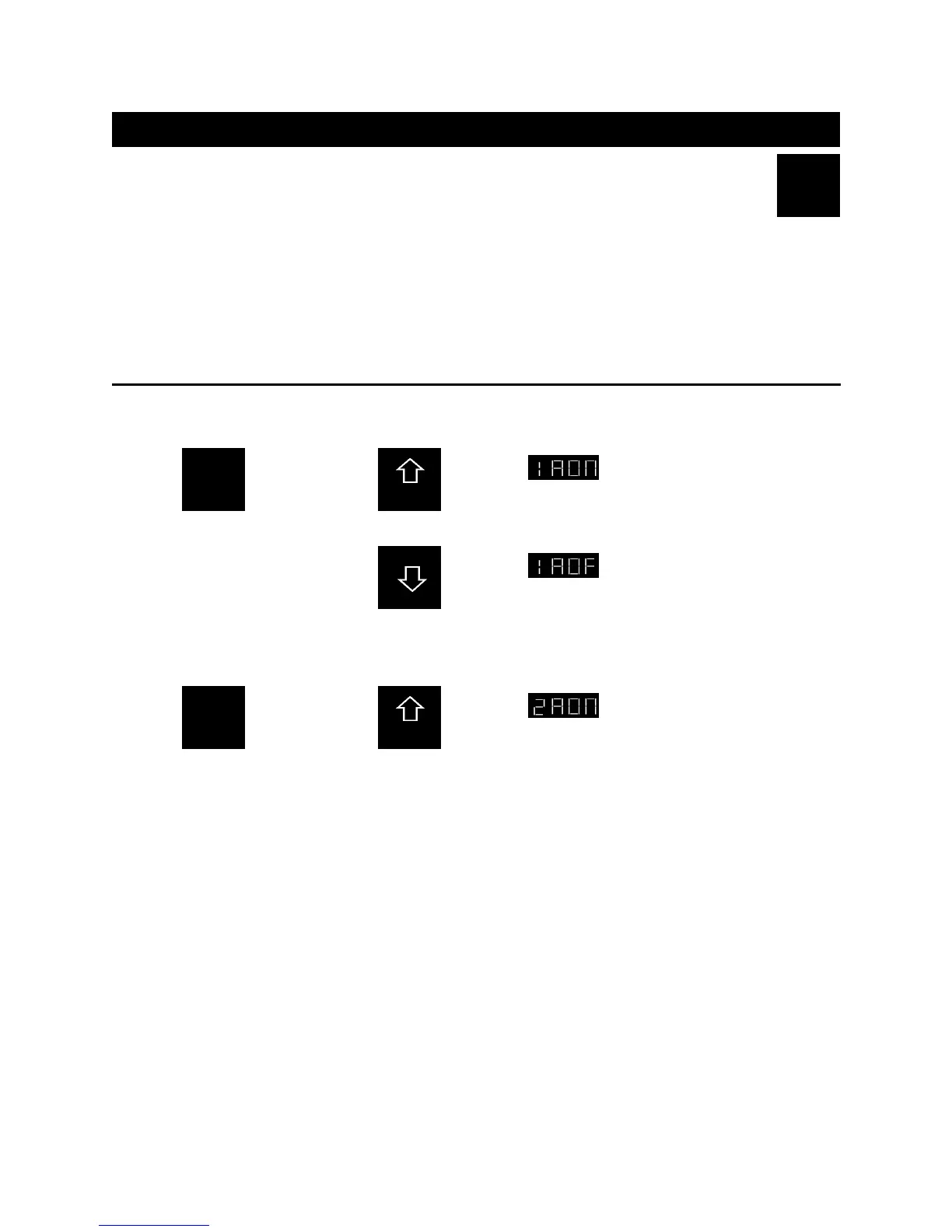
2-A: Watering on specific days
Remember, days of the week are shown as the first digit in the display, and the program is the second
digit.
Press
Once
and set Sun-
day to “on” by
pressing:
Sunday
Program A
On
WHICH
DAYS TO
WATER
or set Sunday
to “off” by
pressing:
Sunday
Program A
On
To advance through each day of the week, repeat this step.
PGM
A
/
C
Press
Once
and set Mon-
day to “on” by
pressing:
Monday
Program A
On
WHICH
DAYS TO
WATER
WHICH
DAYS TO
WATER





 To Next Page