Pro2-Series 3D Printer
/ Quick Start Guide
F. Start First Print
The Pro2/Pro2 Plus units are preleveled in the
factory, but we recommend verifying that the
leveling has not changed during shipping.
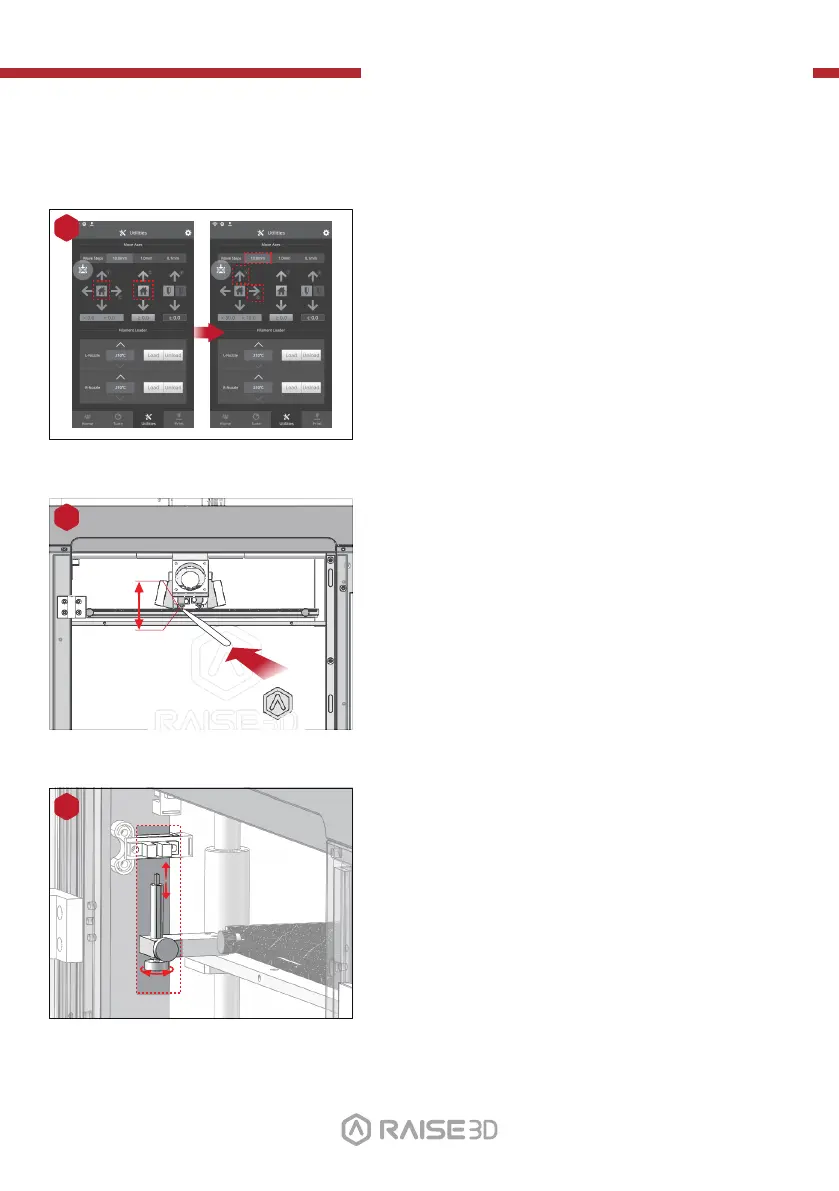
First, home the X/Y Axis by selecting the
"home" button, then Z axis "home" button.
If the homing procedures complete without issues,
reposition the print head.
Select "10mm" for "Move Steps" and move X to
50mm, Y to 10mm.
1
Please use the feeler gauge to check the distance
between nozzle and printing platform. The optimal
distance between is 0.2mm.
The best condition of this is that you can feel a little
friction when you slide the feeler gauge into the gap.
2
0.2mm
The distance between the nozzle and the printing
platform can be adjusted by turning the thumb
screw on the left-front corner of the
Z-plate, the higher the screw stands out, the further
the distance between the nozzle to the printing
platform gets.
3
Closer Further
Feeler Gage
01 02
03 04 05 06
07 08 09 10
11 12 13 14
15 16 17 18
19 20 21 22
23 2624 25
27



 To Next Page