www.raisecom.com User Manual
3
Chapter 3 Device Appearance And Description
3.1 Front panel and explanation
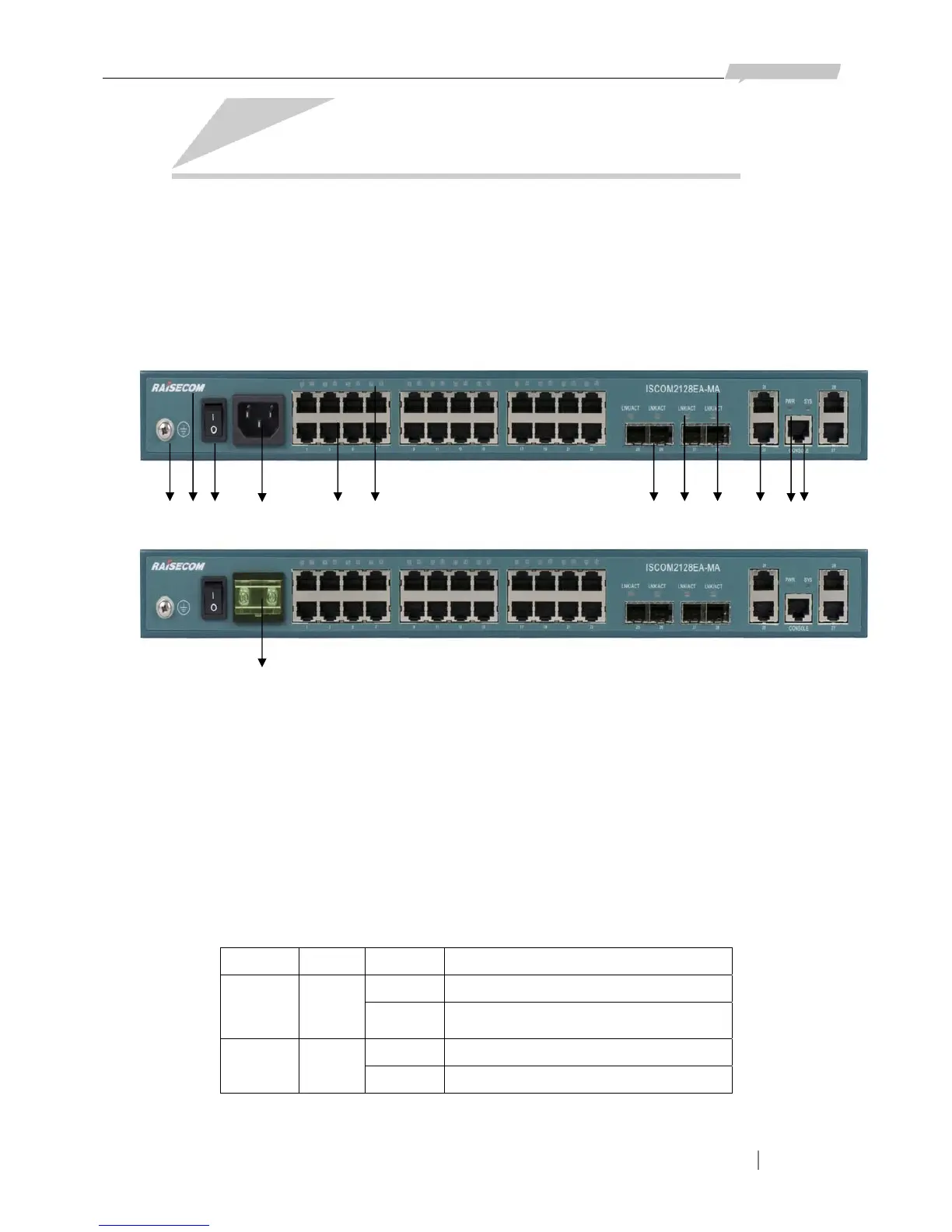
On the front panel of ISCOM2128EA-MA, there are 24 10/100M Ethernet electrical ports, 4
COMBO ports (4 100/1000M SFP optical ports and 4 100/1000M Ethernet electrical ports), 1
Console port, status indicator LEDs and power supply interface. AC and DC power supply are of
different interfaces, see in the following figures:
1 2 3 4 5 6 7 8 9 10 11 12
13
Explanation:
Number 1 is the Grounding bolt
Number 2 is the logo: RAISECOM
Number 3 is the Power supply switch
Number 4 is receptacle for 220V AC power and number 13 is for DC power
Number 5 is the 24 10/100 Ethernet electrical ports, being numbered as 1-24
Number 6 is the LNK/ACT status indicators for Ethernet electrical ports
Number 7 is the 4 100/1000M SFP optical ports, being numbered as 25-28
Number 8 is the LNK/ACT status indicators for SFP optical ports
Number 9 is model of the switch: ISCOM 2128EA-MA
Number 10 is the 4 100/1000M electrical ports, being numbered as 25-28
Number 11 is the 2 status indicators of switch: SYS and PWR (refer to the panel)
Indicator Color Status Indication
SYS Green
Flickering System works normally
ON/OFF
System is initializing or Software fault at
the very beginning of power on device.
PWR Green
ON System powered on
OFF System powered off
Number 12 is CONSOLE port








 To Next Page