Page 10 1061DOC Rev C
Effective date: 6-Mar-14
User Guide RAMVAC Bison
®
Bison S2 Electrols Features
• Easy to read digital display.
• Monitors the vacuum pressure and displays it. Digital pressure sensor accuracy is +/- 0.25% FSS BFSL (Full
Scale Span Best Fit Straight Line). Total error band of 2% full scale span maximum.
• Monitors the system run hours and displays it.
• Monitors hours until maintenance is due and displays it.
• Monitors for “Moisture in Filtrols” alarm. Shuts the system down and displays the fault.
• Monitors for “Water in Exhaust” alarm. Shuts the system down and displays the fault.
• Monitors for “Low Oil” alarm. Allows the system to run for 8 hours and displays the fault.
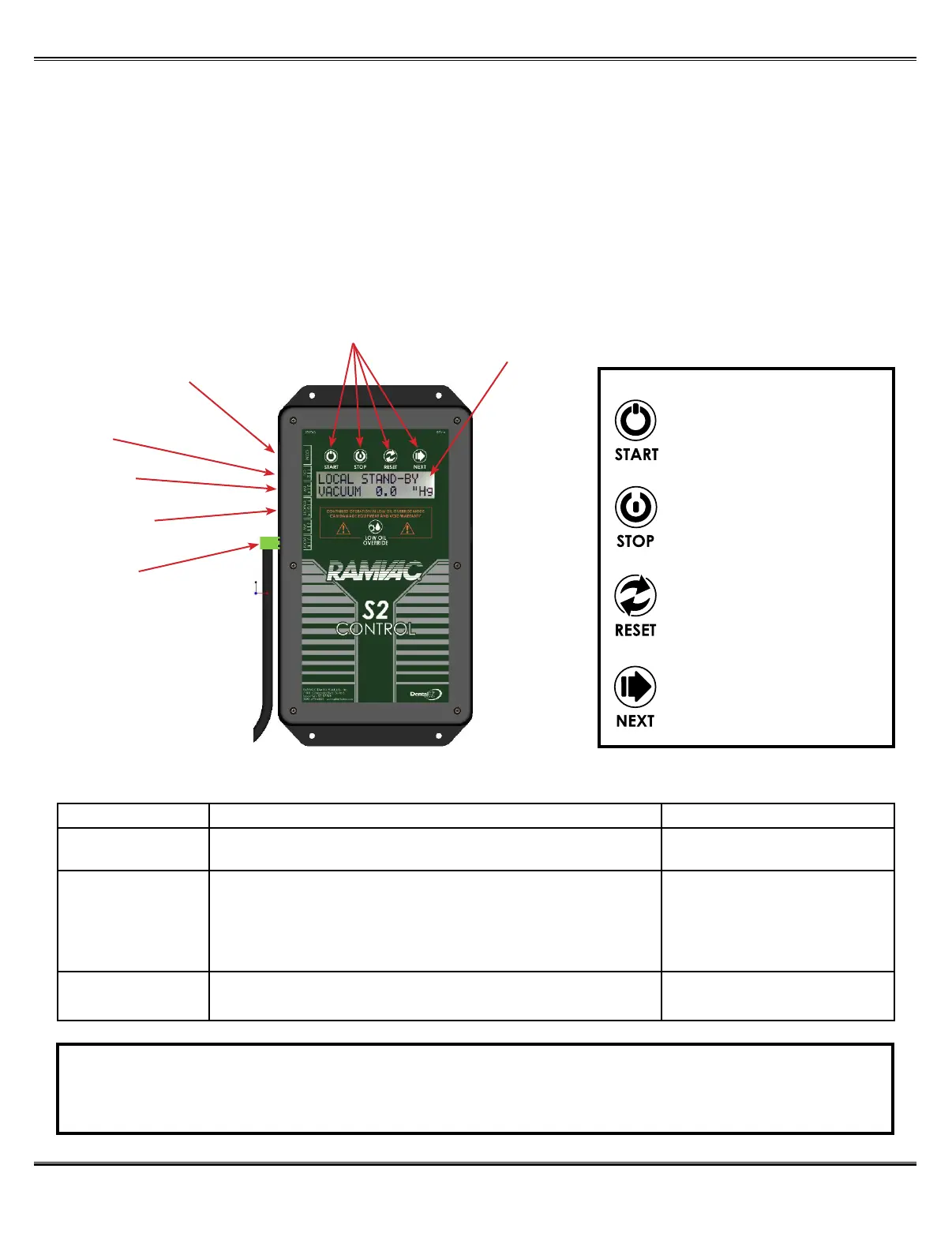
RJ45 Ethernet COM
Low Voltage
Remote Connection
Easy to Read
Display
Filtrols Moisture
Connection
Water in Exhaust
Connection
Oil Level
Connection
S2 Features
Control Buttons
STARTS UNIT
STOPS UNIT FROM RUNNING
TOGGLES SCREENS IN
DISPLAY
RESETS ALARMS AND
MAINTENANCE TIMER
S2 Shutdown Faults for Bison
Fault: System Status: Corrective Action:
Maintenance Due System runs normally. Remote switch indicator will ash slowly.
S2 and/or OWL Touch will indicate maintenance is due on the display.
Perform “Preventative Maintenance”
Hold reset button until it resets.
Moisture in Filtrols S2 displays “Moisture in Filtrols Shutdown” and shuts the system down.
Remote switch indicator ashes rapidly.
WARNING! Continued operation attempting to bypass a “Moisture in Filtrols”
Fault can cause equipment damage not covered by the
warranty.
See “ If you get a
“Moisture in Filtrols Fault”
and “Troubleshooting”.
Low Oil S2 Displays “Low Oil Shutdown” and continues to run for 8 hours.
Remote switch indicator ashes rapidly.
See “Troubleshooting” section.
NOTE
TO CLEAR ALARMS: Press “NEXT” button to identify which alarm is activated. Correct the problem
condition. Once condition is corrected, press the “RESET” button to clear the alarm.



 To Next Page