Network and Remote Operation
R&S
®
FSVA3000/ R&S
®
FSV3000
689User Manual 1178.8520.02 ─ 01
Help
Provides help on the selected setting, function, or result display, as opposed to the
SCPI command itself. This function is identical to selecting the context-sensitive help
icon in the toolbar and then the interface element.
13.4.2 The SCPI Recorder
Access: Toolbar
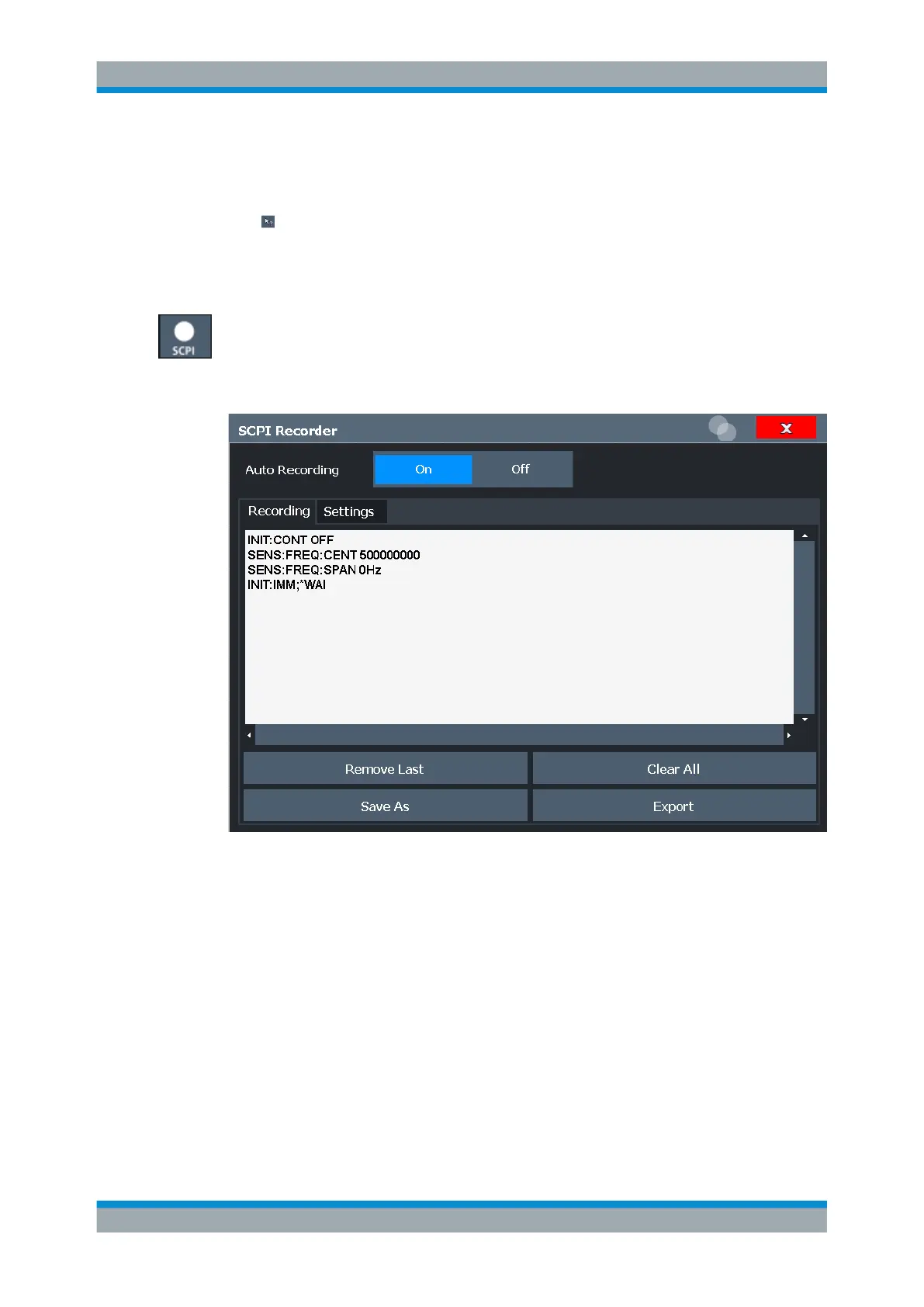
The SCPI Recorder displays a list of the currently recorded commands and provides
functions to create and export a script of SCPI commands. Some additional settings for
recording are provided on a separate tab in the dialog box.
Auto Recording
........................................................................................................... 690
List of recorded commands / script editor................................................................... 690
Remove Last...............................................................................................................690
Clear All.......................................................................................................................690
Save As.......................................................................................................................690
Export..........................................................................................................................690
Settings....................................................................................................................... 691
└ Add Synchronization Commands..................................................................691
└ Combined Recording of Spectrum Analyzer and R&S Signal Generator..... 691
└ IP Address or Computer name of Signal Generator..................................... 691
└ Test Connection............................................................................................ 692
Automating Tasks with Remote Command Scripts



 To Next Page