10
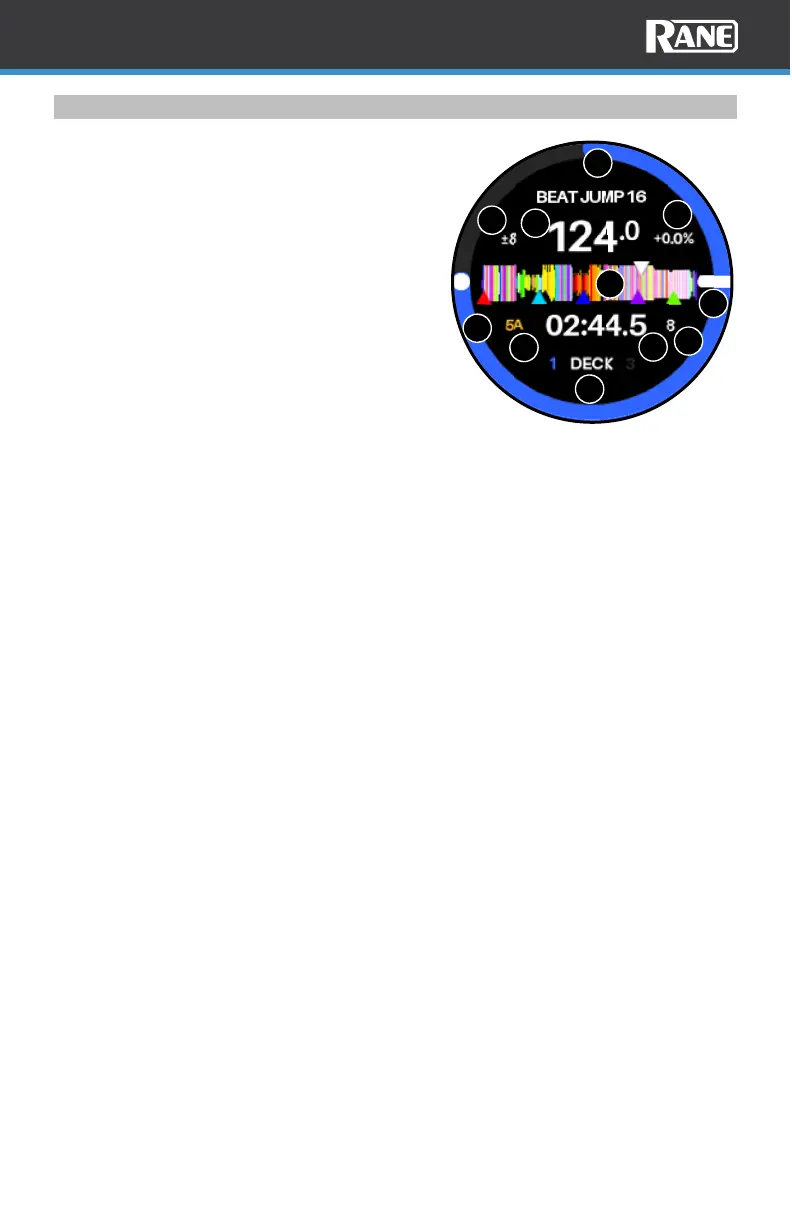
Jog Wheel Display
The jog wheel displays are populated with a
waveform, graphics, and text, and controlled
by Serato DJ via MIDI messages.
1. Track Progress Ring: Displays the total
track progress in the outer ring.
2. Beat Jump Length: Displays the current
size of the Beat Jump Length.
3. Needle Position: This shows the rotating
playhead position. This can be turned off
from the System menu.
4. Pitch: Displays the current pitch
percentage value.
5. BPM: Displays the Beats Per Minute for
the current track.
6. Pitch Range: Displays the current pitch range value.
7. Waveform Overview: Displays the full track waveform with playhead position
(white) and hot cue indicators matching their assigned hot cue colors.
8. Song Key: Displays the song’s key value. This can change if the key is synced or
transposed up or down.
9. Time: Displays the time for the current song. This value may be shown as
elapsed or remaining, depending on the preference in the System menu.
10. Loop Size: Displays the current loop length.
11. Deck: This shows the active deck, 1/3 or 2/4.
1
2
4
6
9
3
5
7
8
10
11



 To Next Page