17
MP2015 MANUAL
Port MIDI Enable enables MIDI commands to/from the MP2015 Mixer controls at the current USB Port. Default is Off.
Port MIDI Channel assigns MIDI channel 1-16 to the MP2015 Mixer at the current USB Port. Default is MIDI channel 1.
USB Port Status indicates the connection status of both USB ports. Active indicates a USB connection between the mixer
and a computer. Local shows the USB Port connected to this control panel's computer.
The Buffer Size control allows the USB buffer to be increased or decreased. This only appears in the Rane Control Panel
for ASIO in Windows. In Mac systems, the buffer control is in the Core Audio setup screen and does not appear here. The
MP2015 driver is designed to run at latencies as low as 5 milliseconds round-trip. However, computer performance and
available resources (number of applications running) may adversely affect the computer’s ability to stream audio reliably. If
pops and clicks are heard in USB audio, try increasing the buffer size to eliminate them. With ASIO, total round-trip latency
is equal to Buffer Size plus device latency. With Core Audio, total round-trip latency is equal to Buffer Size plus software
application buffer latency, plus device latency. Device latency is 2.26 ms.
Deck Inputs I-IV Tab
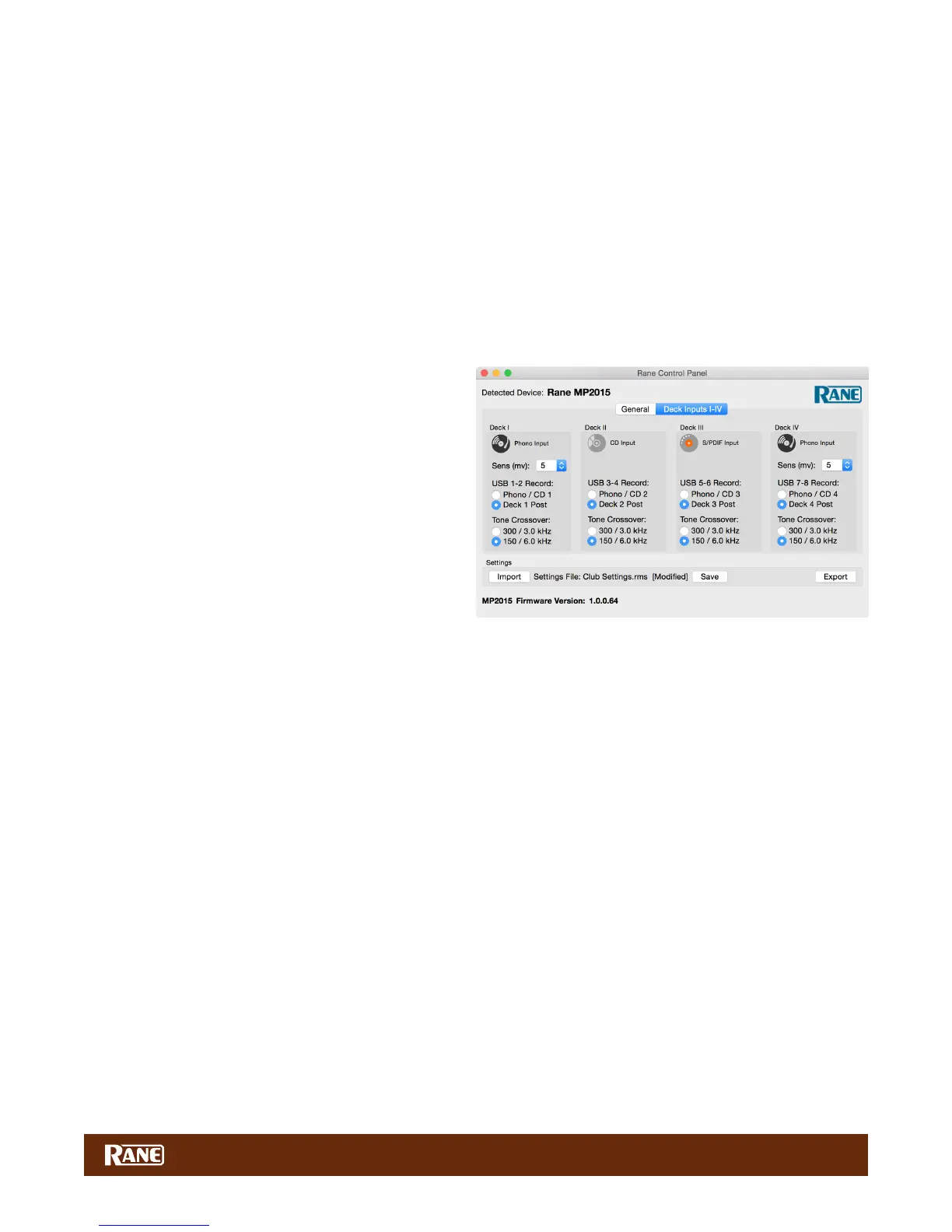
There is one panel for each input channel on the mixer.
Each Deck panel controls these functions:
Analog Input Source: The analog input for each Deck
must be set appropriately for CD, Phono or S/PDIF using
a switch on the rear of the mixer. The control panel shows
the mode selected by these switches for each of the four
inputs. This mode can only be changed on the mixer.
Phono Sensitivity: If a Phono Input is selected on
the mixer (as shown for Decks I and IV), the Sensitivity
adjustment appears in the panel. Click the down-arrow to
display a list of 16 Sensitivity settings between 2.5mV and
10mV in 0.5mV steps. The default is 5mV. Set the Phono
Sensitivity to the same level of your cartridge (see your cartridge documentation for the correct value). Another method is to
match the level of the turntable to a CD playing on another input.
USB Record Source: These controls select one of two sources for each input channel as the USB record source.
• Phono / CD will record the source pre-Mix control, used for DVS applications.
• Deck (1-4) Post records each deck after the Mix control, used for multitrack recording. Each Deck records to separate
USB slots. This is the default setting. See "USB Audio" on page 14.
Tone Crossover sets the crossover points of the 3-band Tone controls for each of the Deck channels to either:
• 300 Hz between Low and Mid, 3 kHz between Mid and High.
• 150 Hz between Low and Mid, 6 kHz between Mid and High (default).


 To Next Page