10
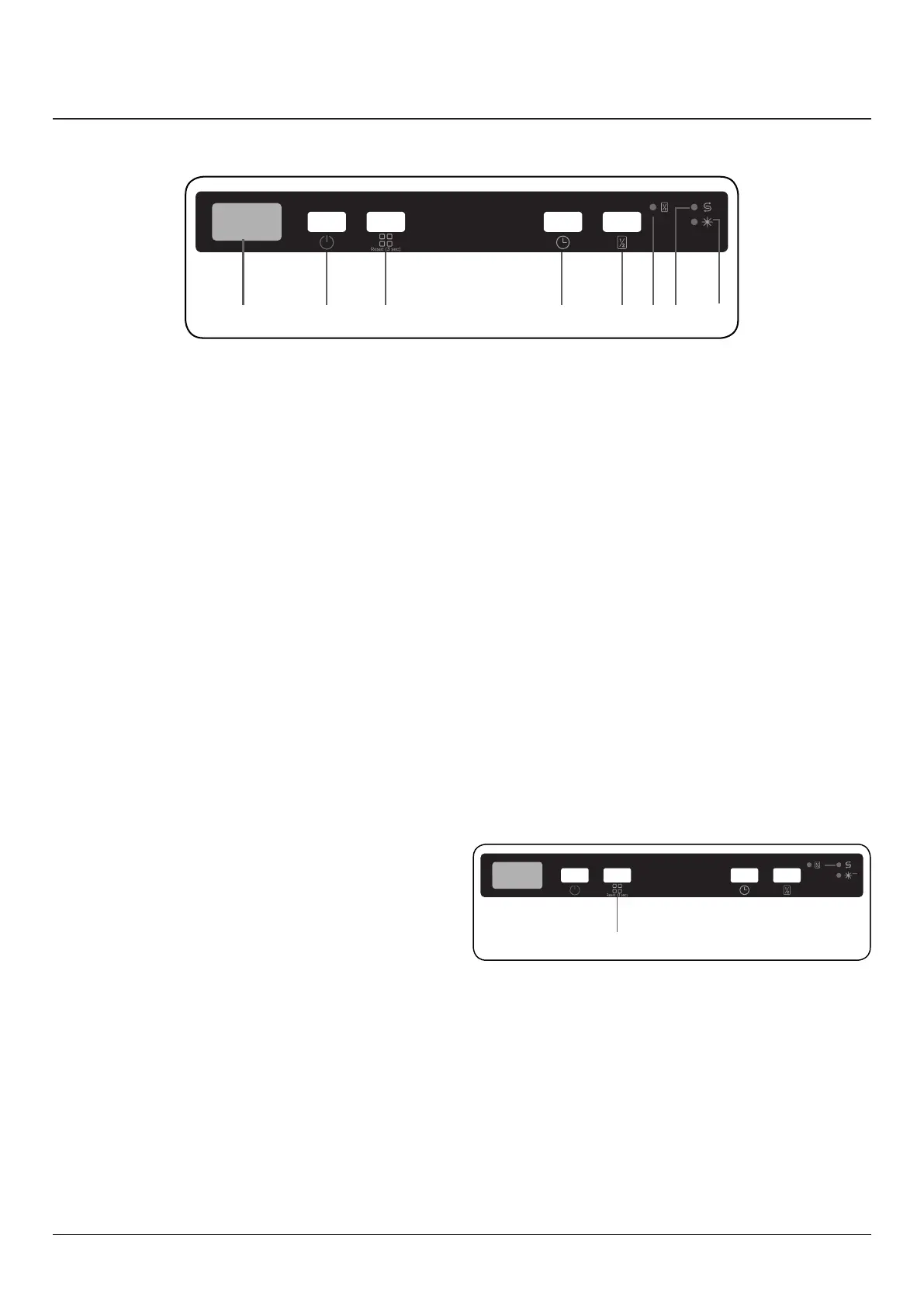
1. On/Off Button
2. Programme Selection Button
3. Display
4. Delay Button
5. Half Load Button
6. Half Load LED
7. Salt Indicator
8. Rinse Aid Indicator
1. On/Off Touch Button
Turn the machine on by pressing the On/O button. When
the machine is on, “--” will be shown on the Display (3).
2. Programme Touch Button
Select a suitable programme for your dishes by touching
programme selection button (2). The programme will start
automatically when the door is closed.
3. Display
The display shows the number and total time of the selected
programme, alternately, and the remaining time during
operation.
4. Delay Buttton
Press the delay button to delay the start time of the selected
programme from 1 hour up to 19 hours.
Pressing the button once delays the start time for 1 hour,
continuing to press will increase the delay time.
Press the Delay button to change or cancel the delayed start.
If you switch o the machine while delay timer is active, the
delayed time is cancelled.
312 64578
5. Half Load Button
Press the half load button to reduce the duration of the
selected programme, and therefore decrease your energy
and water consumption.
When the half load option is selected, half load LED (6) will
illuminate.
NOTE: If you decide not to start the selected programme,
please see the “Changing a Programme” and “Cancelling a
Programme” sections.
NOTE: When there is insucient softening salt, the Salt
Warning Indicator (7) will illuminate to indicate the salt
chamber needs lling.
NOTE: When there is insucient rinse aid, the Rinse Aid
Warning Indicator (8) will illuminate to indicate the rins
chamber needs lling.
Changing a Programme
Follow the steps below to change a programme while in
operation.
1. Open the door and press the Programme selection
button (2) to select a new programme.
2. After closing the door, the newly selected programme
will resume the course of the old programme.
NOTE: Open the door slightly at rst to stop a wash
programme before it is complete in order to avoid water
spillage.
4. Control panel
2


 To Next Page