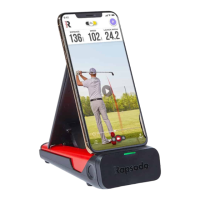
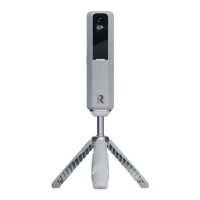
The Rapsodo PRO 3.0 is a sophisticated data-tracking monitor designed for baseball and softball, offering comprehensive analysis of both pitching and hitting performance. This device is engineered to provide accurate and detailed insights, making it a valuable tool for coaches, players, and trainers looking to improve their game. The PRO 3.0 works in conjunction with the Rapsodo Diamond App and a cloud platform, creating an integrated ecosystem for data collection, analysis, and player management.
Function Description
The primary function of the Rapsodo PRO 3.0 is to capture and process data related to pitching and hitting. For pitching, it measures various metrics such as release side, height, extension, release angle, height angle, release velocity, 3D trajectory, side at plate, strike position, height at plate, total spin, top spin, side spin, gyro spin, true spin, spin efficiency, spin axis, seam orientation, vertical trajectory, horizontal trajectory, vertical spin, horizontal spin, and seam shifted wake. For hitting, the device tracks exit velocity, launch angle, hit direction, side of plate, height of plate, depth of plate, distance, 3D trajectory, hit, out, side at plate, height at plate, total spin, and top spin. These metrics provide a holistic view of a player's performance, enabling precise adjustments and targeted training.
The device utilizes advanced camera technology to capture images and data, which are then processed to generate the detailed metrics. The PRO 3.0 is designed for use in a baseball environment, with specific placement requirements to ensure optimal data capture. It connects wirelessly to an iPad running the Rapsodo Diamond App, where all the collected data is displayed, analyzed, and stored.
Usage Features
The Rapsodo PRO 3.0 offers a user-friendly experience with clear indicators and an intuitive app interface.
- Powering On/Off: To turn the PRO 3.0 on, simply press the power button. The top LED displays will show a sequence of colors during power-up, then turn solid red when ready to connect. The small LED display under the handle will flash red. To turn the unit off, hold the power button for 3 seconds; the small LED display will flash yellow as it powers down.
- LED Displays: The device features both top LED lights and a small LED light, which provide visual feedback on its status.
- Red Flashing Lights (Top LED): Indicates the unit is powering on.
- Green Light (Top LED): Signifies the unit is "Ready" to measure and collect data.
- Blue Light (Top LED): Indicates "Processing" data after a valid hit or pitch. This state lasts only a few seconds before returning to green.
- Red Light (Top LED): Means the unit is on but "Not Ready" (not armed).
- White Light (Top LED): Indicates the unit is streaming calibration images to the Diamond App.
- Blue Light (Small LED): Appears when the battery is charging.
- Cloud + App Integration: The PRO 3.0 integrates seamlessly with the Rapsodo Diamond App and the Rapsodo Diamond Sports Cloud Platform. Users create a coach account and player profiles on cloud.rapsodo.com. The Diamond App, available on the Apple App Store, is required to operate the PRO 3.0. The app supports the latest iOS versions and requires an iPad Air 2 or newer. A team membership is necessary to collect and store all data.
- Pairing with Diamond App: To pair the PRO 3.0 with the Diamond App, first connect the iPad to the internet. Open the Rapsodo Diamond App, navigate to the Play tab, and tap the SYNC button. Then, go to iPad Settings > Wi-Fi and connect to the PRO 3.0 Access Point (e.g., "Rapsodo_V3_Serial#") using the password "rapsodowifi." Re-open the Diamond App, go to the Play tab, and click "Refresh" to see sessions.
- Device Placement and Setup: Accurate placement is crucial for optimal performance. Use the included measuring tape to place the O' mark at the front center of home plate, extending through the center of the pitcher's mound. The near side of the PRO 3.0 should be placed 17 feet from the front of home plate, with the red arrow on top of the device facing the mound. Ensure the pitching mound is at 60'6".
- Session Types: The Diamond App offers various session types for both hitting and pitching, including:
- Certified Assessment: A 15-pitch/hit scripted session for athlete analysis and evaluation.
- Low Intent: Bullpen/hitting session at lower intensity/volume for arm maintenance or pitch/hit development.
- High Intent: Bullpen/hitting session at 100% intensity without live hitters.
- Flat Ground: Pitching session not throwing off a mound.
- Live: Live At-Bats, scrimmages, or game-like environment for tracking performance against live batters/pitchers.
- Rehab: Low-intent, low volume session with strict pitch counts for injury recovery.
- Tee Work: Stationary hitting setting with 0 mph pitch speed.
- Soft Toss: Hitting setting with pitch speed under 35 mph.
- Batting Practice: Multi-option function to switch between Tee, Soft-toss, and Live within the same session.
- Pitching Machine: Used in Live/BP mode for incoming pitch speeds over 35 MPH.
- Game Mode: Interactive, video-game like environment for practicing specific challenges.
- PRO 3.0 ONLY - Live on Live BP: Batting practice with paired incoming pitch data, requiring the tosser to be at full pitching distance.
- PRO 3.0 ONLY - Live on Live Game: Game or scrimmage session where hitting and pitching data are recorded and paired.
- PRO 3.0 ONLY - BP with Pitching Machine: Batting practice off a machine with incoming pitch data recorded, requiring the pitching machine to be at full pitching distance.
- Data Collection: After a hit or pitch, a processing wheel appears for 4-8 seconds before data is displayed. If the wheel doesn't appear, check alignment and session type.
- Game Mode: This feature requires a Rapsodo Hitting 2.0 or PRO 3.0 unit, Rapsodo Diamond App, Rapsodo Game Mode App, Rapsodo Team Membership, and a recommended iPad (Pro 2nd Gen or newer). To set up, turn on the Rapsodo Hitting unit but do not connect to its Wi-Fi. While connected to home Wi-Fi, open the Diamond App, go to settings > Subscription > License > Link Device, and select your RCE. To connect to Game Mode, connect to Rapsodo Wi-Fi, open Diamond App > Play > Refresh, select 'Game Mode', return to the iPad home screen, open Rapsodo Game Mode, and drag the Diamond App into the Game Mode App. Then select ball type, game mode version, and add players.
Maintenance Features
The Rapsodo PRO 3.0 is designed for durability and ease of use, with specific considerations for its care and longevity.
- Charging: The device is charged via an included USB-C cable, which connects to a port underneath the handle, next to the power button. The unit can be used while charging. The small LED display above the power button will show blue when charging.
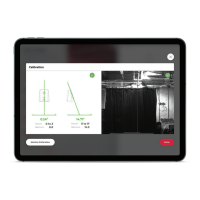
- Calibration: Regular calibration ensures accurate data. The calibration board should be placed flush with the front edge of home plate and centered, with the leveling bubble as close to the center as possible. Calibration can be done via Settings > Devices > PRO 3.0 > Recalibrate or Play > Recalibrate in the Diamond App. During calibration, the top LED displays will show white, and the app will show calibration streams from all three cameras. The Mono camera's red azimuth line should go down the middle of the mound (pitching rubber should not be visible), while Stereo 1 & 2 lines should land on the calibration board. After aligning, tap "Field Calibration" and then "DONE" to save.
- Environmental Considerations:
- Interference: The PRO 3.0 is highly sensitive. Be aware of electrical or optical interference from everyday items like appliances, computers, cell phones, and bulbs, which can cause false readings.
- Lighting: The device should be used in well-lit environments. Performance may vary in low light conditions, potentially leading to incorrect measurements.
- Wet Conditions: The PRO 3.0 is not water-resistant. Do NOT expose it to water, as this can cause damage.
- Software Updates: Rapsodo periodically updates the Diamond App to improve features and performance. Users are recommended to regularly download the latest version for the highest monitor performance.
- Troubleshooting Data Collection: If the processing wheel appears but no data is recorded, it indicates insufficient clear readings. Continue the session; if readings consistently fail, recalibrate. If issues persist, contact customer support. Ensure other lanes with players are at least 8 feet apart, no fans or HVAC units are blowing near the unit, and no other players are practicing behind the recording player.
- Completing a Session: To finish a session, tap the bottom right-hand corner in the app. Connect to Wi-Fi, then open Rapsodo Diamond App > Settings > Upload Progress, and select the arrows in the top left corner. Leave the app open until all files are uploaded. Sessions will then appear on the Rapsodo cloud.
- Warranty and Returns: Rapsodo provides a one-year limited warranty for manufacturing defects. Detailed warranty information and return policy can be found on their website.
- Disposal: The device should be disposed of separately from ordinary household waste at its end of life, at recycling centers for electronic equipment. Batteries should also be collected separately. Packaging and the device should be disposed of according to local regulations.

 Need help?
 General

 To Next Page