EasyManua.ls Logo

Rath SmartRescue 5 - User Manual

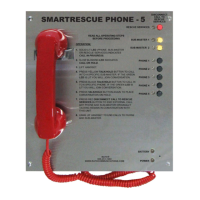
Rath SmartRescue 5
14 pages
Print Icon
To Next Page IconTo Next Page
Loading...
N56W24720 N. Corporate Circle Sussex, WI 53089
800-451-1460 262-246-4828 (fax)
www.rathmicrotech.com www.area-of-refuge.com
RP8500510
Ver. 1
12/17
Made in the USA
3 Year Warranty
SmartRescue 5 & 10
Installation & Operations Manual

Questions and Answers

  • K
    Kimberly SanchezAug 14, 2025
    Why is two-way communication from my Rath SmartRescue 5 so poor?
    • L
      Lindsey CannonAug 14, 2025
      Poor two-way communication from the SmartPhone could be due to feedback on the line. Try adjusting the VR1 and VR2. Also, verify that the wiring is not spliced onto the phone line cord.
  • S
    Shannon AndrewsAug 18, 2025
    Why are the LEDs on my Rath SmartRescue 5 flashing when the button is pressed?
    • J
      Jeremy ShawAug 18, 2025
      LEDs flashing on the SmartPhone when the button is pressed indicates a potential issue with the phone line. Ensure the phone line is working and connected properly. Also, verify that a dial tone is present at the call stations.
  • B
    Brian HurstAug 21, 2025
    How to fix a Rath SmartRescue 5 Emergency Phone when the power LED is off?
    • A
      Amanda BoothAug 21, 2025
      If the power LED is not illuminated, check that the transformer is connected to a working 120V power source or, if it's 24V powered, check the power supply. Also, ensure the power connection on the circuit board is secure.
  • B
    Brian DeanAug 25, 2025
    What to do if my Rath SmartRescue emergency phone system will not dial out?
    • T
      tonyfreemanAug 26, 2025
      If the SmartRescue system isn't dialing phones, verify that the wires are connected properly from the base to the SmartPhones.
  • J
    Jacob PorterAug 28, 2025
    Why is the battery LED on my Rath SmartRescue 5 Emergency Phone not illuminated or always red?
    • S
      Sarah SalinasAug 28, 2025
      A battery LED that is not illuminated or always red may indicate several issues: * The battery hasn't charged long enough; allow 18 hours for a trickle charge to reach 19V when fully charged. * The battery plug isn't properly connected to the circuit board; verify the connection. * The battery is worn and needs replacing, which is recommended every 2 years.
  • M
    Mrs. Amanda Boyd MDAug 31, 2025
    What to do if there is a dial tone on my Rath SmartRescue handset but it is not calling out?
    • K
      Katelyn CurryAug 31, 2025
      If there's a dial tone on the SmartRescue handset when there shouldn't be and the phone isn't calling out, it could be due to a few reasons: * Wire pairs are out of order; verify the wire pairs are connected to the correct pins. * Wires are shorted and need to be replaced.
  • E
    Eric GonzalezSep 3, 2025
    Why are the Submaster and Phone LEDs blinking on my Rath SmartRescue base?
    • M
      mcclainlanceSep 4, 2025
      If the Submaster and Phone LEDs are blinking on the SmartRescue base, verify that power is applied and the backup battery is connected properly to the SmartRescue board.
  • A
    Alyssa DorseySep 7, 2025
    Why is there no sound or tone on my Rath SmartRescue handset?
    • N
      Nathan StevensSep 7, 2025
      If there is no sound or tone on the SmartRescue handset, verify that 24v power is connected to the SmartRescue base.
  • C
    Carol LawrenceSep 12, 2025
    What does it mean when the Rath SmartRescue LEDs stay on?
    • J
      Jason EllisSep 12, 2025
      If the SmartRescue LEDs remain constantly on, it may indicate that the wires are crossed. Verify the wiring from the base to the SmartPhone is correct.

Summary

Installation and Setup

Pre-Installation Requirements

Lists necessary requirements before installing the SmartRescue system.

Installation Steps

Provides step-by-step instructions for mounting the SmartRescue.

Wiring the SmartRescue

Connecting to 120 V Power Source

Details the process of wiring the SmartRescue unit to a 120V power source.

Wiring Emergency Phones

Connecting Phones to SmartRescue

Explains how to connect the emergency phones to the SmartRescue base.

SmartRescue Programming

Factory Default Operation

Describes the default programming where phones call offsite directly.

Powering Emergency Phones

Phone Programming

Operations and Testing

Troubleshooting and Volume Adjustment

Adjusting SmartPhone Volume

Guide for adjusting the volume on the SmartPhone using VR1 port.

Common Troubleshooting Issues

Lists common problems and their possible causes and solutions.

Rath SmartRescue 5 Specifications

General IconGeneral
BrandRath
ModelSmartRescue 5
CategoryEmergency Phone
LanguageEnglish

Related product manuals