EasyManua.ls Logo

Rath Multi-Line Command Center - User Manual

Rath Multi-Line Command Center
11 pages
Print Icon
To Next Page IconTo Next Page
Loading...
N56W24720 N. Corporate Circle Sussex, WI 53089
800-451-1460 www.rathcommunications.com
RP8500NE10DG
Ver. 3
08/18
Made in the USA
3 Year Warranty
Installation & Operations Manual
Multi-Line Command Center

Questions and Answers

  • P
    philiprussellAug 9, 2025
    What to do if Rath Emergency Phones will not call out?
    • M
      matthew02Aug 10, 2025
      If your Rath Emergency Phone isn't calling out, start by checking the wires for 48VDC. If there's no voltage, ensure the phone is connected to the SLT interface on the Distribution Module; note that some SLT interfaces use only the blue and orange pairs. If you find 28VDC, the phone is incorrectly connected to the DKP interface. Also, be sure to dial any access digit needed to dial out of your building.
  • E
    Emma WattsAug 14, 2025
    How to fix insufficient volume on Rath call boxes?
    • J
      Jonathan LangAug 14, 2025
      To increase the volume on Rath call boxes, turn the VR1 potentiometer on SmartPhones. For 2400 Phones, use the VOL key.
  • L
    lsanchezAug 19, 2025
    Why is my Rath phone making internal calls, but not external calls?
    • D
      darrell91Aug 19, 2025
      If your Rath phone makes internal calls but not external ones, check that the phone line is connected to the correct interface on the Distribution Module. Also, verify the phone line has 48-52VDC and use an analog phone to confirm you can call in and out.
  • G
    Garrett ColonAug 25, 2025
    What to do if lights continuously blink on button for Rath call box?
    • T
      Toni BrownAug 25, 2025
      If the lights continuously blink on the button for your Rath call box, the phone is not properly hung up. Lift the Command Center handset, select the blinking light, then hang up the handset.
  • J
    Jonathan ParkAug 29, 2025
    How to troubleshoot a Rath Command Center that will not power on?
    • M
      Michelle ClarkAug 29, 2025
      If the Rath Command Center does not power on, check the wires for voltage, ensuring it should be 28VDC. If no voltage is detected, confirm the connection to the DKP interface on the Distribution Module. If you have 48VDC, it indicates an incorrect connection to an SLT interface.
  • C
    carrie81Sep 3, 2025
    Why do lights periodically blink on my Rath Command Center?
    • E
      Emily CainSep 4, 2025
      Periodic blinking lights on the Rath Command Center indicate the phone is performing a phone line check. This is a normal system function and requires no action. To disable this function, refer to the SmartPhone Programming Guide.

Rath Multi-Line Command Center Specifications

General IconGeneral
CategoryEmergency Phone
Mounting TypeWall Mount
MaterialStainless Steel
Power Supply120 VAC
Number of LinesMultiple
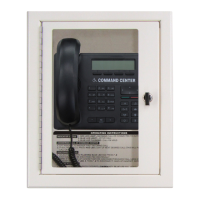
DescriptionThe Multi-Line Command Center is designed to provide a single location for all emergency communications. This vandal-resistant unit provides a variety of communication options including a master phone, handset, and hands-free phone. The unit is equipped with a master telephone with a keypad for dialing and a telephone handset with a push-to-talk amplified speaker.

Related product manuals