GB
Page 48 of 64
INSTRUCTION, USE AND
MAINTENANCE MANUAL
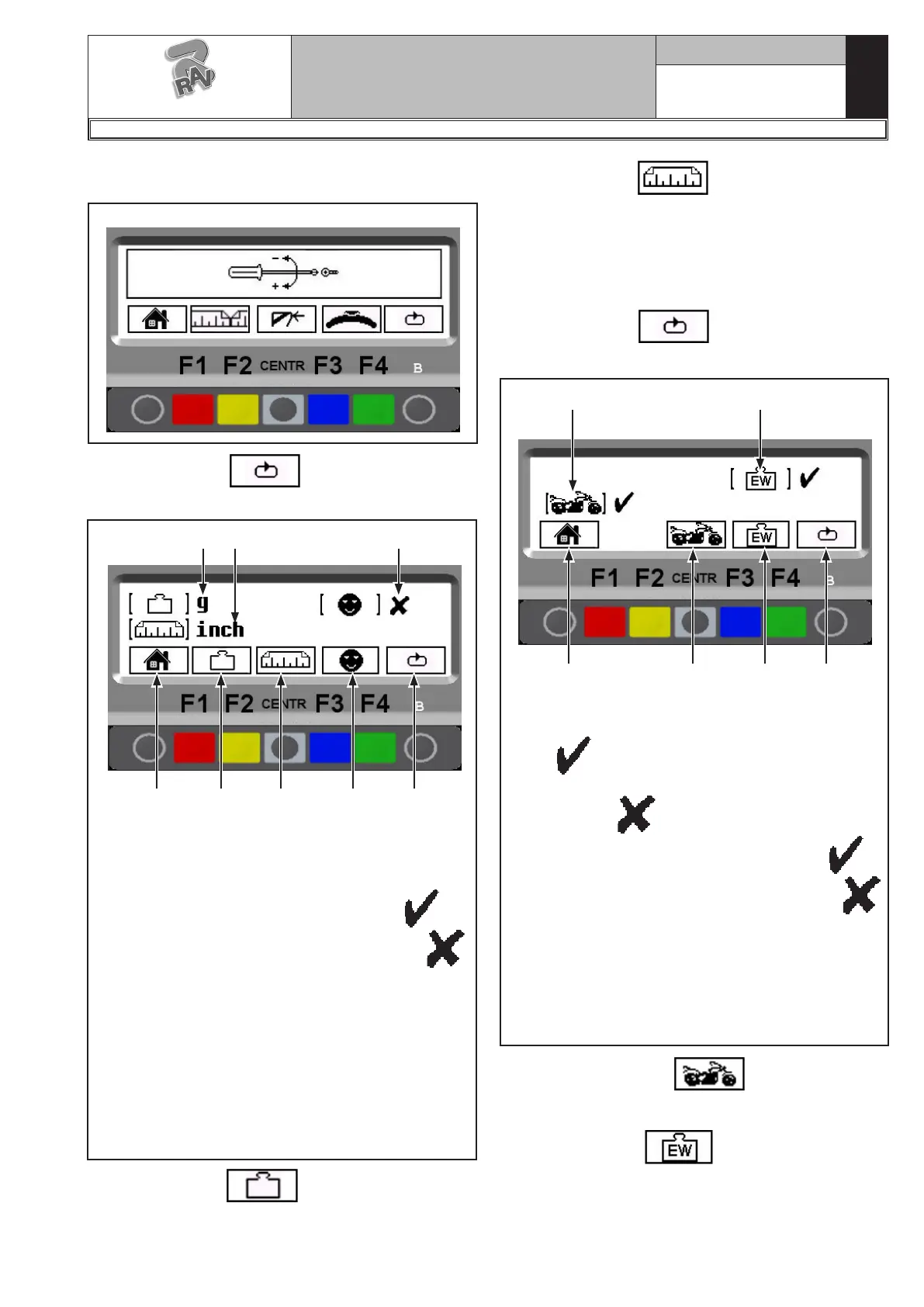
Type in the password F1-F2-CENTR-F3, The program
will show the screen page in Fig. 98:
Fig. 99
4
KEY
1 – Selected weight measurement unit = grams (g)
2 – Selected unit of width/diameter measurement
= inches (inches)
3 – "User Control" function ENGAGED →
"User control" function DISENGAGED →
4 – Return to Fig. 96 screen page (RED) (F1)
5 – Change unit of weight measurement from grams
(g) to ounces (oz) and vice versa (YELLOW) (F2)
6 – Change unit of width/diameter measurements
from inches (in) to millimetres (mm) and vice
versa (CENTRAL)
7 – Enable/disable “User control” function (see Par.
15.2)
8 – Display subsequent operations (GREEN) (F4)
5 6 8
1 2 3
7
Press the “F2 key” to change weight unit of
measurement from grams to ounces and vice versa.
The symbol "g" or "oz" appears on the monitor.
Fig. 100
3
KEY
1 – Motorcycle wheel balancing mode ENGAGED
→
Motorcycle wheel balancing mode DISEN-
GAGED →
2 – “ECO-WEIGHT” function ENGAGED →
“ECO-WEIGHT” function DISENGAGED →
3 – Return to Fig. 96 screen page (RED) (F1)
4 – Engage/Disengage motorcycle wheel balancing
mode (see Chap. 16) (CENTRAL)
5 – Engage/disengage “ECO -WEIGHT” function (see
Par. 15.6) (BLUE) (F3)
6 – Display subsequent operations (GREEN) (F4)
4 6
1 2
5
Press the “CENTR key” to engage or disen-
gage motorcycle wheel balancing mode (see Chapt. 16).
Press the “F3 key” to engage or disengage
“ECO -WEIGHT” function (see Par. 15.6).
All the settings of the measurement unit are stored
even after the machine is switched off.
Press the “F3 key” to change the width and
diameter unit of measurements from inches to millime-
tres and vice versa. The symbol "in" or "mm" appears
on the monitor.
After setting the required measurement unit, to engage
or disengage the motorcycle wheel balancing mode,
press the “F4 key” .
The program will show the following display page:
Fig. 98
Press the “F4 key” , the program will show
the following display page:
G2.124R - GP2.124R
RAVAGLIOLI S.p.A.
1297-M010-0_R



 To Next Page