
 To Next Page
J
Jacob BarronJul 29, 2025
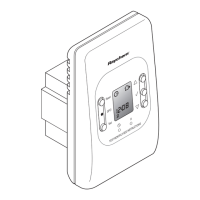
What to do if Raychem nVent Thermostat shows room failure?
- MMark ClarkJul 29, 2025
If your Raychem Thermostat indicates a room failure, this suggests the thermostat itself is defective and needs replacement.

What to do if Raychem nVent Thermostat shows room failure?
If your Raychem Thermostat indicates a room failure, this suggests the thermostat itself is defective and needs replacement.
What to do if Raychem Thermostat says floor sensor defective?
If your Raychem Thermostat indicates that the floor sensor is defective or short-circuited, you should check or replace the external sensor.
Allows the user to choose the display language for the thermostat interface.
Enables setting and confirming the current time on the thermostat display.
Allows the user to set and confirm the current date on the thermostat.
Option to select the type of sensor used for temperature measurement.
Describes the energy-efficient mode that operates based on a pre-programmed weekly heating schedule.
Explains the mode where the thermostat maintains a single, constant temperature setting.
Covers the temporary mode that overrides current settings for a specified duration.
Details the steps for programming or adapting the weekly heating schedule within the Event Mode.
Instructions for adjusting the thermostat's internal clock and calendar.
Details on activating and deactivating the child lock feature to prevent accidental changes.
 General
| Brand | Raychem |
|---|---|
| Model | nVent |
| Category | Thermostat |
| Language | English |