
 Need help?
Do you have a question about the Raycon FITNESS EARBUDS and is the answer not in the manual?
Highlights IPX7 water resistance, secure fit, and battery life for athletic use.
Details Active Noise Cancellation (ANC) and Awareness Mode for enhanced sound experience.
Explains Multipoint Technology for simultaneous connection to multiple devices.
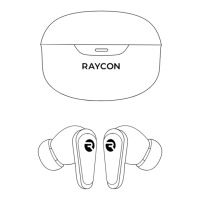
Lists the charging capsule as part of the package contents.
Lists the main earbuds as part of the package contents.
Identifies the included charging cable.
Mentions the included documentation.
Lists the various sizes of gel tips provided.
Identifies the stabilizers for a secure fit.
Mentions the included lanyard.
Lists the included carabiner.
Identifies the area on the earbud for touch controls.
Locates the LED indicator and microphone on the earbuds.
Points out the stabilizer component for fit.
Identifies the gel tip on the earbud.
Shows the port for charging the capsule.
Indicates the surface for wireless charging.
Locates the indicator for battery status.
Identifies the button for resetting the device.
Details specific touch commands for the left earbud.
Details specific touch commands for the right earbud.
Lists shared touch controls applicable to both earbuds.
Explains how to toggle between EQ profiles for different sound.
Describes ANC for blocking noise and Awareness Mode for ambient sound.
Step-by-step guide for pairing earbuds with a device via Bluetooth.
Instructions on charging the capsule using USB-C or wireless pad.
Explains the meaning of LED colors during capsule charging.
Describes the LED behavior when earbuds are placed in the capsule for charging.
Details the meaning of different LED indications on the charging capsule.
Explains the LED signals on the earbuds for pairing and connection.
Instructions on how to perform a factory reset and unpair the earbuds.
Guide on how to replace and properly install earbud geltips.
Instructions on attaching and securing the perfect fit stabilizers.
Explains the concept and benefits of connecting to multiple devices simultaneously.
Provides a step-by-step guide for configuring the multipoint feature.
Addresses issues with connectivity and audio quality.
Provides solutions for problems related to the charging capsule not charging.
Offers troubleshooting steps if the earbuds fail to charge.
Helps resolve issues when the multipoint feature is not functioning.
How to clean earbud attachments like gel tips and stabilizers.
Methods for cleaning the earbud nozzles without damaging electronics.
Guidance on safely cleaning the exterior of the charging capsule.
Important precautions for safe usage and handling of the earbuds.
Information on how to get customer support.
Details about the product's warranty coverage.
Technical specifications of the Raycon Fitness Earbuds.
Regulatory compliance statement regarding FCC rules.
Compliance information related to Industry Canada regulations.
Statement on the device's radio frequency exposure compliance.
 General
| Bluetooth Version | 5.0 |
|---|---|
| Water Resistance | IPX7 |
| Charging Case | Yes |
| Fit Type | In-ear |
| Noise Isolation | Passive |
| Wireless | Yes |
| Microphone | Yes |
| Driver Size | 6mm |
| Charging Time | 1.5 hours |
| Type | Earbuds |
| Weight | 5g (each earbud) |


 To Next Page