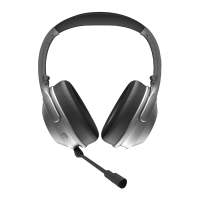
The Raycon Fitness Headphones are an audio companion designed for active lifestyles, offering a blend of robust features, immersive sound, and versatile connectivity. These wireless headphones are engineered to enhance workouts and daily activities, providing a premium audio experience.
Function Description:
The Fitness Headphones are primarily designed for audio playback, offering a wireless connection via Bluetooth 5.0. They integrate Active Noise Cancellation (ANC) to block out external distractions and an Awareness Mode to amplify ambient sounds, ensuring users can stay focused or aware of their surroundings as needed. The headphones also support hands-free calling with controls for answering, ending, and rejecting calls, as well as redialing the last number. A key feature for productivity is Multipoint Technology, allowing simultaneous connection to two devices (e.g., a smartphone and a laptop), enabling seamless switching between audio sources like workout playlists and work calls without manual disconnection and reconnection. The headphones are built for activity, featuring IPX4 water resistance, making them suitable for various workouts and environments.
Important Technical Specifications:
- Model: RBH841
- Pairing Name: The Fitness Headphones
- Bluetooth Version: 5.0
- Power Input: DC 5V/1A
- Li-battery Capability: 500mAh
- Bluetooth Playtime: 45 hours
- Charging Time: Approximately 2 hours
- Support Profile: A2DP /AVRCP/HFP /HSP
- Frequency Response: 20Hz-20KHz
- Bluetooth Operating Range: ≤ 10 m
- Water Resistance: IPX4
Usage Features:
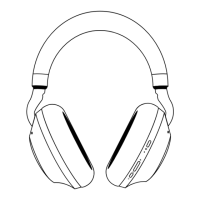
- Controls: The headphones feature physical buttons for volume control (up/down), power on/off, play/pause, call management (answer, end, reject, redial), and ANC/Awareness Mode toggling.
- Volume Up: Tap once.
- Skip Track: Hold for 2 seconds.
- Power On/Off: Hold for 3 seconds.
- Play/Pause: Tap once.
- Answer/End Call: Tap once.
- Redial Last Number: Tap twice.
- Reject Call: Hold for 2 seconds (while receiving a call).
- Volume Down: Tap once.
- Previous Track: Hold for 2 seconds.
- ANC On/Off: Tap once.
- Awareness Mode: Tap once.
- Sound Profiles (EQ Controls): Users can switch between three sound profiles:
- Balanced Sound: Hold for 1.5 seconds. Offers a leveled sound for all-around performance and warmth.
- Bass Sound: Hold for 1.5 seconds. Provides a bass-boosted sound, ideal for bass lovers.
- Pure Sound: Hold for 1.5 seconds. Delivers refined sound with perfect clarity.
- Bluetooth Pairing:
- To power on and enter pairing mode automatically, hold the power button for 3 seconds.
- To re-enter pairing mode, hold the power button for 5 seconds, which will also disconnect from any connected devices.
- The pairing LED (right side) will show alternating blue and red lights when in pairing mode and solid blue when connected.
- Charging: The headphones are charged via a USB-C port located on the left side. The charging LED (left side) glows red while charging and turns blue when fully charged. The headphones cannot be used while charging.
- Quick Swap Ear Cushions: The headphones come with three sets of ear cushions to suit different needs:
- PU Leather Ear Cushion: Optimized for noise cancellation, providing ultimate comfort and focus.
- Black / Blue Galaxy Mesh Ear Cushions: Breathable, easy-to-clean, and sweat-proof, designed for tough workouts.
- Cushions can be swapped by holding the headphone firm, turning the cushion counter-clockwise by about 30 degrees to remove, and then placing the new cushion in the removal position (30 degrees counter-clockwise) and rotating clockwise until secured.
- Multipoint Technology: Allows connection to two devices simultaneously. To set up, pair with the first device, disconnect from it (which puts the headphones back into pairing mode), then pair with the second device. The headphones will then automatically connect to both when turned on.
Maintenance Features:
- Cleaning Ear Cushions:
- Always remove ear cushions from the headphones before cleaning. Do not wash/clean them while attached.
- Fabric Cushions: Can be hand or machine washed with warm soapy water. Allow 5-6 hours to dry before re-using.
- PU Leather Cushions: Hand wash only with soapy water or damp cloths. Avoid harsh chemicals.
- Prevent moisture from getting inside the earcups.
- Troubleshooting: The manual provides guidance for common issues:
- Won't Power On: Check battery charge; the charging port LED should glow red if charging.
- Won't Charge: Ensure the correct USB-C cable is used and the power source is sufficient (wall charger preferred).
- No Sound (Bluetooth): Verify headphones are within 10 meters (33 feet) of the device, check battery levels, and try re-pairing.
- No Sound (3.5mm Aux Cable): Check volume levels on the device and headphones, and ensure the cable is securely connected.
- Multipoint Not Working: Confirm headphones are charged, disconnected from other Bluetooth devices, and in pairing mode before reconnecting.
Safety Guidelines:
- Avoid edges, uneven surfaces, and metal parts to prevent injury.
- Listen at a proper volume to protect hearing.
- Do not store in high temperatures or direct sunlight.
- Do not expose to rain or liquids for extended periods.
- Avoid dropping or undue impact.
- Do not modify, repair, or dismantle the product.
- Do not use diluents or volatile liquids for cleaning.
- Do not use in hazardous locations.

 Need help?

 To Next Page
 General