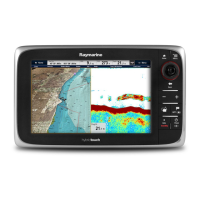
1.Touchscreen—youcantouchthescreentooperate
manycommonfunctions,includingallmenuoperations
(HybridTouchmultifunctiondisplaysonly).
2.Menu—accessesmenus.Pressagaintoclosemenus.
3.UniControl—providesajoystickandrotarycontrolandan
OKbuttonforusingmenusandapplications.
4.Back—presstoreturntoapreviousmenuordialoglevel.
5.WPT/MOB—pressandreleasetoaccessthewaypoint
options.Pressagaintoplaceawaypoint.Pressandhold
toplaceaManOverboard(MOB)markeratyourcurrent
position.
6.Power—pressoncetoswitchtheunitON.Oncepowered
on,pressthePowerbuttonagaintoadjustthebrightness,
accessthepowercontrolsforexternaldevices,andaccess
theautopilotcontrols.PressandholdtoswitchtheunitOFF .
7.Chartcardslots—openthecarddoortoinsertorremove
MicroSDcards.Thereare2cardslots(labelled1and2),
usedforelectronicchartsandarchivingwaypoint,routeand
trackdata.
6.4c95/c97/c125/c127/e95/e97/
e125/e127/e165Controls
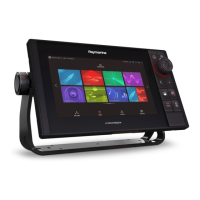
1.Touchscreen—youcantouchthescreentooperate
manycommonfunctions,includingallmenuoperations
(HybridTouchmultifunctiondisplaysonly).
2.Home—Presstoreturntothehomescreen.
3.Menu—accessesmenus.Pressagaintoclosemenus.
4.UniControl—providesajoystickandrotarycontrolandan
OKbuttonforusingmenusandapplications.
5.Back—presstoreturntoapreviousmenuordialoglevel.
6.RangeIn/Out—Pressminus(-)torangeoutandplus(+)
torangein
7.WPT/MOB—pressandreleasetoaccessthewaypoint
options.Pressagaintoplaceawaypoint.Pressandhold
toplaceaManOverboard(MOB)markeratyourcurrent
position.
8.Power—pressoncetoswitchtheunitON.Oncepowered
on,pressthePowerbuttonagaintoadjustthebrightness,
accessthepowercontrolsforexternaldevices,andaccess
theautopilotcontrols.PressandholdtoswitchtheunitOFF .
9.Chartcardslots—openthecarddoortoinsertorremove
MicroSDcards.Thereare2cardslots(labelled1and2),
usedforelectronicchartsandarchivingwaypoint,routeand
trackdata.
10.Standby(Auto)—Presstodisengageintegratedautopilot,
pressandholdtoactivateAutomodeonintegratedautopilot.
11.SwitchActivePane—Presstoswitchtheactivepane.
UniControl
NewcSeriesandNeweSeriesdisplayincludeaUniControl
whichconsistsofRotary,Joystickandpushbuttoncontrols.
Gettingstarted
73



 To Next Page
