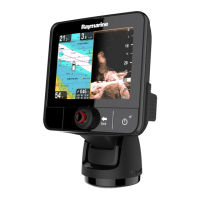
3.5eSSeriesControls
DescriptionFunctions
1Touch-
screen
youcantouchthescreentooperate
manycommonfunctions,includingall
menuoperations.
2HomePresstoreturntotheHomescreen.
3MenuAccessesmenus.Pressagaintoclose
menus.
4
UniControl
Providesrotaryandjoystickcontrol.
5
OkOkpushbutton
6BackPresstoreturntoapreviousmenuor
dialoglevel.
7
WPT/MOB
•Pressandreleasetoaccessthe
waypointoptions.Pressagaintoplace
awaypoint.
•PressandholdtoplaceaMan
Overboard(MOB)markeratyour
currentposition.
8Power
•PressoncetoswitchtheunitON.
•Oncepoweredon,pressthePower
buttonagaintoadjustthebrightness,
performascreencapture,access
Powersavemodeoraccessthepower
controlsforexternaldevices.
•PressandholdtoswitchtheunitOFF.
9
Cardreader
slot
Openthecarddoortoinsertorremove
aMicroSDcard.Thereare2cardslots
(labelled1and2),usedforelectronic
chartsandarchivingwaypoint,route,
trackandsettingsdata.
10Pilot•Presstodisengageintegrated
autopilot.
•PressandholdtoactivateAutomode
onintegratedautopilot.
11
Switch
ActivePane
•Presstoswitchtheactivepanein
splitscreenpages.
•Pressandholdtoexpandtheselected
panetofullscreen.
eSSeriesUniController
1.Rotary—usetoselectmenuitems,movethe
onscreencursor,andadjusttherangeinthe
ChartandRadarapplications.
2.Directionalcontrol—usetomovethecursor
positioninapplications,panup,down,left
andrightintheChart,WeatherandFishnder
applicationsortocyclethroughdatapagesinthe
Dataapplication.
3.OKpushbutton—pushintoconrmaselection
orentry.
Gettingstarted
25





 To Next Page