The Razer Book 13″ (2020) has sensors that detect the state of the laptop, if the lid is closed or not. If
a Razer Book 13″ is placed on top of another Razer Book 13″ with a closed lid, the laptop on top may
go into sleep mode as well because of the sensors being so close. To avoid this, we recommend not
placing laptops on top of each other.
Can I upgrade the RAM and memory storage of my Razer Book 13” (2020)?
The Razer Book 13” (2020) | RZ09-0357 has a fixed 8/16GB LPDDR4X of RAM. The storage can be
upgraded to max of 4 TB
Is the Razer Book 13″ (2020) compatible with the Core, Core V2 or Core X?
Yes, the Razer Book 13″ (2020) features a Thunderbolt™ 4 port with four lanes of PCI Express and
external graphics support for support with Razer Core, Razer Core V2, and Razer Core X.
What are the connectivity features of the new Razer Book 13″ (2020)?
The new Razer Book 13” (2020) | RZ09-0357 is equipped with a full array of connectivity and ports
including Thunderbolt™ 4, USB-C, USB-A, HD Webcam and WiFi-6.
Can I dual-boot, partition, or otherwise modify the Razer Book’s operating
system?
Dual-booting your system has its advantages and uses. It enables you to switch between two
Operating Systems (OS) quickly and access its exclusive tools, test application compatibility or to try
out a new OS, and so on.
However, Razer Book laptops are designed for compatibility with the as-shipped OS, also note that
modifying Book’s OS will result in voiding its warranty and support.
How To
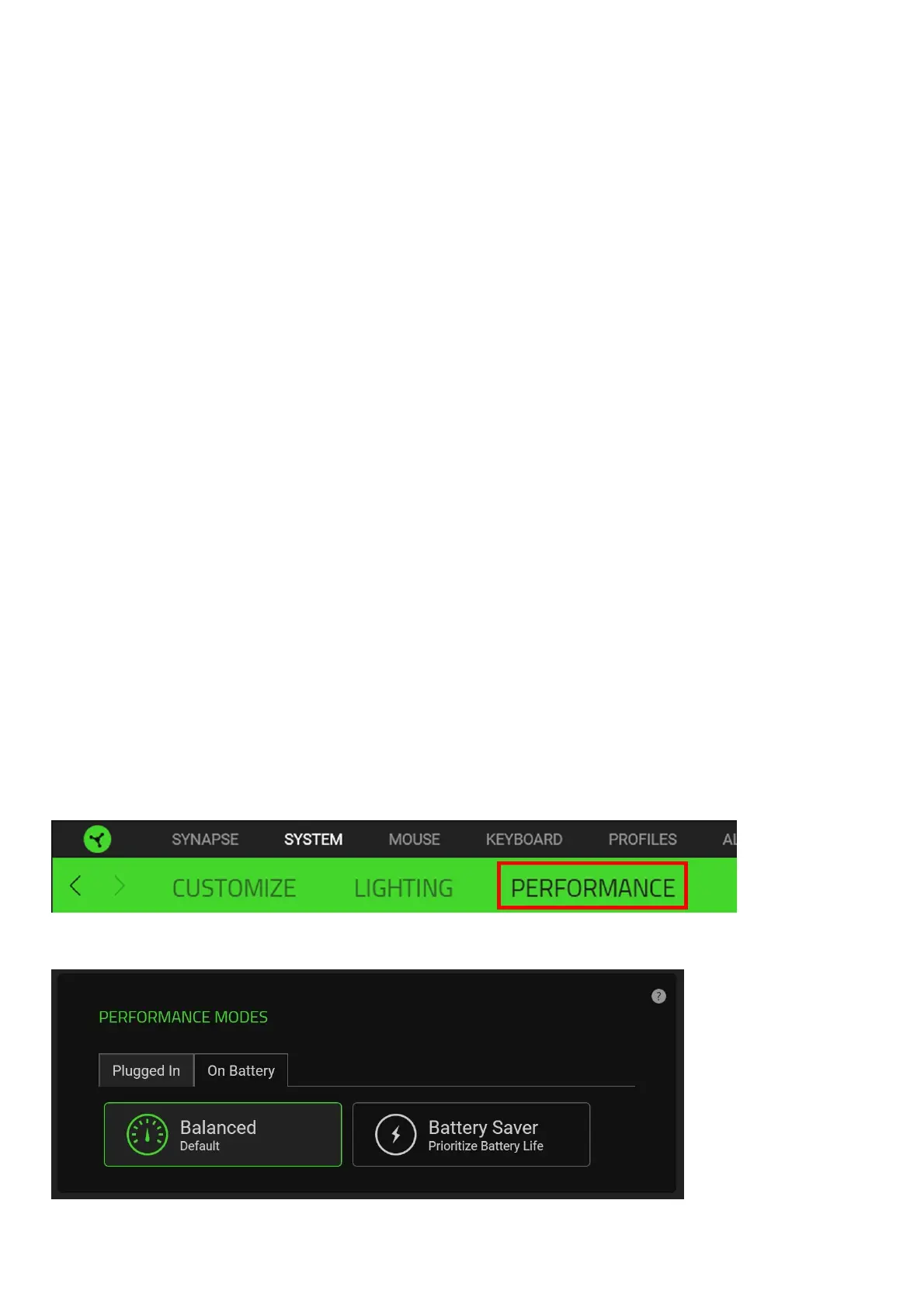
How do I change the performance mode of the Razer Book 13″ (2020) | RZ09-0357
Follow the steps below to change the performance mode of your Razer Book 13″ (2020):
1. Select the “PERFORMANCE” tab under the “SYSTEM” module
2. Select the performance mode you prefer from the “PERFORMANCE MODES” panel
There 2 available modes:



 To Next Page