that their teammates would not be able to hear them. You can configure the volume of the mic
monitor in Razer Synapse 3.
The default setting for the mic monitor on the Razer Nari is set to OFF.
My voice is not heard when making a call using my Razer Nari.
Follow the steps below to help solve your issue.
1. Launch Razer Synapse and select your headset from the dashboard.
2. Navigate to the MIC tab and adjust the Mic Volume slider to 100.
3. Ensure the Mic Sensitivity option “Automatically determine mic input sensitivity” is turned “ON”.
Why is the Razer Nari Essential not producing sound?
Ensure the Razer Nari Essential is not muted in your operating system and that the headset is set to
be the default playback device in the Audio Control panel or in the Software Audio Options.
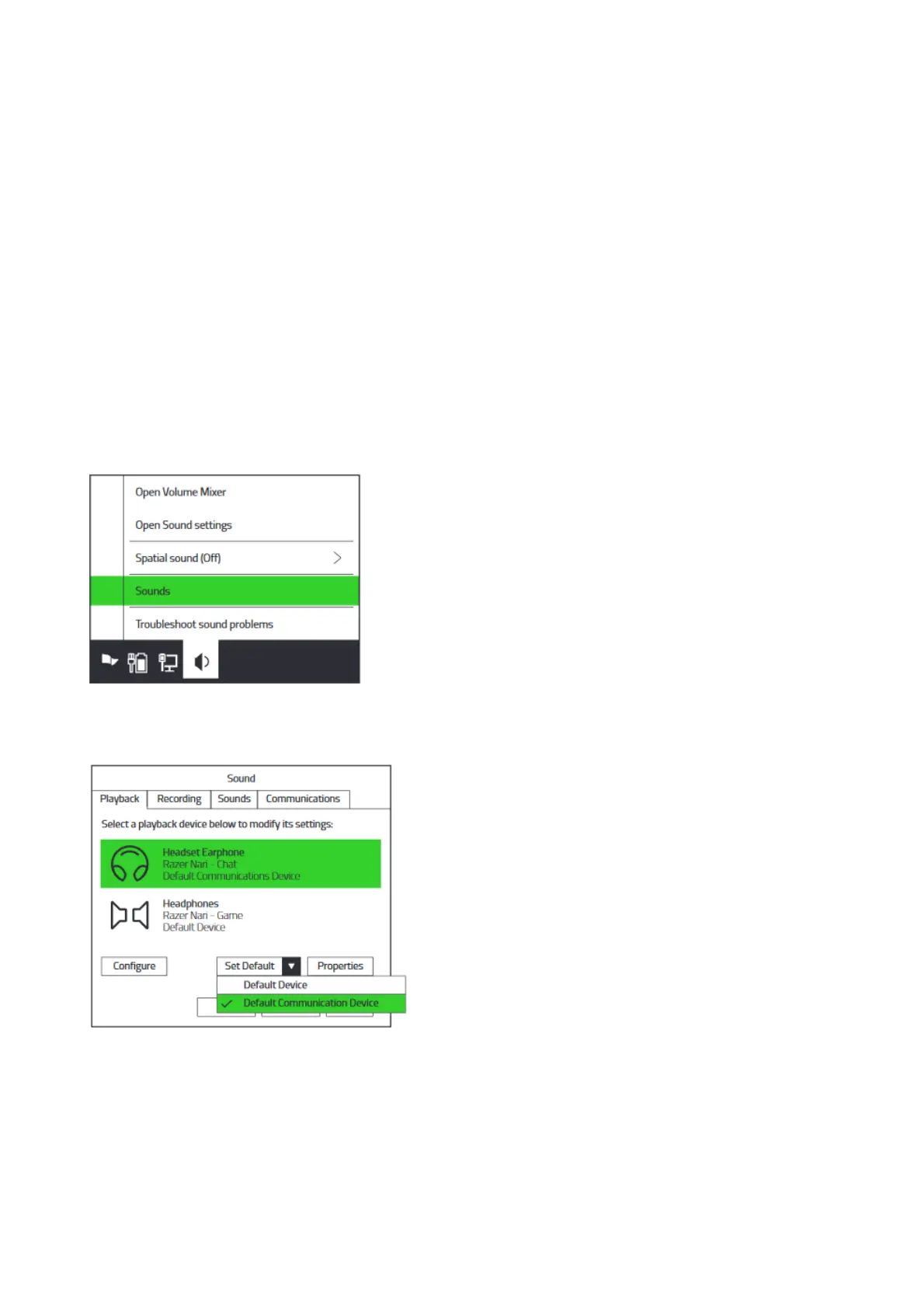
To set the default playback device on your computer simply:
1. Right-click on the sound icon on the system tray and select Sounds.
2. On the Playback tab, select “Razer Nari Essential- Chat” from the list, and then set it as the
Default Communication Device.
3. On the Playback tab, select “Razer Nari Essential – Game” from the list, and then set it as the
Default Device.










 To Next Page