EasyManua.ls Logo

Razer NARI - Headset Charging and Notifications

Razer NARI
32 pages
Print Icon
To Next Page IconTo Next Page
To Previous Page IconTo Previous Page
Loading...
FOR GAMERS. BY GAMERS.
7
5. SETTING UP YOUR RAZER NARI
CHARGING YOUR HEADSET
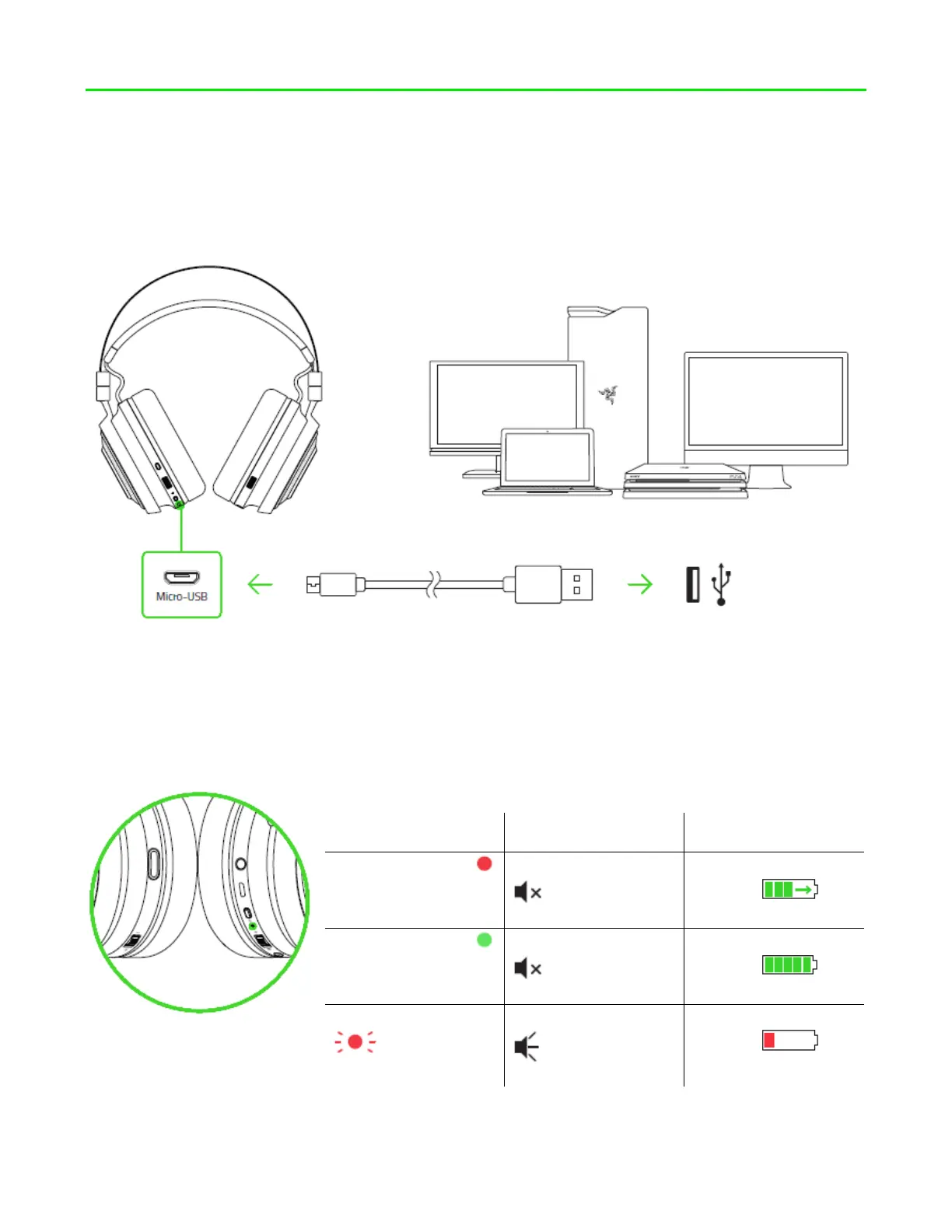
Connect your Razer Nari to a powered USB port using the charging cable.
For best results, please fully charge your headset before using it for the first time. A depleted
unit will fully charge in about 4 hours.
UNDERSTANDING THE CHARGING NOTIFICATIONS
Your Razer Nari will send out notifications depending on its current charging status, as shown
here:

STATUS
INDICATOR
SOUND INDICATOR
DESCRIPTION
Static red
None
Charging/low
battery
Static green
None
Fully charged/full
battery
Blinking red
Warning tone
Battery is critically
low

Other manuals for Razer NARI

Related product manuals