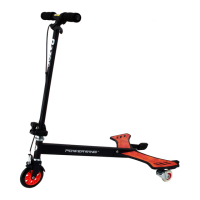
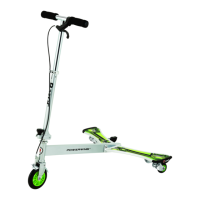
The Razor PowerWing Lightshow is a unique, self-propelling wheeled product designed for recreational use by children aged 6 and older, with a maximum weight capacity of 143 lb (65 kg). This owner's manual provides essential safety warnings, assembly instructions, usage guidelines, and maintenance information to ensure safe operation and longevity of the product.
Function Description:
The PowerWing Lightshow is a three-wheeled scooter-like device that allows riders to propel themselves without pushing off the ground. It features a handlebar stem, a front fork assembly with a light-up front wheel, and a deck assembly with two platforms, each equipped with a rear caster and a light-up rear wheel. The unique design allows for propulsion through a side-to-side motion of the rider's hips and legs, shifting weight on the platforms. The device also incorporates a "Lightshow" feature with LED lights on the deck and wheels, activated by a vibration sensor when the PowerWing Lightshow is in motion. The deck lights remain on for approximately 20 seconds after the device stops moving and reactivate when motion resumes. There are five different light modes, which can be cycled through by pressing a button located on the front left side of the deck. Stopping is achieved by squeezing a hand brake lever located on the handlebar.
Important Technical Specifications:
- Rider Age: 6 years and older (estimated, dependent on rider's size, weight, and ability).
- Maximum Rider Weight: 143 lb (65 kg).
- Propulsion: Self-propelling through side-to-side body motion; no pushing required.
- Braking System: Hand brake lever with a front fender clamping mechanism.
- Lighting System: LED lights on the deck and wheels, activated by a vibration sensor.
- Light Modes: Five (5) distinct light modes, selectable via a button.
- Power Source for Lights: 3x AA batteries (included).
- Construction: Features a steel frame, handlebar stem, front fork assembly, deck assembly, and light-up wheels.
- Wheels: Light-up front wheel and light-up rear wheels (casters).
- Assembly Tools (Included): Two (2) 5 mm Allen wrenches.
- Assembly Tools (Not Included, for brake adjustment): 3 mm Allen wrench and 8 mm wrench.
Usage Features:
- Riding Technique: Riders place both hands on the handlebars, one foot on each platform directly above the casters. After an initial push-off, propulsion is achieved by slightly bending knees and swinging hips and legs side to side, shifting weight on the platforms from right to left in sync with the body motion.
- Light Operation:
- No dedicated power switch for lights; they activate automatically.
- Deck lights are activated by a vibration sensor.
- Deck and wheel lights activate when the PowerWing Lightshow is in motion.
- Deck lights stay on for approximately 20 seconds after motion ceases and reactivate upon resuming motion.
- Five light modes are available, changed by pressing the light mode button (A) on the front left side of the deck.
- Stopping: The hand brake lever on the handlebar is squeezed to apply the brake. Riders should not step off the platforms until the unit has come to a complete stop.
- Recommended Riding Environment: Controlled environments, free of potential traffic hazards and public streets. Suitable for solid, flat, clean, and dry surfaces like pavement or level ground, without loose debris. Avoid wet, slick, uneven, rough surfaces, mud, ice, puddles, water, steps, sloped driveways, hills, roadways, alleys, swimming pool areas, and excessive speeds associated with downhill rides. Not for use indoors on surfaces like carpet or flooring that could be damaged. Do not ride at night or when visibility is impaired.
- Safety Attire: Always wear proper protective equipment, including an approved safety helmet (potentially legally required), elbow pads, kneepads, and closed-toe shoes with tied shoelaces. Never ride barefooted or in sandals.
- Supervision: Direct adult supervision is required at all times. Parents are responsible for reviewing safety information, ensuring children obey warnings, and maintaining the product.
- Rider Capacity: Never allow more than one child at a time on the PowerWing Lightshow.
Maintenance Features:
- Pre-Ride Checklist: Before each ride, check for:
- Loose Parts: Secure all fasteners, especially steering bolts and foot platforms. Listen for unusual rattles or sounds.
- Replacement Parts: Replace worn or broken parts immediately.
- Brake: Ensure proper function, with positive braking action when the lever is squeezed.
- Frame, Fork, and Handlebars: Inspect for cracks, broken connections, bends, or breaks.
- Safety Gear: Confirm all protective equipment is worn.
- Battery Replacement (for lights):
- Requires a Phillips screwdriver (not included).
- Locate the battery compartment on the bottom of the deck.
- Remove three screws from the battery cover.
- Remove the cover, discard old AA batteries.
- Insert new AA batteries, ensuring positive and negative terminals align with markings.
- Replace the cover and tighten screws.
- Warning: Battery replacement should be done by an adult. Do not mix old and new batteries, or different battery types (alkaline, standard, rechargeable). Dispose of batteries properly. Loose batteries are a choking hazard for small children. Batteries are not covered under the Limited Warranty.
- Cleaning: Wipe the PowerWing Lightshow with a damp cloth to remove dirt and dust. Do not use industrial cleaners, solvents, alcohol-based, or ammonia-based cleaners, as they can damage surfaces, plastic components, decals, or decal adhesive.
- Wheels and Bearings: Under normal conditions, wheels and bearings are maintenance-free. However, owners/guardians should periodically inspect them for wear and tear, axle tightness, and side-to-side play. Replace worn wheels/bearings immediately with genuine Razor wheels only, as non-genuine parts may affect safety and void the warranty. Worn wheels/bearings are considered normal wear-and-tear and are not covered by the Razor Warranty.
- Replacement Parts: Frequently requested replacement parts are available from Razor retail partners and on the Razor website (www.razor.com).
- Repair Centers: A list of authorized Razor repair centers can be found on www.razor.com.
- Product ID: Keep the 22-character product I.D. code (located on the white label of the product) available when contacting Razor for assistance.

 Need help?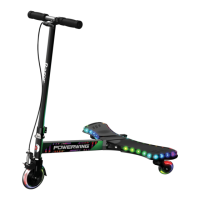

 To Next Page
 General