14
Setting the language
You can choose from three different languages (English, French and Spanish) for the on-screen displays.
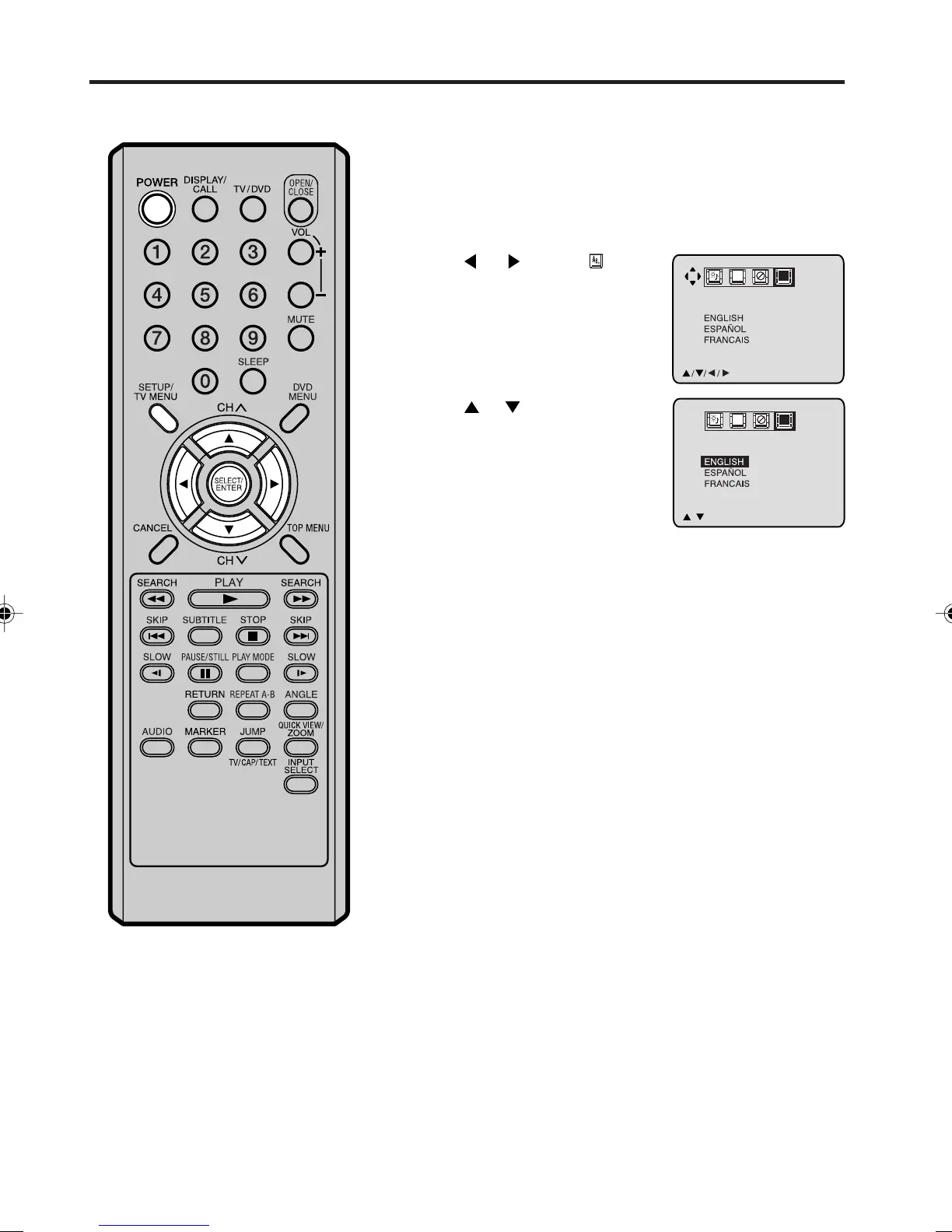
Press TV MENU in the TV mode. The TV menu screen will
appear.
Press TV MENU until the menu screen disappears.
1
2
3
Press or to select
option.
Press POWER to turn on the TV/DVD.
5
Press or to select the
desired language:
English (ENGLISH),
Spanish (ESPAÑOL)
or French (FRANCAIS),
then press ENTER.
4
LANGUAGE/IDIOMA/LANGUE
//
ENTER/MENU
CH
C
A
B
LANGUAGE/IDIOMA/LANGUE
/MENU
CH
C
A
B
NOTES:
• If the TV/DVD does not operate
properly (using the buttons on the TV/
DVD and/or the remote control),
disconnect the AC cord, wait a few
minutes and plug it back in. Static
electricity, etc., may have affected the
player's operation.
• The TV section has its own menu and
also DVD section has its own menu (see
page 28).
5M90801A [E] P14-18 28/4/04, 17:3014



 To Next Page