22
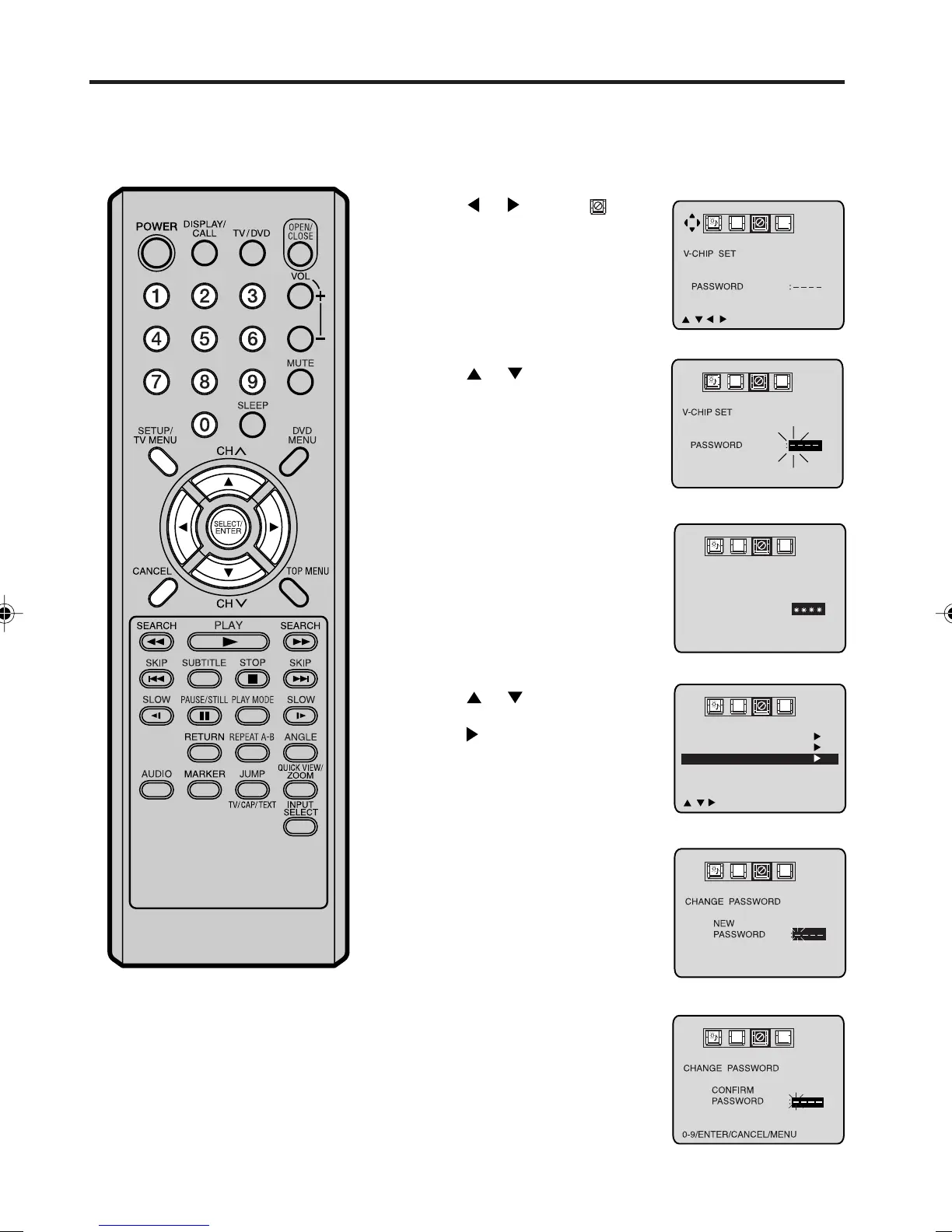
TO CHANGE PASSWORD
Press TV MENU in the TV mode. The TV menu screen will
appear.
Press
or to select option.
Press
or to select the
“PASSWORD”.
Press
or to select
“CHANGE PASSWORD”, then
press
.
Enter the new password using
number buttons (0-9), then
press ENTER.
Enter the same password again
to confirm, then press ENTER.
Press TV MENU until the menu
screen disappears.
1
2
3
5
6
7
8
Enter the Password using
number buttons (0-9), then
press ENTER.
If you put a wrong number, press
CANCEL.
4
Setting the V-Chip
(continued)
0-9/ENTER/CANCEL/MENU
CH
C
A
B
0-9/ENTER/CANCEL/MENU
CH
C
A
B
V-CHIP
V-CHIP SET
CHANGE PASSWORD
///
MENU
ON
CH
C
A
B
V-CHIP SET
PASSWORD :
0-9/ENTER/CANCEL/MENU
CH
C
A
B
5M90801A [E] P19-27 28/4/04, 17:3022



 To Next Page