44
Changing the parental level
1
2
3
4
5
6
7
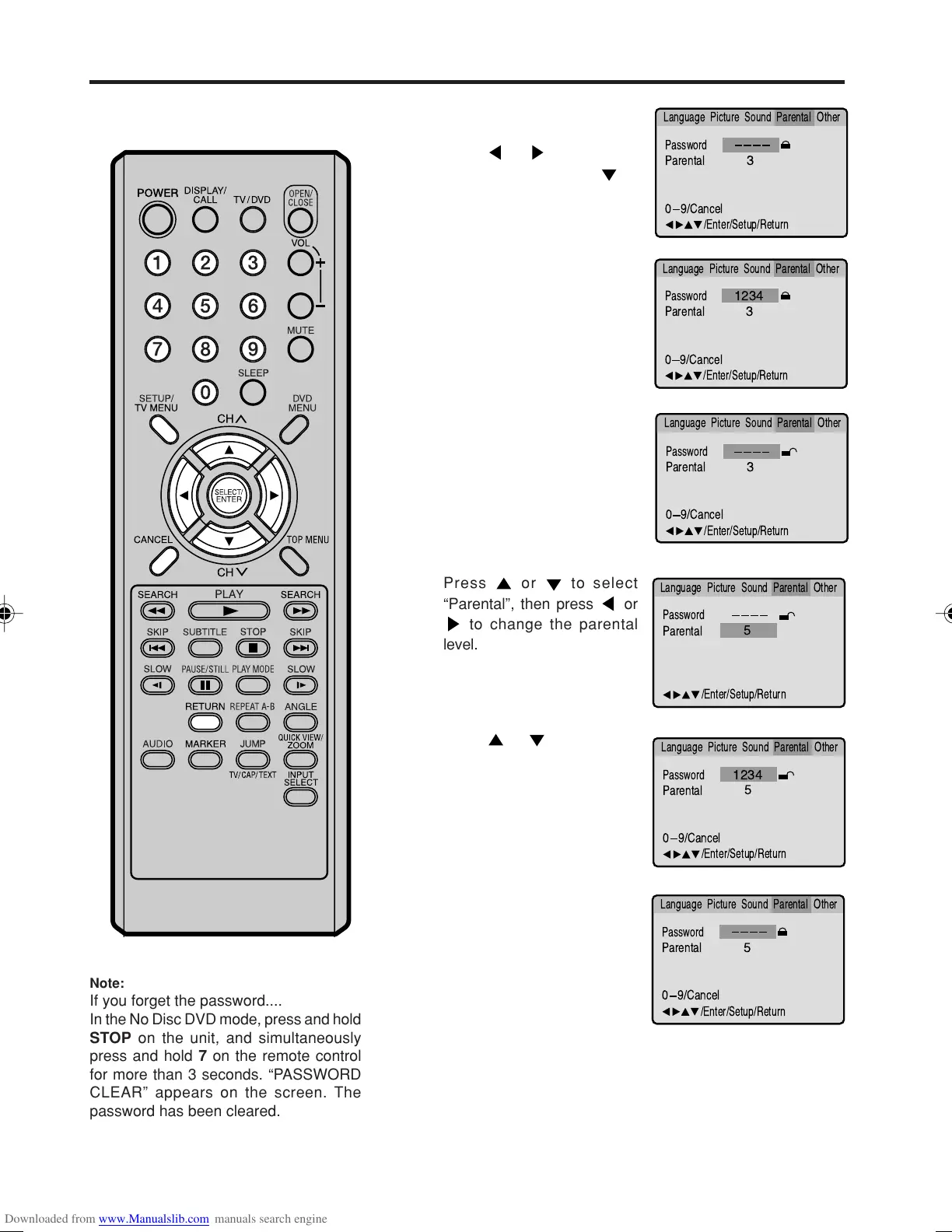
Press SETUP in the stop
mode or No Disc.
Press
or to select
“Parental”. Then press
or
ENTER.
Press number buttons (0-9)
to enter the password you
have stored.
Press ENTER.
The rating is now unlocked.
Press
or to select
“Password”, then press
number buttons (0-9) to
enter the password.
NOTE: You can change the
password at this time if you
want.
Press ENTER.
The parental level is changed
and locked.
Press SETUP or RETURN to remove the Menu screen.
• If you input a wrong
number, press CANCEL.
Password
Parental
5
1234
Language Picture ParentalSound Other
0 9/
Cancel
/Enter/Setup/Return
Password
Parental
3
Language Picture ParentalSound Other
0 9/
Cancel
/Enter/Setup/Return
Password
Parental
3
0 9/
Cancel
/Enter/Setup/Return
Language Picture ParentalSound Other
Password
Parental
3
1234
Language Picture ParentalSound Other
0 9/
Cancel
/Enter/Setup/Return
Password
Parental
/Enter/Setup/Return
Language Picture ParentalSound Other
5
Password
Parental
5
Language Picture ParentalSound Other
0 9/
Cancel
/Enter/Setup/Return
Press or to select
“Parental”, then press
or
to change the parental
level.
Note:
If you forget the password....
In the No Disc DVD mode, press and hold
STOP on the unit, and simultaneously
press and hold 7 on the remote control
for more than 3 seconds. “PASSWORD
CLEAR” appears on the screen. The
password has been cleared.
5M90801A [E] P44-51 28/4/04, 17:3244



 To Next Page