30
Special playback
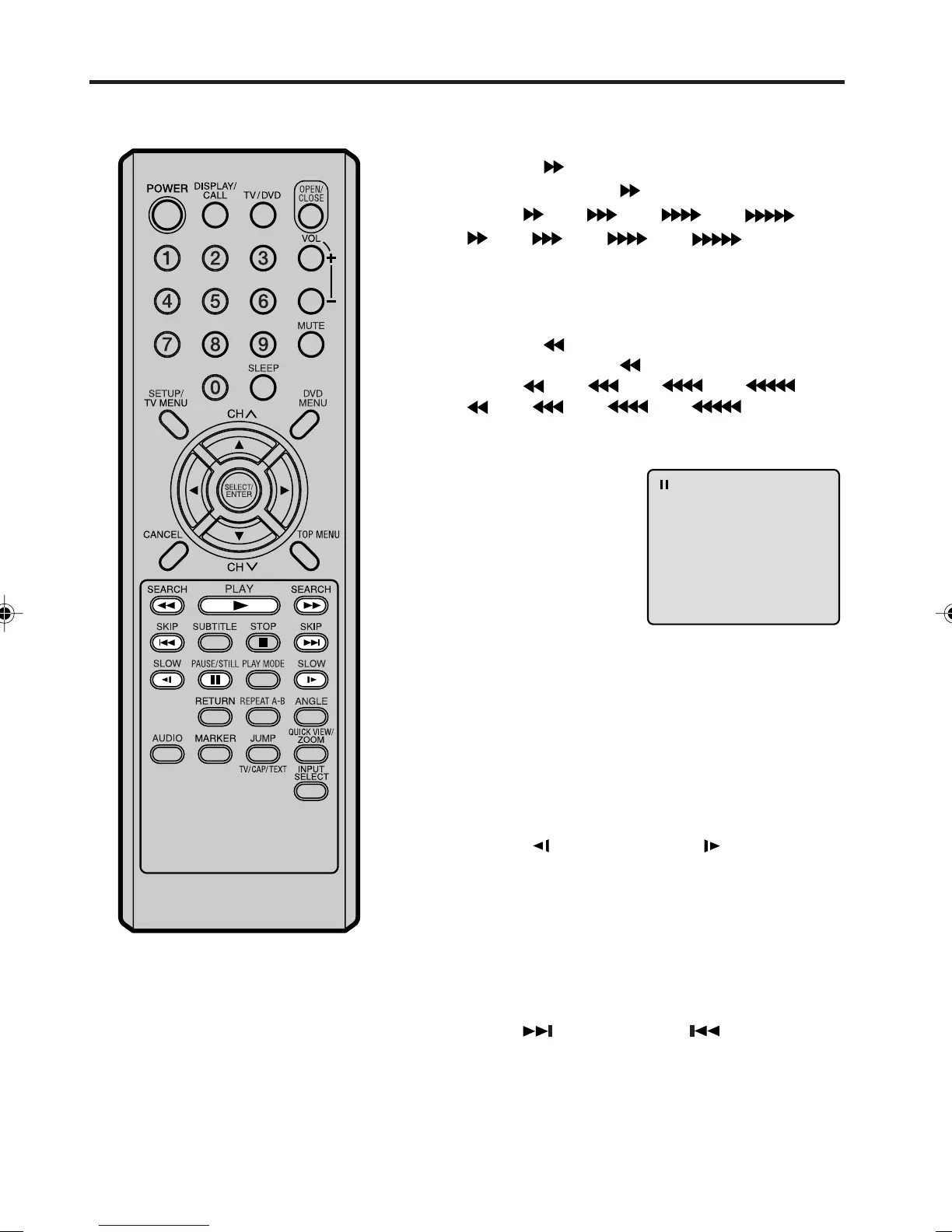
Press SEARCH during normal playback.
Each press of the SEARCH
button will increase the speed
of the search
(x 2), (x 4), (x 8), (x 15).
(CD:
(x 2), (x 4), (x 8), (x 20))
• To resume normal playback, press PLAY.
Fast Forward Playback
Press SEARCH during normal playback.
Each press of the SEARCH
button will increase the speed
of the search
(x 2), (x 4), (x 8), (x 15).
(CD:
(x 2), (x 4), (x 8), (x 20))
• To resume normal playback, press PLAY.
Review Playback
Press PAUSE/STILL during
normal playback to pause play-
back.
Still Playback
To resume normal playback, press PLAY.
Press PAUSE/STILL during still playback.
One frame is advanced each time you press PAUSE/STILL.
Frame Advance
• To resume normal playback, press PLAY.
• To resume the still playback, press PAUSE/STILL.
Press SLOW
( )
Reverse or SLOW
( )
Forward during
normal playback or still playback.
Each press of SLOW will change the speed of the slow x1/2,
x1/4, x1/6, x1/7.
Slow-motion Playback
To resume normal playback,
press PLAY.
Locating a chapter or track
NOTE:
The TV/DVD is capable of holding a still
video image or On screen display
image on your television screen
indefinitely. If you leave the still video
image or On screen display image
displayed on your TV for an extended
period of time, you risk permanent
damage to your television screen.
Projection televisions are very suscepti-
ble.
Press SKIP( ) Forward or SKIP( ) Reverse during
playback to locate a chapter that you want to watch.
Each time you press the button, a chapter or track is
skipped.
There may be a slight delay between when you press the button and the function activating.
5M90801A [E] P28-37 28/4/04, 17:3130



 To Next Page