33
/Enter/Setup/Return
Language Picture Parental OtherSound
Tv Screen
Display
On
JPEG Interval
Select Files
4:3
/Enter/Setup/Return
Language Picture Parental OtherSound
Off
All
Tv Screen
Display
On
JPEG Interval
Select Files
All
/Enter/Setup/Return
Language Picture Parental OtherSound
5 Seconds
4:3
1
2
3
4
Setting the JPEG interval
Setting the JPEG Interval
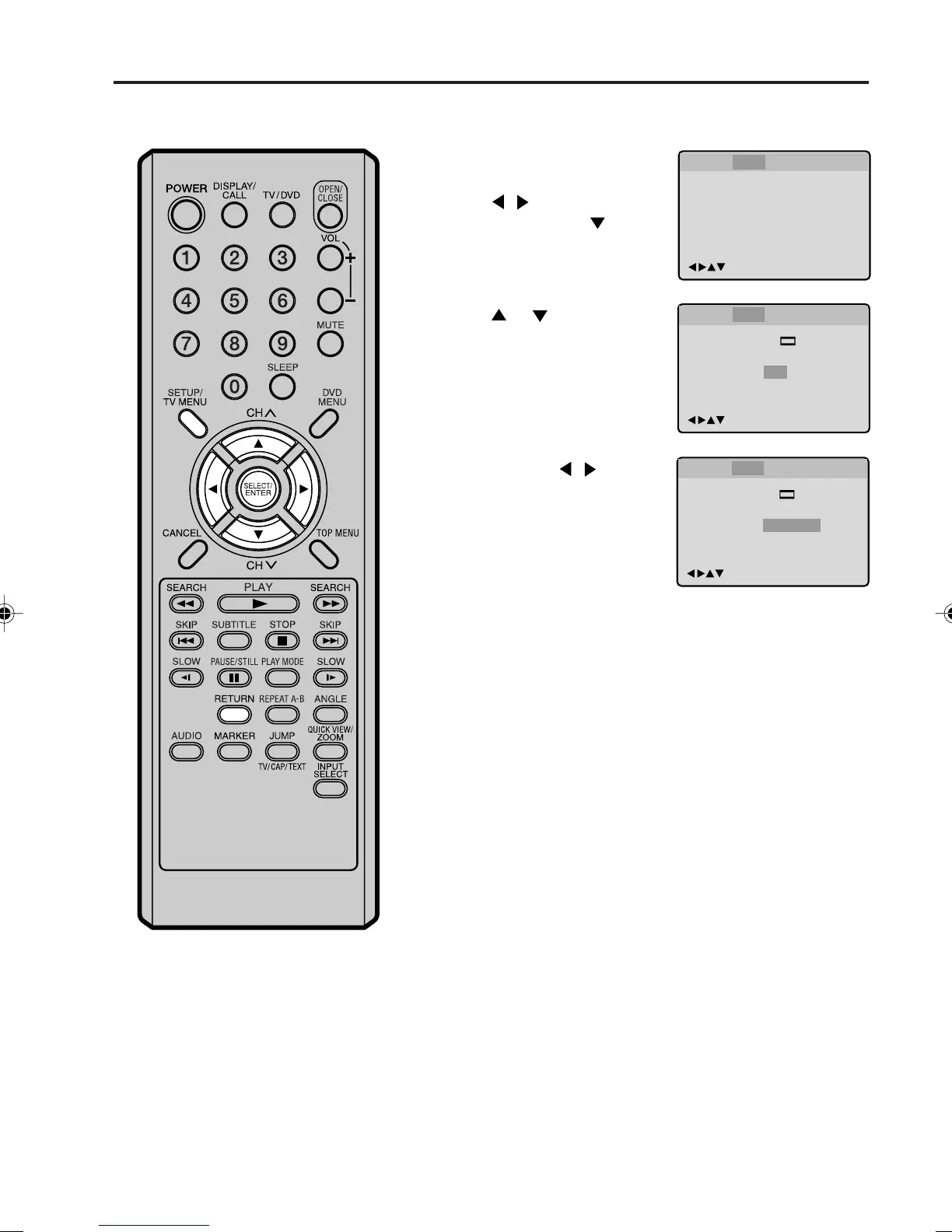
You can continuously play back all JPEG files automatically.
Press SETUP in the stop
mode.
Press
/ to select
“Picture”, then press
or
ENTER.
Press
or to select
“JPEG Interval”.
Press ENTER or
/ to select
your desired time.
Off:
Plays back one file at a time.
5 Seconds:
Plays back images in the form of a slide show at 5 second
intervals.
10 Seconds:
Plays back images in the form of a slide show at 10 second
intervals.
15 Seconds:
Plays back images in the form of a slide show in 15 second
intervals.
Press SETUP or RETURN to remove the MENU screen.
5M90801A [E] P28-37 28/4/04, 17:3133



 To Next Page