8
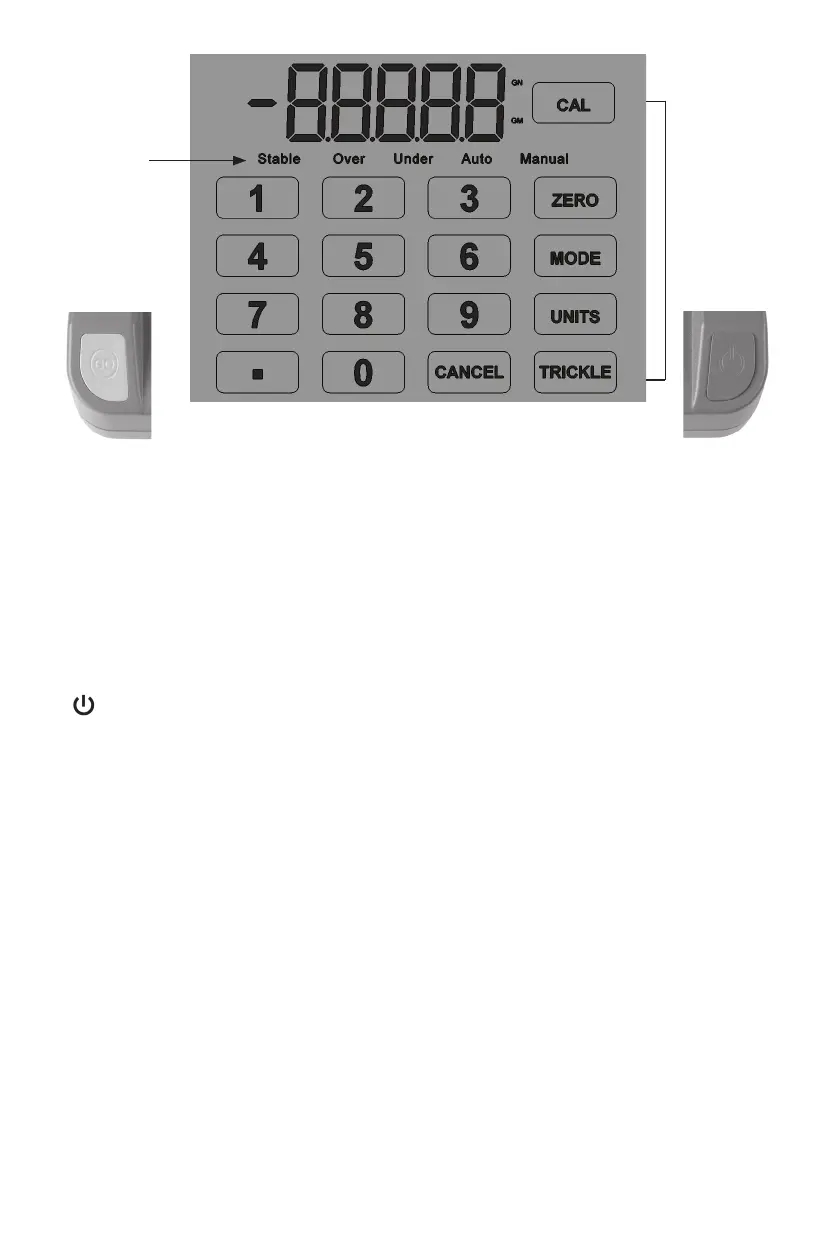
SCALE INDICATORS DESCRIPTION
Stable: indicates the weight is stable
Over: indicates the powder weight in the pan is higher than the set value
Under: indicates the powder weight in the pan is lower than the set value
Auto: indicates in Automatic Dispense Mode
Manual: indicates in Manual Dispense Mode
FUNCTION KEY DESCRIPTION
: Key is to power the scale on and o. When you turn the scale on the display will rst
show 99999 and will go through a quick count down and will then display to 0.0 GN (grain
mode). “Stable” indicates when ready to use. When the scale is not in use the scale should
be turned o and unplugged.
GO: Press key to dispense the powder once you have entered a given charge.
CAL: Key is used to calibrate the scale. You should calibrate your scale each time you begin
a new reloading session. See the calibration section for full details. (Note: it is important
to make certain the scale display is properly set to the weight unit (either grains or grams)
that you are using.
ZERO: Key is used to re-zero the scale. For example, to weigh powder in a powder pan, you
would rst place an empty pan on the scale platen and press [ZERO] key to re-zero the
scale. This will automatically subtract the weight of the pan from the scale.
MODE: Key switches between Auto to Manual Dispensing mode. The default is Auto.
UNITS: Key switches scale from GN (grains) to GM (grams). The default is GN.
TRICKLE : Hold it to manually to dispense the powder.
CANCEL: Clear the data or stop the operation.
Function
Keys
Scale
Indicators
GO
Power


 To Next Page