20
ENGLISH
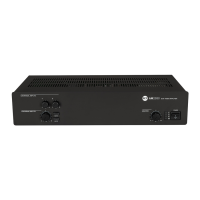
REAR PANEL
9 Channel 1 balanced audio input (removable connector):
IMPORTANT: it is necessary to either link the CMD pin to ground of the respective removable connector or use
the VOX function to open the audio input 1 (even when using the XLR plug for the audio signal).
P Channel 2 balanced audio input (removable connector).
See 9 (channel 1 balanced audio input) for its connection.
IMPORTANT: it is necessary to either link the CMD pin to ground of the respective removable connector or use
the RJ 45 port priority command to open the audio input 2.
{ MIC-LINE input setting (channels 1 and 2) through 4 dip-switches:
1
+ Hot audio input
2
- Cold audio input
3
GND ground
4
CMD
command: input on / priority access when connected to
ground
1
OFF – PHANTOM
(IN 2)
OFF: channel 2 input phantom
power is off.
PHANTOM 2:
channel 2 input phantom power is on.
2
-20 dBu – MIC
(IN 2)
-20 dBu: channel 2 input sensitivity
set to LINE (-20 dBu).
MIC 2:
channel 2 input sensitivity set to MIC.
3
OFF – PHANTOM
(IN 1)
OFF: channel 1 input phantom
power is off.
PHANTOM 1:
channel 1 input phantom power is on.
4
-20 dBu – MIC
(IN 1)
-20 dBu: channel 1 input sensitivity
set to LINE (-20 dBu).
MIC 1:
channel 1 input sensitivity set to MIC.
] [ i u w q }
O{Po
y
t
r
ep


 To Next Page