10
ENGLISH
REAR PANEL FUNCTIONS
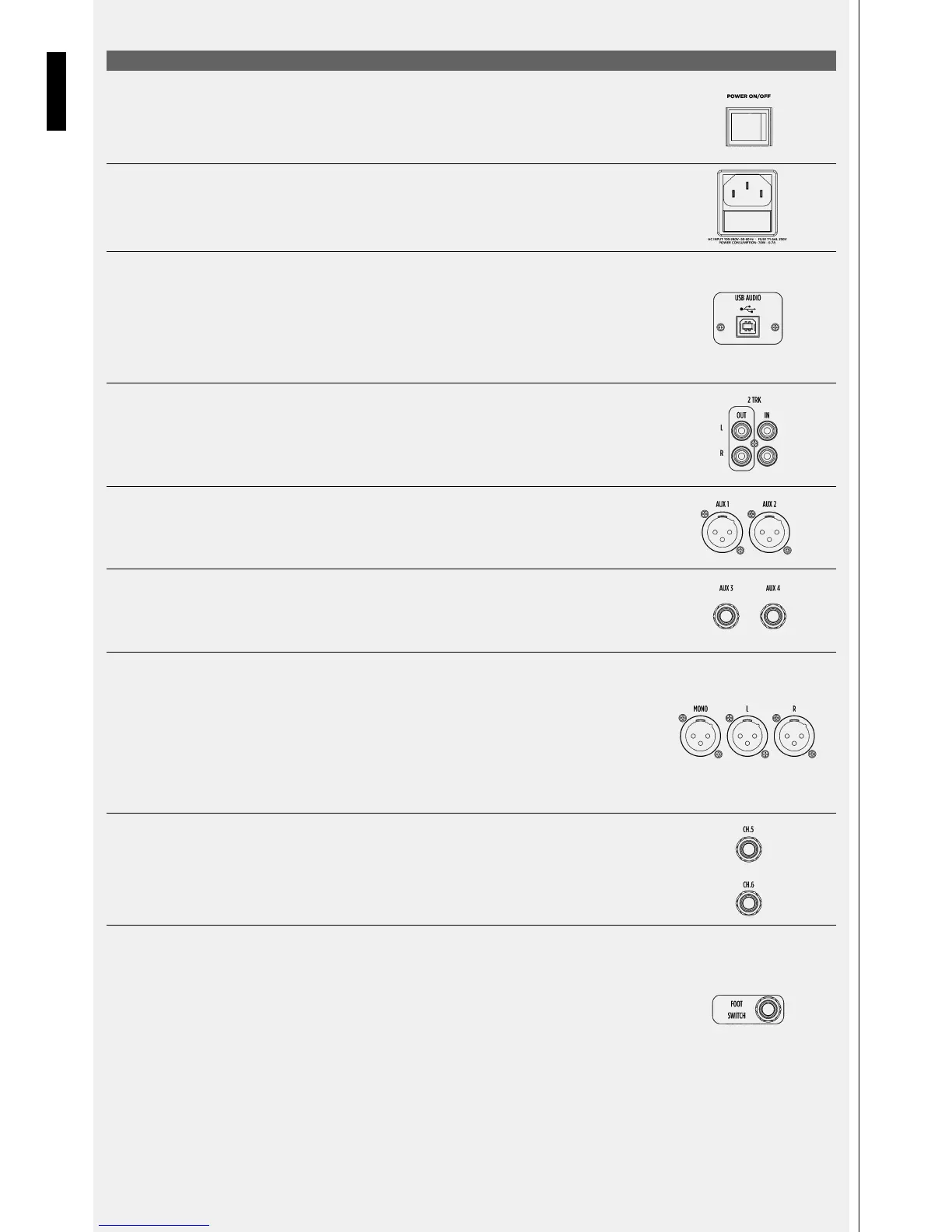
[30] POWER SWITCH
Use this switch to turn on and off your E12 mixer.
[31] POWER CORD INLET
Connect the power cord provided here. The universal internal power supply accepts power from 100V to 240V AC
50-60Hz.
[32] USB TYPE B PORT
Use this to connect your computer for audio stereo recording of the MAIN MIX or BUS 1/2 signal and audio stereo
playback. The computer connection does not require any driver and allows the recording and reproduction of PCM
audio at 44.1/48.0 kHz – 16 Bit. The audio level of the USB input is controlled by a dedicated potentiometer on the
front panel called 2TRACK/USB INPUT (see section 13 on front panel description). The audio signal coming from
a computer connected to the USB port could be reproduced from the 2TRK IN or Channel 11-12 audio path (see
section 12 of MAIN PANEL description)
[33] 2TRK IN/OUT RCA CONNECTORS
Connect your -10dB low level analog audio devices here. 2TRK OUT allows recording of the MAIN MIX signal. 2TRK
IN allows the connection of stereo devices for the reproduction of analog audio. The audio level of the 2TRK input
is controlled by a dedicated potentiometer on the front panel called 2TRACK/USB INPUT (see section 13 on front
panel description)
[34] AUX1 – AUX2 OUTPUTS
These XLR male connectors provide +4dB balanced audio output coming from auxiliary sends 1 and 2. Connect your
stage monitors or external effects here.
[35] AUX3 AND AUX4 OUTPUTS
These TRS JACK connectors provide +4dB balanced audio output coming from Auxiliary sends 3 and 4. Connect your
stage monitors or external effects here.
[36] MAIN OUTPUTS
These XLR male connectors provide +4dB balanced audio output coming from MAIN MIX and MONO audio path.
Connect your main speaker system to XLRs called L and R. Connect to the MONO XLR connector any MONO
destination device such as sub-woofers or front fill speakers system. The audio level of MAIN MIX OUT L and R is
controlled by the dedicated MAIN fader on the front panel (see section 29 on front panel description). L and R XLR
MAIN MIX output is replicated with L and R TRS Jacks (see section 41). The audio level of MONO OUT is controlled
by a dedicated MAIN fader on the front panel. It is possible to trim the MONO OUT level +/- 15dBs by the dedicated
potentiometer on the front panel called MONO TRIM located just above the MAIN fader (see section 24 on front
panel description).
[37] INSERTS
These TRS jacks provide insert points for input channels 5 and 6. Use TRS male jack where TIP=SEND, RING=RETURN,
SLEEVE=COMMON GROUND. Due to the nature of connection, the insert path allows managing -10dB unbalanced
signals.
[38] FOOTSWITCH
This TS jack connector allows the use of MOMENTARY switches or foot pedals to MUTE and UN-MUTE the audio
sent to the internal FX. When the FX is muted via footswitch a message will appear on the FX display (see section
10 on front panel description).
When the effect send is muted via footswitch the red LED close to the TAP/HOLD TO SAVE button turns on, indicating
the FX is muted externally.
In this condition, the effect can be unmuted by pressing the TAP/HOLD TO SAVE button once.
When the effect is unmuted, the red LED and the button return to their normal function.


 To Next Page