%*(*5"-*/$6#"503
47
Incubation start with Manual Mode
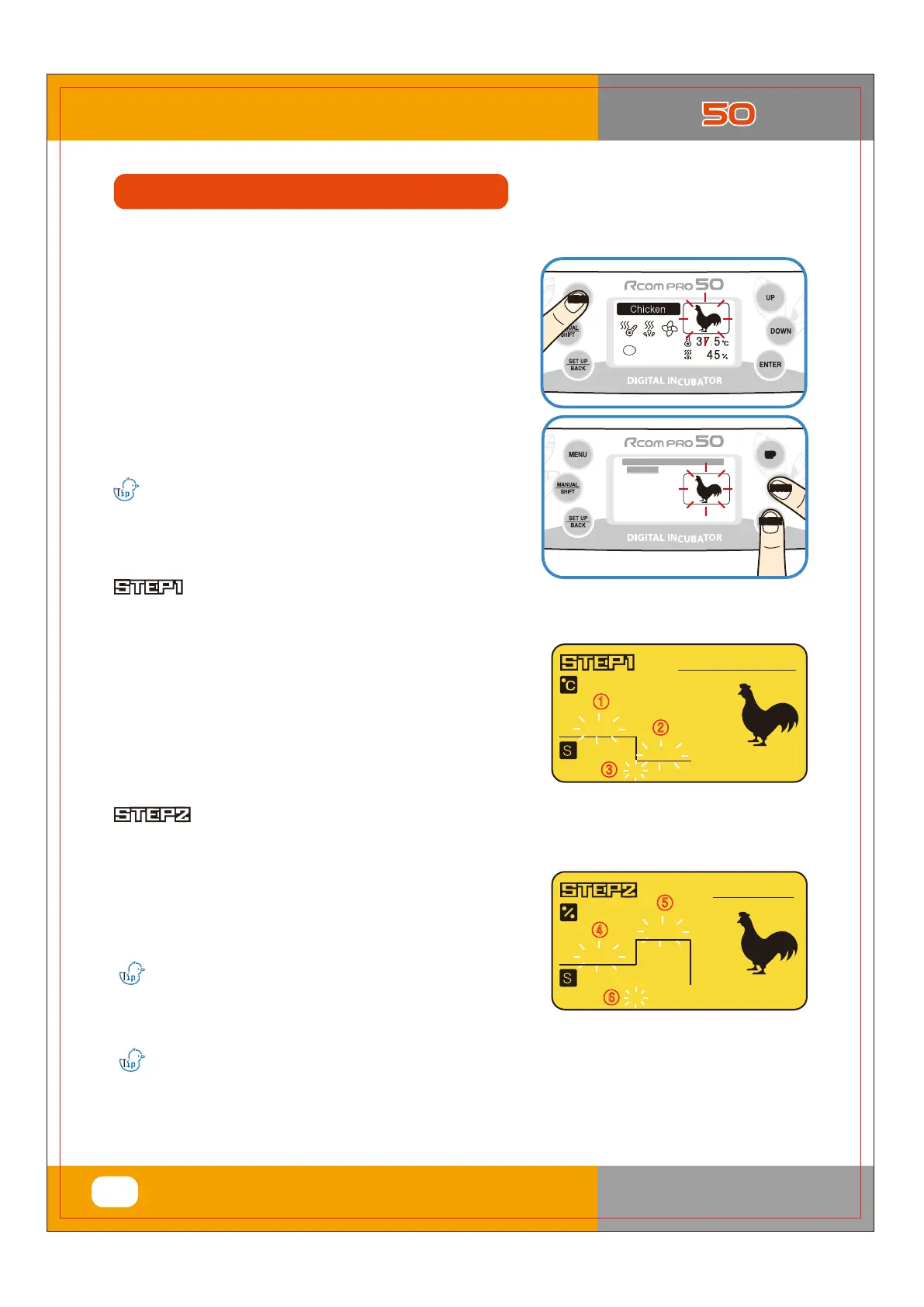
▶ Press MENU button on basic screen.
▶ Select the species of birds with UP/DOWN button
and press ENTER button then it goes to incubation
conditions setting mode.
▶ Set required temp. humidity, and egg turning angle & interval
with UP/DOWN button, and press ENTER button to pass to
next step.
This mode helps users to set temp. humidity, and egg turning etc. according to their needs.
This mode is ideal for those persons who are experienced in incubation.
Humidity setting
Temperature setting
① Setting of temperature of
early and middle stages of incubation.
② Setting of temperature of
final stage of incubation.
③ Setting of date of temperature change
in the final stage of incubation.
④ Setting of humidity of
early and middle stages of incubation.
⑤ Setting of humidity of
final stage of incubation
⑥ Setting of date of humidity change
in the final stage of incubation.
▶ Optimum incubation temperature of general birds at early and
middle stages ① is 37.5℃, and the temperature of
final stage ② is better to set at 37℃ three days
before the expected date of hatching (D-Day) ③.
User can optionally change the temperature
of early, middle, and final stages of incubation.
(Default settings: ① 37.5℃, ② 37.0℃, ③ 3days)
▶ The optimum humidity depends on type of birds.
However the humidity of final stage ⑤
(3 days before incubation)is generally higher than that of
early and middle stages ④ of incubation.
(Default settings: ④ 45%, ⑤ 60%, ⑥ 3days)
)VNJEJUZ
䀽
䀾
䀿
%BZT
[Humidity Setting]
5FNQFSBUVSF
%BZT
䀺
䀻
䀼
[Temperature Setting]
If there is no proper option, please select option other
bird, Refer to Page16.
It is recommended to raise the humidity setting to
over 60% from 1~3days before hatching.
(In areas of high ambient humidity, the humidity
may not need to be raised until the last half day -
after the chick is into the air space at the end of the egg.)
Temperature and humidity is optimized when Rcom products are released.
We do no recommend customers to recalibrate by their own. If you need to recalibrate, please visit our
ZHEVLWHZZZUFRPFRNUĺ'RZQORDGĺ0DQXDORUDVNSXUFKDVHSODFH
Because of low price thermometers and hygrometers are not accurate, e recommend you to use special
calibrated thermo-hydrometer. (Poultry only thermo-hydrometer: check Rcom website: DigilogⅡ)
3. Function Setting
(2) Incubation start
with Manual Mode
#--###Fkrrvh##d###nlqg#####--
-#Fklfnhq#
-#Gxfn
-#Txdlo
-#Skhdvdqw
-#Shdirzo
-#Jrrvh
-#Zlogjrrvh#
--###Fkrrvh##d###nlqg#####--
UP
DOWN
ENTER
ྙ
ྚ
* Press UP/DOWN button to select bird
species and press ENTER.
USA & Canada Official Sales & Service https://www.R-Com-Hatcher.com
Egg Incubator Hatcher Rcom USB and Pro 50 User Manual



 To Next Page