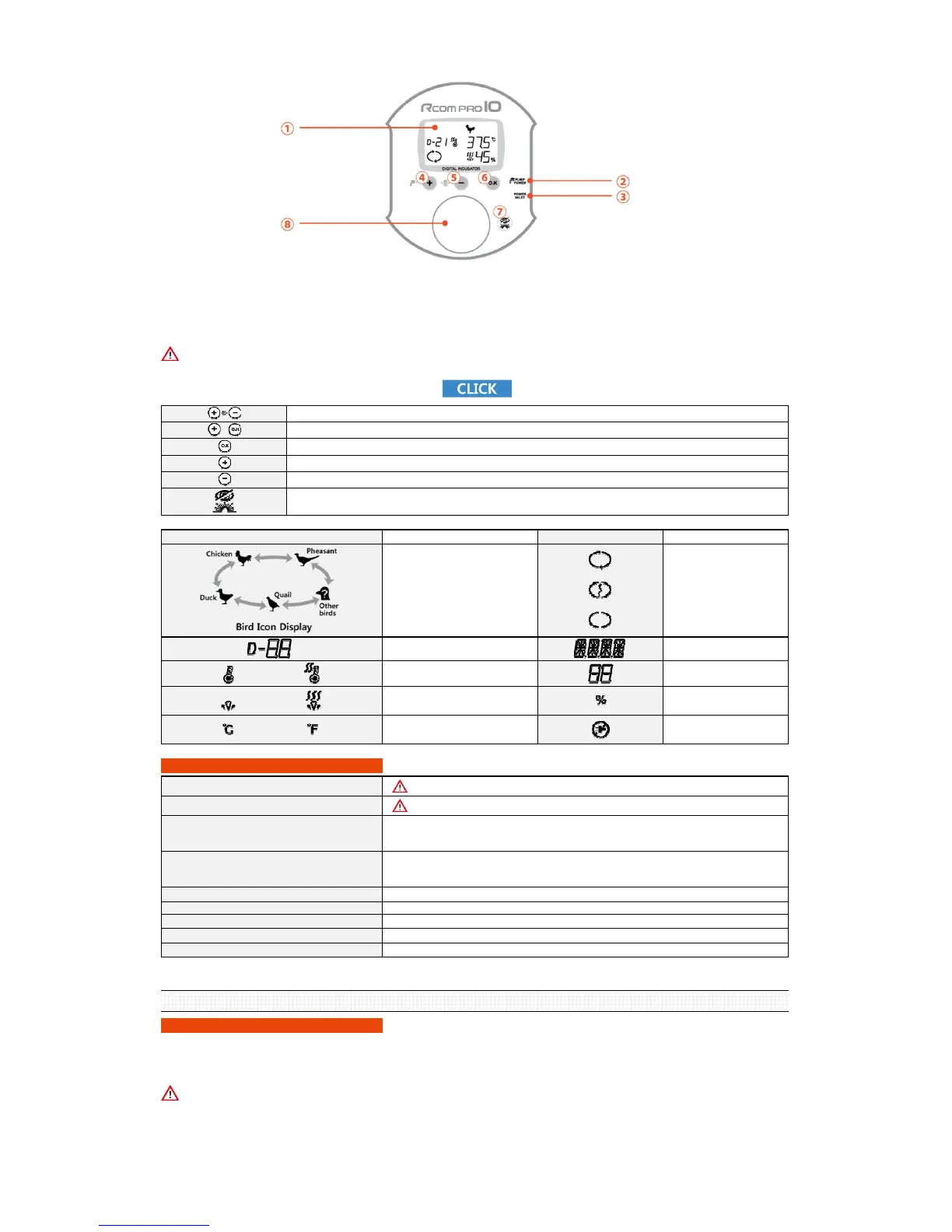
① Display (LCD) : Shows the incubation environment. ② Automatic Pumping System (APS) connection socket :
③ Power adaptor connection socket :This socket allows power into to the device.
It is the socket which connects the APS to the device.
⑤ Down button : Used to select menu or to decrease value. ④ Up button : Used to select menu or to increase value.
⑥ Menu selection button : Button to save setup values.
⑧ Candling zone : Used as candling device by pressing the Candling button.
ICON Name and function
Shows operating Egg
rotation
Shows Egg rotation suspended
Shows Terminated Egg
rotation
Shows humidity units
Shows humidity value
Shows blackout notification
2. BEFORE USE
(1) What is incubation room?
What is Hatching room?
What is a hatching room? This is the location where the incubator is installed and operated. As the environment affects the hatching rate the place of
installation must be a place with low nearby noise or vibration, and nearby temperature must be 22~25℃ (71.6~77℉) with low temperature difference.
Especially in night time the temperature is lowered than daytime therefore it surely must be verified, and in daytime the device must never be exposed
directly under the sunlight. Also the place must not have direct ventilation as air conditioner to the device.
If the temperature of hatching room is lower than setup value there might be misted or dripping water inside due to dew condensation.
7. In.L (Interior lighting setup) Device's interior lighting ON/OFF setup [Default value : ON]
8. Snd (Sound) Device's button sound ON/OFF setup [Default value : ON]
9. Info (Basic information) Shows the basic information of this device. (Shows version information)
4. LO (Abnormal low temperature alarm)
Sounds alarm when the incubator temperature is lower than setup value due to external
environmental change or other anomaly.
0.0℃ ~ -5.0℃ [Default value : -3.0℃] modified by 1 degree unit.
5. C/F (Celsius/Fahrenheit modification) Modification of Celsius (℃), Fahrenheit (℉) degrees [Default value : Celsius (℃)]
6. B.Lt (Back light setup)
LCD back light ON/OFF/EVENT ON setup
Explanation on Optional Functions
1. T.CAL (Temperature calibration) It is not recommendable direct adjustment by user. Please contact agent or supplier.
2. H.CAL (Humidity calibration) It is not recommendable direct adjustment by user. Please contact agent or supplier.
3. HI (Abnormal high temperature alarm)
Sounds alarm when the incubator temperature is higher than setup value, due to external
environmental change or other anomaly.
0.0℃ ~ 5.0℃ [Default value : 2.0℃] modified by 1 degree unit.
/
Shows Heater OFF/ON
/
Shows Humidification OFF/ON
/
Shows unit of Celsius / Fahrenheit
While the button is pressed the candling function is turned on.
When setup menu : moves to previous step.
ICON Name and function
Chicken ↔
Pheasant ↔
Other birds ↔
Quail ↔
Duck
(according to above order)
Days until hatching
See Video on Icon's, Name's of buttons and Performance of function's
Factory Defautlt Reset : The reset can be done by pressing 2 buttons at the same time for 1 seconds (only during incubation)
Option setup : The option can be setup by pressing 2 buttons at the same time for 3 seconds.
Menu selection / Egg rotation test / Setup value verification during incubation.
Increase value / 5 seconds : forcible pump operation / 10 seconds : forced pump operation for 2 minutes.
Decrease value / Termination of incubation.
⑦ Candling button / Back button : Used to turn ON/OFF the candling function
or to go back to previous step in setup selections.
Do not look directly into the LED light.
North America Sales & Service www.RcomCo.com
Rcom Bird Egg Incubator Eco Pro Plus 10 User Manual













 To Next Page