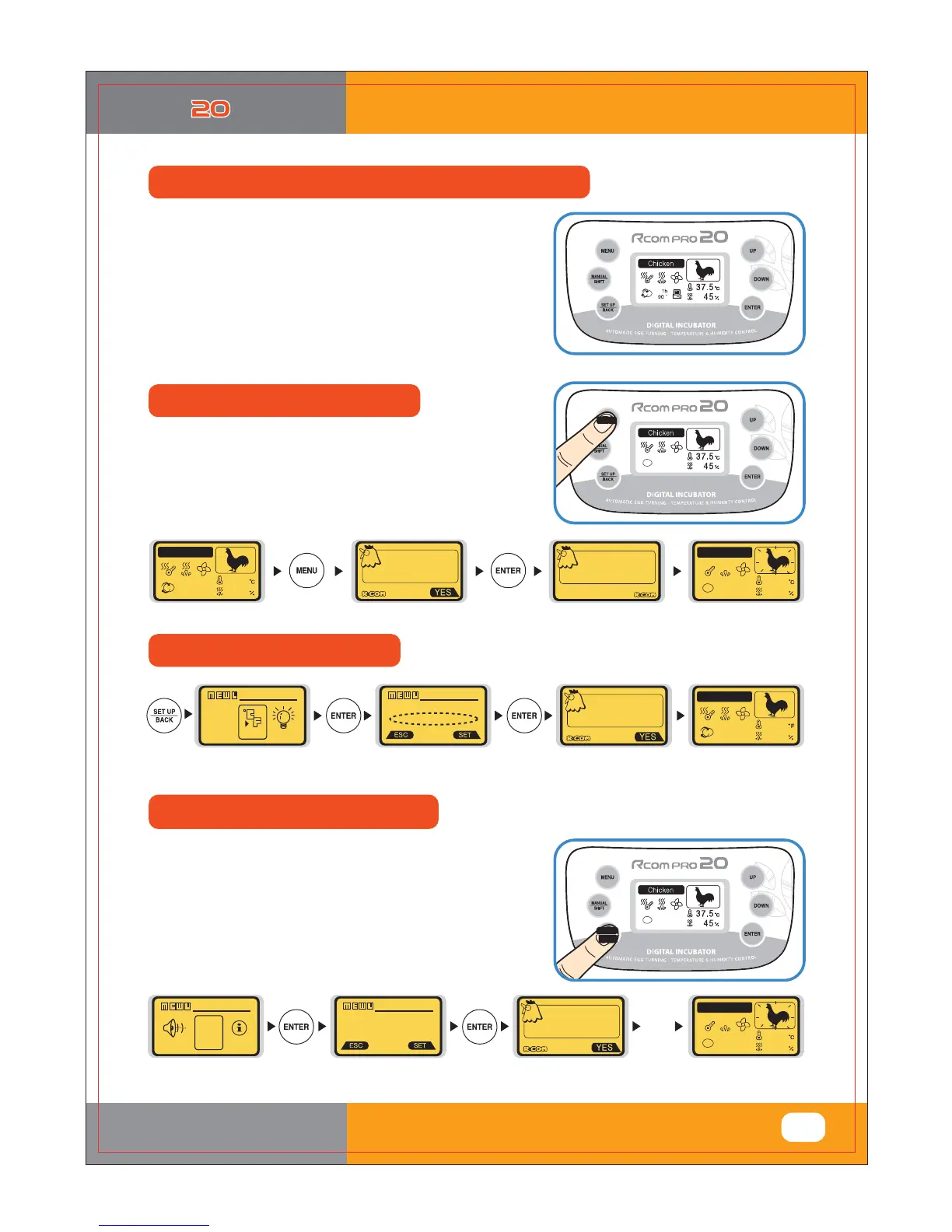
Change Cels. & Fahr.
Incubation Termination
Incubation start with PC connecting mode
<Rcom USB 20 MODEL ONLY>
▶ During incubation, press MENU button then you can
see a message as "System finish, Are you sure?"
▶ Select YES with UP/DOWN button and press ENTER.
▶ Refer to the PC Software Manual for starting incubation
in PC connecting mode.
With this function, you can share incubation process,
optimum incubation setting by building a database.
▶ When users have changed the incubator settings,
but want to return to factory setting.
▶ Press SET UP button and select All Reset with
UP/DOWN button. Then, press ENTER.
If you press ENTER button once again, LCD display
goes off with message & alarm. Incubator returns to
factory setting after about 15 sec.
LCD
Display
goes off
Initialization after about 15sec.
6HOHFWÛ&RUÛ)ZLWK83'2:1EXWWRQ
6HOHFWZLWK83'2:1EXWWRQ
Sdudphwhu#vdyhg
Fklfnhq
y
GGGGGyGG
mGfG
** WARNING **
hGy
z p
hG
y
y
V|vwhp#ilqlvk
Duh#|rx#vxuhB
Ilqlvk
Lqfxedwlrq
Fklfnhq
Fklfnhq
##4k
<3#䯍
Sdudphwhu#vdyhg
|
{G
GGmOȋmP
{U|
| s
sG
{
sl
Fklfnhq
##4k
<3#䯍
Return to factory setting
%*(*5"-*/$6#"503
4:
3. Function Settings
(4) Incubation start with PC connection Mode
,QFXEDWLRQ7HUPLQDWLRQ&KDQJH&HOV)DKU
Return to Factory Setting



 To Next Page