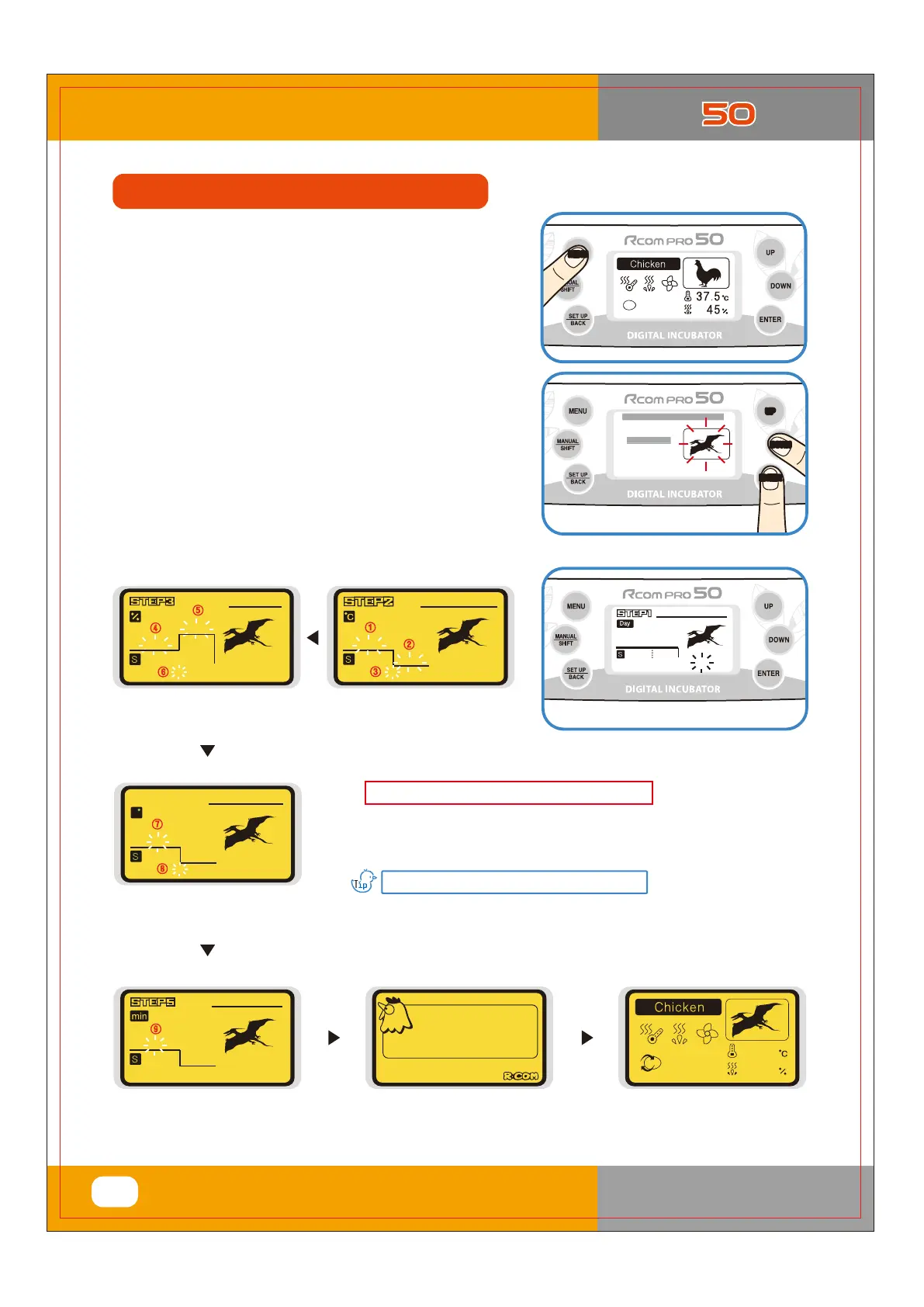
Incubation Start for other birds
▶ Press MENU button in basic screen.
▶ Select Other Birds by UP/DOWM button and then press
ENTER to go to setting.
▶ Set incubation date, temperature, humidity, egg turning
angel and egg turning interval with UP/DOWM button,
and press ENTER button to save setting value.
[Refer to the page 14, 15]
This function is used when user wishes to incubate other birds
which are not memorized in the incubator menu setting.
User can change incubation conditions according to needs.
[Humidity Setting] [Temperature Setting]
[Egg Turning Interval,
Incubation Date Setting]
[Incubation Start Notification]
[Egg Turning Angle Setting]
[During Incubation]
Vwduw
Lqfxedwlrq
##93
<3ȋ
5FNQFSBUVSF
%BZT
䀺
䀻
䀼
䀽
䀿
)VNJEJUZ
䀾
%BZT
ș How to Set Consecutive Incubation Function : On Incubation date
setting, raise incubation date up to D-50 and then press UP button
one more, then “?” will be show and it starts Consecutive incubation.
5VSOJOH"OHMF
䁀
䁁
%BZT
5VSO*OUFSWBM
䁂
%BZT
What is Consecutive Incubation Setting?
This function is used if you want to continue incubation without
termination with same setting.
%*(*5"-*/$6#"503
49
3. Function Settings
(3) Incubation Start for
Other Birds
#--###Fkrrvh##d###nlqg#####--
-#J0Skhdvdqw#
-#Wxunh|
-#Rwkhu#Elugv#
--###Fkrrvh##d###nlqg#####--
UP
DOWN
ENTER
ྙ
ྚ
* Press UP/DOWN button to select bird
species and press ENTER.
%%BZ
%BZT
OGYhh]b[X]gd`UmZcf8!8UmQ
USA & Canada Official Sales & Service https://www.R-Com-Hatcher.com
Egg Incubator Hatcher Rcom USB and Pro 50 User Manual



 To Next Page