5
5
Note: Auto-Fill ONLY:
The water is supplied directly to the unit and
the water fill level marking is not used.
Operation is not affected by the water being
below the fill line.
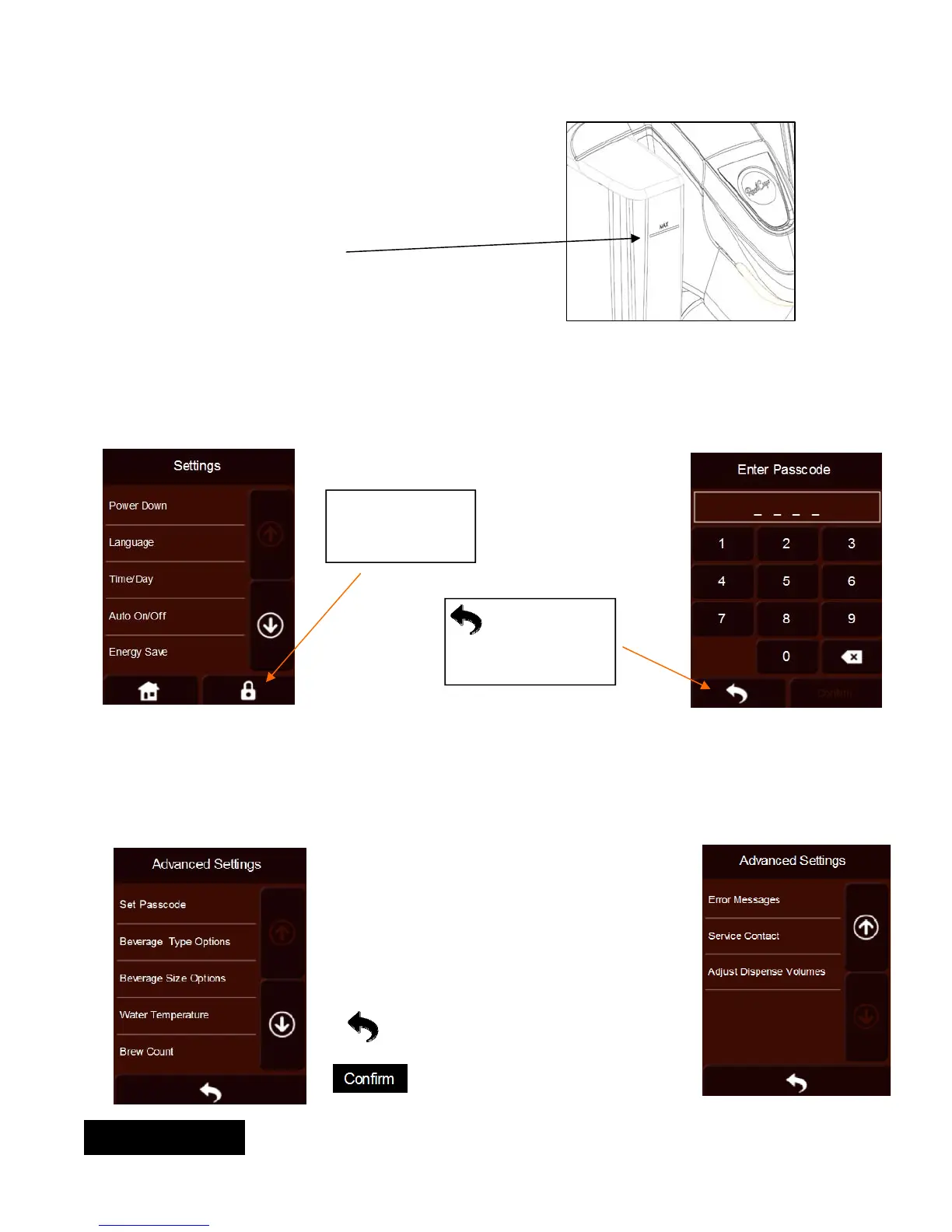
Fill Level
Advance Settings:
The advance setting feature is available to authorized service agents only. It allows changes beyond the skills of the
regular end user. It is only accessible via a passcode and allows the technician to change the passcode, change
beverage options, beverage size options, water temperature, brew count, review error messages, modify service
contact information, and adjust dispense volumes.
This icon allows
to enter the ad-
vanced settings
This icon allows
to go back to the
“Lift to Brew”
screen.
To access the advanced settings screen, type in the factory default passcode: 0400
The brewer brings you to
the Advance Settings
screen
There are eight options within the
Advance Settings Menu:
Set passcode
Beverage Type Options
Beverage Size Options
Water Temperature
Brew Count
Error Messages
Service Contact
Adjust Dispense Volumes
Allows to go back to main set up
screen, on previous page, without
saving changes.
Allows to go back to main set up
screen, on previous page, and save
changes.
ENGLISH


 To Next Page