9
9
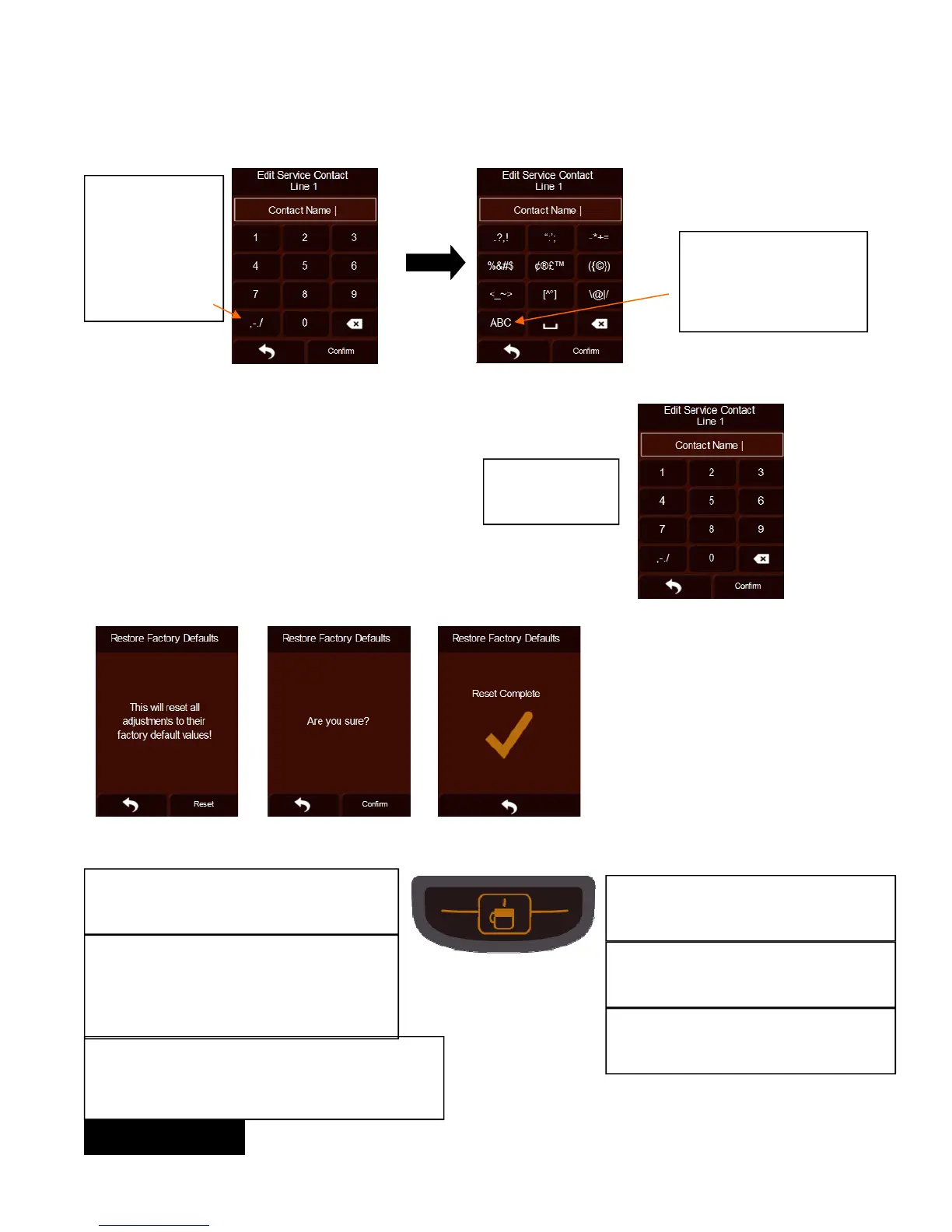
Edit Service Contact Name (continued):
Once you are in
the number
screen, if you
press this symbol,
you will go to the
character screen.
Once you are in the char-
acter screen, if you press
this symbol, you will go to
the English characters
screen.
Editing Service Contact Number:
Input new number
using numeric
screen
Reset Factory Default:
RED-BLUE-GREEN: The initial start does a
RED-BLUE-GREEN sequence.
GREEN: When in the brew selection screen
AND the hot tank is at temperature, it is
steady green. It is also steady green at the
end of a dispense. It pulses green during a
dispense.
Brew Button Color Indications:
ORANGE: When in “Lift to Brew”, the instructions
screens, the basic settings screens or the More
Options screen AND the hot tank is at
temperature, it is steady Orange.
YELLOW: If the brew chamber is open
or the display is in the advance settings,
the brew button will show yellow.
RED: When the brew is heating in many
screens, it will pulse red. If there is a
fault, it will flash red.
AQUA: When the hot tank is low, it is
steady on. When the reservoir is low or
removed, it flashes.
When in Restore Factory Default, if
you select reset, the brewer will ask
you to confirm. If you confirm, the
brewer will display a screen indicating
that the reset is complete.
ENGLISH


 To Next Page