1. Turn on the transceiver.
2. Press VF.
3. Use the keypad to enter the last four digits of the frequency. For
example, to enter 146.940, press 6940.
NOTES: If you make a mistake, press CLR and repeat this step.
The transceiver rounds the last digit down to 0 or 5.
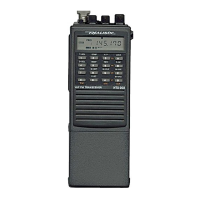
TUNING USING THE TUNE CONTROL
You can quickly tune to a nearby frequency by rotating TUNE on top of the
transceiver.
1. Turn on the transceiver.
2. Press VF.
3. Rotate TUNE counterclockwise to tune down or clockwise to tune up. The
transceiver tunes up or down one frequency step per click, see "Setting
the Frequency Rate."
SCANNING FOR ACTIVE FREQUENCIES
You can scan for activity on a frequency by pressing and holding down /\SC
or \/SC for at least 1 second. The transceiver begins to scan up or down
the full frequency range, and stops on active frequencies. To scan only a
selected frequency range press F+/\SC or F+ \/SC. See "Setting the Scan
Options" to see how to change the scanning range, the frequency step, the
scan resume condition, and the scan delay time. The following are the
factory presets for these options.
Frequency Step: 15KHz
Scan Resume Condition: Resumes scanning in 10 seconds, regardless of
absence or presence of a carrier.
Scan Delay: Not activated.



 To Next Page