EasyManua.ls Logo

Realistic PRO-2023 - MOVING A FREQUENCY FROM MONITOR MEMORY TO A CHANNEL; USING THE RESET SWITCH

Realistic PRO-2023
23 pages
Print Icon
To Next Page IconTo Next Page
To Previous Page IconTo Previous Page
Loading...
MOVING
A
FREQUENCY
FROM
MONITOR
MEMORY
TO
A
CHANNEL
If
you
want
to
move
a
frequency
you
have
stored
in
the
monitor
memory
to
a
channel,
follow
this
procedure.
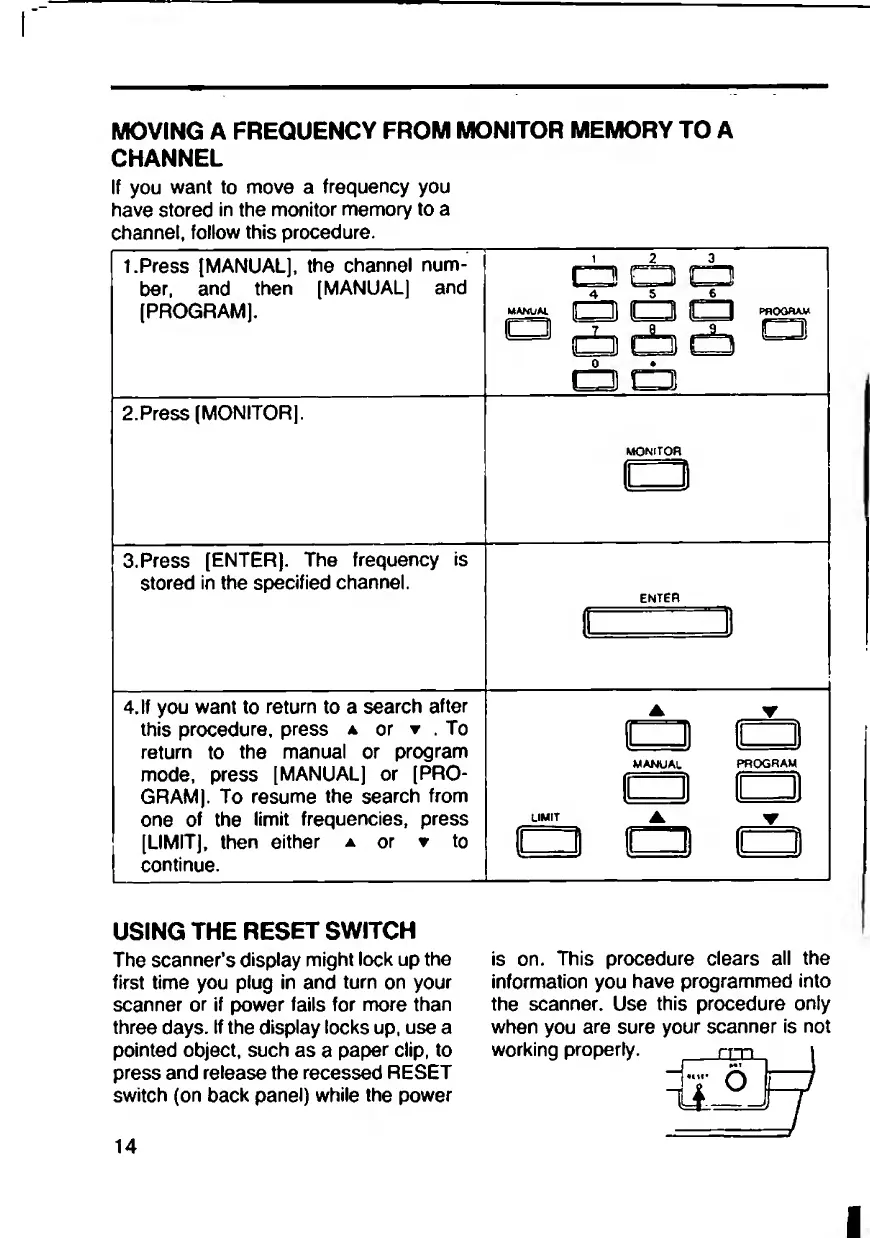
1.Press
[MANUAL],
the
channel
num¬
ber,
and
then
[MANUAL]
and
[PROGRAM].
2.Press
[MONITOR].
(±3
di
db
cb
□
^3
(±B
{±3
db
cb
PflOGHAV
C3
3.
P
ress
[ENTER].
The
frequency
is
stored
in
the
specified
channel.
4.
I
f
you
want
to
return
to
a
search
after
this
procedure,
press
a
or
▼
.
To
return
to
the
manual
or
program
mode,
press
[MANUAL]
or
[PRO¬
GRAM].
To
resume
the
search
from
one
of
the
limit
frequencies,
press
[LIMIT],
then
either
a
or
t
to
continue.
MONITOR
ENTER
_^3l
■
■
1
—
Hi
!
■
USING
THE
RESET
SWITCH
The
scanner’s
display
might
lock
up
the
first
time
you
plug
in
and
turn
on
your
scanner
or
if
power
fails
for
more
than
three
days.
If
the
display
locks
up.
use
a
pointed
object,
such
as
a
paper
clip,
to
press
and
release
the
recessed
RESET
switch
(on
back
panel)
while
the
power
is
on.
This
procedure
clears
all
the
information
you
have
programmed
into
the
scanner.
Use
this
procedure
only
when
you
are
sure
your
scanner
is
not
working
properly.
rr~n
iI°J
14