EasyManua.ls Logo

Realistic PRO-2023 - OPERATION; PROGRAMMING YOUR SCANNER

Realistic PRO-2023
23 pages
Print Icon
To Next Page IconTo Next Page
To Previous Page IconTo Previous Page
Loading...
OPERATION
PROGRAMMING
YOUR
SCANNER
A
good
reference
for
active
frequencies
is
Radio
Shack's
Police
Call
Directory
including
Fire
and
Emergency
Ser¬
vices.
We
update
this
directory
every
year,
so
be
sure
to
get
a
current
copy.
Also,
refer
to
"Reception
Notes"
and
"Searching
for
Active
Frequencies"
in
this
manual.
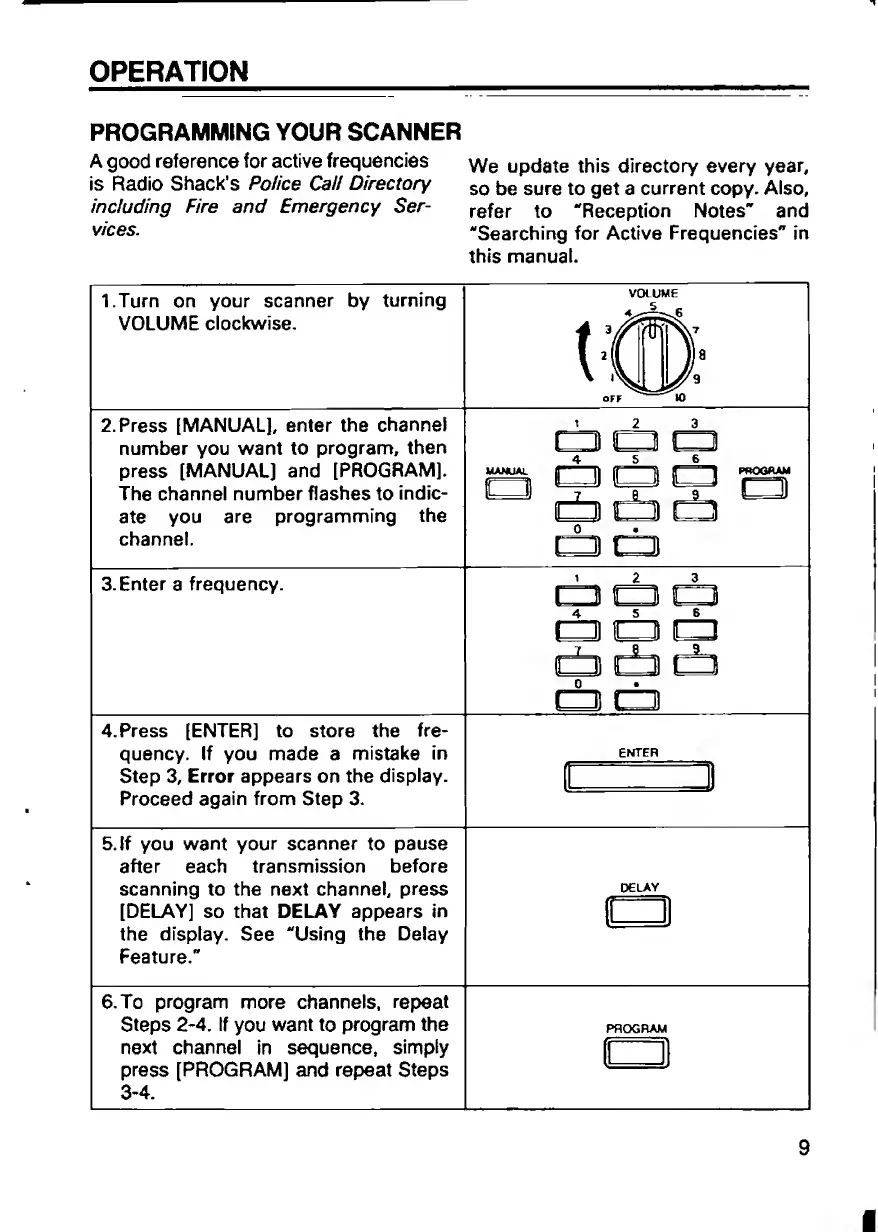
I.Turn
on
your
scanner
by
turning
VOLUME
clockwise.
2.
Press
[MANUAL],
enter
the
channel
number
you
want
to
program,
then
press
[MANUAL]
and
[PROGRAM].
manual
T
he
channel
number
flashes
to
indie-
5-—H
ate
you
are
programming
the
channel.
3.
Enter
a
frequency.
4.Press
[ENTER]
to
store
the
fre¬
quency.
If
you
made
a
mistake
in
Step
3,
Error
appears
on
the
display.
Proceed
again
from
Step
3.
5.If
you
want
your
scanner
to
pause
after
each
transmission
before
scanning
to
the
next
channel,
press
[DELAY]
so
that
DELAY
appears
in
the
display.
See
"Using
the
Delay
Feature."
6.
To
program
more
channels,
repeat
Steps
2-4.
If
you
want
to
program
the
next
channel
in
sequence,
simply
press
[PROGRAM]
and
repeat
Steps
3-4.
VOLUME
cb
cb
rib
rb
cb
rib
rig
rib
tb
tb
db
rib
rib
rib
tip
cb
cb
rib
a
ENTER
~1
DELAY
PROGRAM
9

Related product manuals