EasyManua.ls Logo

Realistic PRO-2023 - A LOOK AT THE KEYBOARD

Realistic PRO-2023
23 pages
Print Icon
To Next Page IconTo Next Page
To Previous Page IconTo Previous Page
Loading...
A
LOOK
AT
THE
KEYBOARD
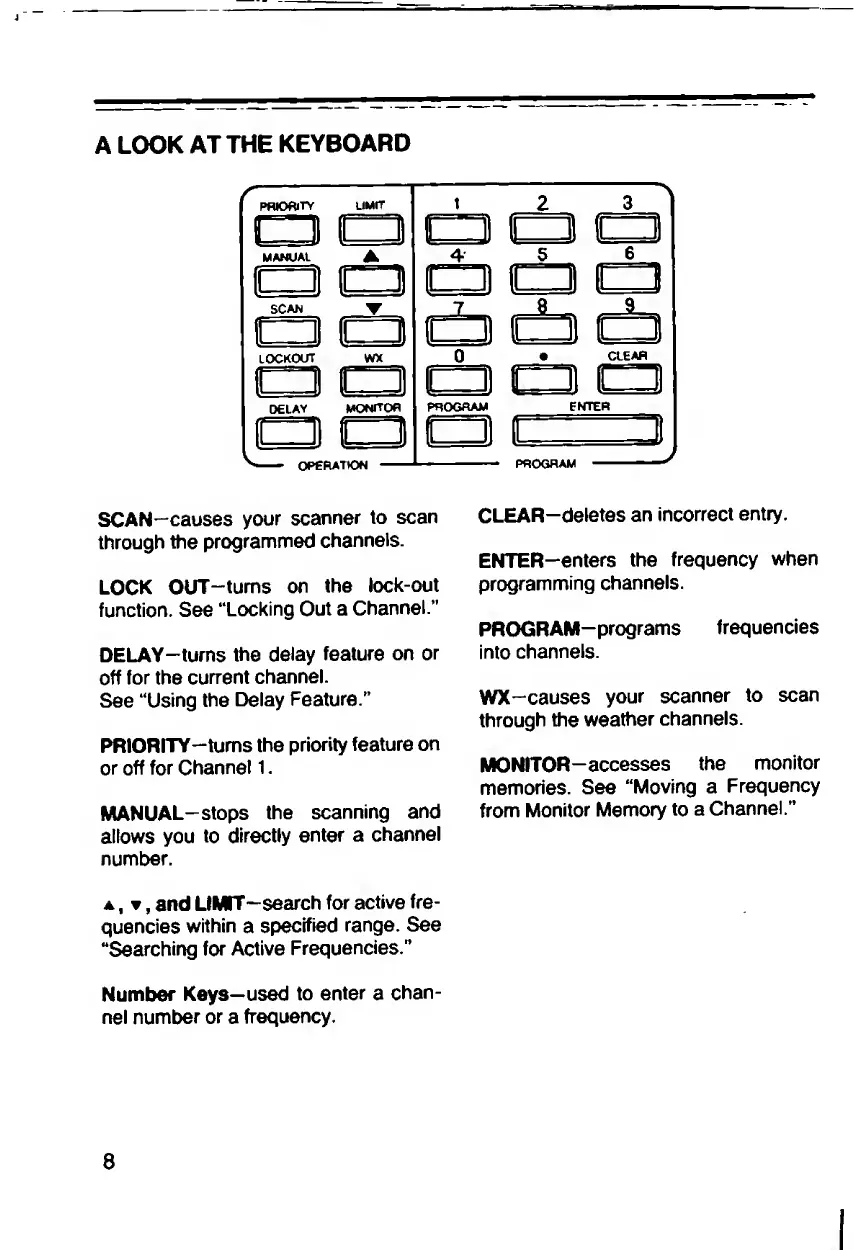
SCAN—causes
your
scanner
to
scan
CLEAR—deletes
an
incorrect
entry,
through
the
programmed
channels.
ENTER—enters
the
frequency
when
LOCK
OUT-tums
on
the
lock-out
programming
channels,
function.
See
‘‘Locking
Out
a
Channel.”
PROGRAM-programs
frequencies
DELAY—turns
the
delay
feature
on
or
into
channels,
off
for
the
current
channel.
See
“Using
the
Delay
Feature."
WX-causes
your
scanner
to
scan
through
the
weather
channels.
PRIORITY-tums
the
priority
feature
on
or
off
for
Channel
1.
MONITOR-accesses
the
monitor
memories.
See
“Moving
a
Frequency
MANUAL-stops
the
scanning
and
from
Monitor
Memory
to
a
Channel.”
allows
you
to
directly
enter
a
channel
number.
a
,
,
and
LIMTT—
s
earch
for
active
fre¬
quencies
within
a
specified
range.
See
"Searching
for
Active
Frequencies.”
Number
Keys—
u
sed
to
enter
a
chan¬
nel
number
or
a
frequency.
8

Related product manuals